

MyClouDrive
MyClouDrive is made and published by Thoai Nguyen Anh. AppBrain is an independent app data site and isn't affiliated with Thoai Nguyen Anh. The app name, icon, screenshots and description belong to Thoai Nguyen Anh and are shown as published on the App Store.
AppBrain's verdict
- Last updated
- September 30, 2026
Rankings
App Store top chartsApp Store Rankings for MyClouDrive
Competitors
Similar apps and more from Thoai Nguyen Anh







Releases
Updates seen on the App Store- Version
- 0.1.22
- Launched
- April 2026
No changelog data
User feedback
Ratings and reviews on the App StoreComments on MyClouDrive for iOS
We don't have enough comments to show example comments. Please check back later.
Technology
Found in the app by AppBrain- Price
- Free
- App size
- 86.7 MB
- Content rating
- Everyone
Technologies used by MyClouDrive
About the app and developer
About MyClouDrive
MyClouDrive is a productivity app developed by Thoai Nguyen Anh.
User Ratings
The app has no ratings yet.
App Information
MyClouDrive is freely available from the App Store. The app size is 86.71 MB. The latest version available is 0.1.22. The last update was on September 30, 2026.
Technical Requirements
The app has a content rating of Everyone. The app has been available on the App Store since April 2026.
Developer information for Thoai Nguyen Anh
Address:
Frequently asked questions about MyClouDrive
Is MyClouDrive free?
Yes. MyClouDrive is free on the App Store.
Is MyClouDrive still available?
Yes. MyClouDrive is on the App Store, and the last update we saw was on September 30, 2026.
How large is MyClouDrive?
MyClouDrive is 86.71 MB.
Is MyClouDrive suitable for children?
App Store rates the content of MyClouDrive as suitable for everyone.
Who made MyClouDrive?
MyClouDrive was developed by Thoai Nguyen Anh. It is listed in the productivity category on the App Store.
What are the best alternatives to MyClouDrive?
People looking at MyClouDrive also look at these productivity apps: PowerFolder, KAGE VPN, My WebDAV, SFTP File Provider, Contacts Cleanup Plus.
Store listing
By Thoai Nguyen Anh, from the App Store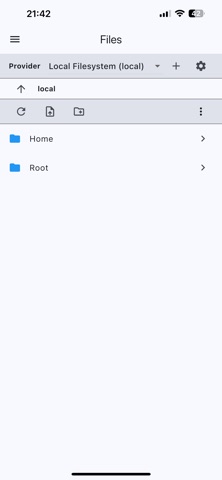



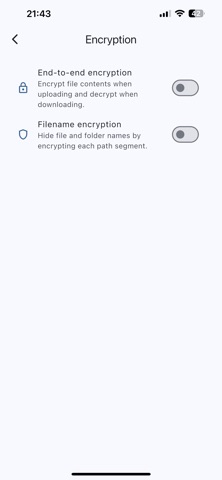

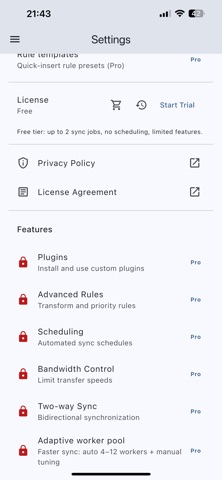
Description by Thoai Nguyen Anh Written by the developer, not by AppBrain. Click to read.
What you can do:
- Connect supported providers and browse your files: S3, WebDAV, SFTP (SSH), FTP/FTPS, SMB/LAN (Windows Share), Local Filesystem (custom root), Google Drive, OneDrive, Dropbox, Box, NextCloud, ownCloud, pCloud, Yandesk.Disk, MEGA and Uloz.to
- Select folders to sync or back up
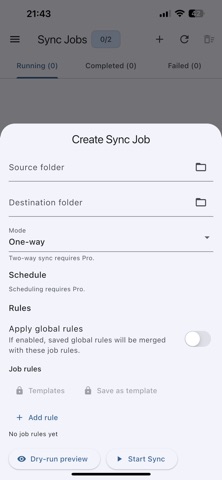
- Choose sync modes: One-way, Two-way, Mirror, or Move (copy then delete)
- Preview planned changes before running sync (best effort)
- Use advanced rules (include/exclude, protected paths, path transforms, priorities)
- Save and reuse rule templates
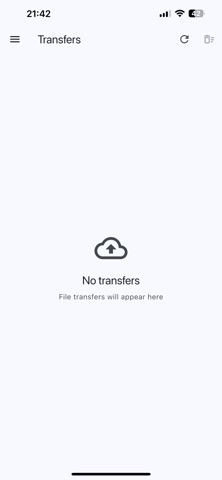
- Manage transfers (progress, pause/resume/cancel, history)
- Work offline and resume queued operations later
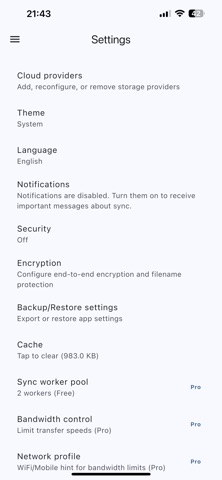
- Control bandwidth/performance and use network profiles (where available)
- Schedule sync jobs (where enabled)
- Stream/play files in-app directly
Subscriptions and purchases:
- Pro Monthly (auto-renewable subscription): 1 month
- Lifetime License (one-time purchase): non-consumable
- Price is shown in-app at the time of purchase and may vary by region
Subscription terms:
- Payment is charged to your Apple ID account at confirmation of purchase
- Subscriptions automatically renew unless canceled at least 24 hours before the end of the current period
- Your account is charged for renewal within 24 hours before the end of the current period
- You can manage or cancel subscriptions in your Apple ID account settings
Legal:
- Privacy Policy: https://www.goldtek.com.vn/en/app-privacy?app=mycloudrive
- Terms of Use (EULA): https://www.goldtek.com.vn/en/app-eula?app=mycloudrive