

MyListen: Create Audio Offline
MyListen: Create Audio Offline is made and published by 铁果 朱. AppBrain is an independent app data site and isn't affiliated with 铁果 朱. The app name, icon, screenshots and description belong to 铁果 朱 and are shown as published on the App Store.
AppBrain's verdict
New- Rating on App Store
- 5.00
- 1 ratings
- Last updated
- October 26, 2026
MyListen: Create Audio Offline came out 89 days ago. It doesn't have enough ratings yet to judge what users think.
Rankings
App Store top chartsApp Store Rankings for MyListen: Create Audio Offline
Releases
Updates seen on the App Store- Version
- 1.2.2
- Launched
- August 2026
No changelog data
User feedback
Ratings and reviews on the App StoreComments on MyListen: Create Audio Offline for iOS
We don't have enough comments to show example comments. Please check back later.
Technology
Found in the app by AppBrain- Price
- Free
- App size
- 1.04 GB
- Content rating
- Everyone
Technologies used by MyListen: Create Audio Offline
About the app and developer
About MyListen: Create Audio Offline
MyListen: Create Audio Offline is a productivity app developed by 铁果 朱.
What is the rating of MyListen: Create Audio Offline?
MyListen: Create Audio Offline is rated 5.00 out of 5 stars, based on one rating ratings.
Is MyListen: Create Audio Offline free?
MyListen: Create Audio Offline is free. The app size is 1.04 GB. The latest version available is 1.2.2. The last update was on October 26, 2026.
What are the requirements for MyListen: Create Audio Offline?
The app has a content rating of Everyone. The app has been available on the App Store since August 2026.
Developer information for 铁果 朱
Address:
Frequently asked questions about MyListen: Create Audio Offline
Is MyListen: Create Audio Offline free?
Yes. MyListen: Create Audio Offline is free on the App Store.
Is MyListen: Create Audio Offline still available?
Yes. MyListen: Create Audio Offline is on the App Store, and the last update we saw was on October 26, 2026.
How large is MyListen: Create Audio Offline?
MyListen: Create Audio Offline is 1.04 GB.
Is MyListen: Create Audio Offline suitable for children?
App Store rates the content of MyListen: Create Audio Offline as suitable for everyone.
How do people rate MyListen: Create Audio Offline?
MyListen: Create Audio Offline has one rating of 5.00 stars on the App Store.
Who made MyListen: Create Audio Offline?
MyListen: Create Audio Offline was developed by 铁果 朱. It is listed in the productivity category on the App Store.
Store listing
By 铁果 朱, from the App Store


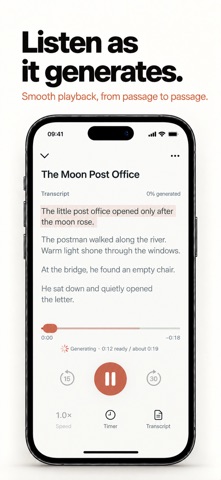


Description by 铁果 朱 Written by the developer, not by AppBrain. Click to read.
Your AI tool has done the writing. You don't have to spend more time staring at a screen. Paste the text into MyListen, choose a voice, and generate audio right on your iPhone. Listen while commuting, walking, doing chores, or winding down.
No subscription, account, or ads.
MADE FOR LONG-FORM AI WRITING
Paste and edit long texts, or import TXT and Markdown documents. Ask your AI tool to explain a complex topic, turn reading notes into a listening script, or prepare a briefing on topics you follow. Stories, book summaries, and other long-form writing can become episodes in your personal listening library, too.
NATURAL VOICES, GENERATED ON DEVICE
High-quality English and Chinese text-to-speech models deliver natural-sounding voices with smooth, easy-to-follow delivery. English narration sounds natural, too. Audio is generated right on your iPhone, without uploading your writing to a cloud TTS service.
LISTEN WHILE IT GENERATES
Start listening once 8 seconds of audio are ready. The rest generates as you listen—no need to wait for the whole piece.
PICK UP WHERE YOU LEFT OFF
MyListen remembers your listening position. Enjoy background playback, adjustable speed, and a sleep timer. Follow the synchronized transcript and return to saved episodes whenever you like.
EXPORT YOUR AUDIO. COPY YOUR TEXT.
Export completed episodes as M4A audio files or copy the full original text. You can also export all audio or all original-text documents separately from Settings.
YOUR CONTENT STAYS WITH YOU
Your text, generated audio, and listening progress are stored on your device. No account, no ads.
WHY THE LARGER DOWNLOAD?
MyListen includes high-quality English and Chinese text-to-speech models for natural-sounding narration on your device. These model files take up storage space, which makes the app download larger. Once installed, the built-in models need no separate download, and your text can be turned into speech without being sent to the cloud.
MyListen reads the text you provide. It doesn't write stories or fetch news for you. Prepare your writing in your preferred AI tool, then bring it to MyListen.
CONTACT & FEEDBACK
Email: zsexdr123321456@gmail.com