

MyVideoAnalyser Remote
MyVideoAnalyser Remote is made and published by MyVideoAnalyser. AppBrain is an independent app data site and isn't affiliated with MyVideoAnalyser. The app name, icon, screenshots and description belong to MyVideoAnalyser and are shown as published on the App Store.
AppBrain's verdict
Established- Rating on App Store
- 5.00
- 2 ratings
- Last updated
- September 21, 2026
It doesn't have enough ratings yet to judge what users think.
Rankings
App Store top chartsApp Store Rankings for MyVideoAnalyser Remote
Competitors
Similar apps and more from MyVideoAnalyserAlternatives to MyVideoAnalyser Remote








More from MyVideoAnalyser


Releases
Updates seen on the App Store- Version
- 4.3.6
- Launched
- January 2018
No changelog data
User feedback
Ratings and reviews on the App StoreComments on MyVideoAnalyser Remote for iOS
We don't have enough comments to show example comments. Please check back later.
Technology
Found in the app by AppBrain- Price
- Free
- App size
- 18.3 MB
- Content rating
- Everyone
Technologies used by MyVideoAnalyser Remote
About the app and developer
About MyVideoAnalyser Remote
MyVideoAnalyser Remote is a sports app developed by MyVideoAnalyser.
What is the rating of MyVideoAnalyser Remote?
MyVideoAnalyser Remote is rated 5.00 out of 5 stars, based on 2 ratings.
Is MyVideoAnalyser Remote free?
MyVideoAnalyser Remote is free. The app size is 18.28 MB. The latest version available is 4.3.6. The last update was on September 21, 2026.
What are the requirements for MyVideoAnalyser Remote?
The app has a content rating of Everyone. The app has been available on the App Store since January 2018.
Developer information for MyVideoAnalyser
Address:
Store listing
By MyVideoAnalyser, from the App Store




Description by MyVideoAnalyser Written by the developer, not by AppBrain. Click to read.
Your video analysis workflow, but wireless.
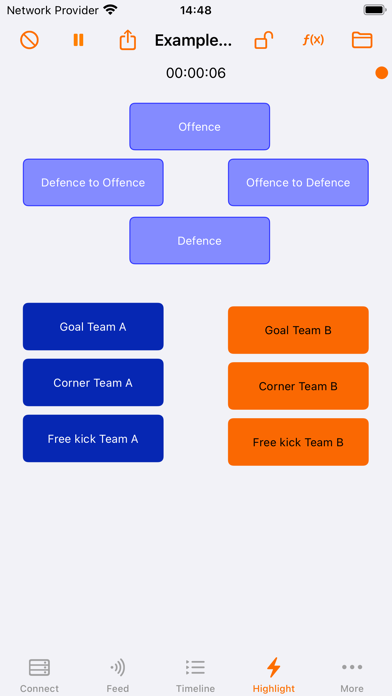
MyVA Remote is your app to highlight, watch the highlights, use custom build reports, create an offline playlist and synchronise playlists between devices. Watch, zoom and rewind the live video feed and highlight your video from anywhere. You can also use MyVA Remote without connection. Highlight the game you are watching and later share the created timeline in JSON format.
MyVA Remote Features:
Live feed and highlight
- You are able to view a live feed of the highlights (with video) during capture.
- From your iOS device in the palm of your hand you can highlight and send the highlights directly to the timeline in MyVA.
- By preference you can load a highlight scheme on top of your live video so you can watch and highlight at the same time.
Highlight post-Match and without connection
- Also on a post-match project you can view a feed of the highlights (with video).
- Highlight from your iOS device when not connected to a MyVA Remote Server and share the created timeline (JSON) on a later moment.
- Add highlights from the feed and timeline view to a local playlist for offline playback of the video from your iOS device.
Timeline
- The timeline of your project (with video) can be viewed during capture and on a post-match project.
Video
- Watch and rewind the live video stream from MyVA Remote Server.
- Start/Pause the capture on the MyVA Remote Server.
- Zoom a video (or the live stream)
Playlist
- Synchronise playlists between MyVA Remote Server and MyVA Remote.
- Send the live highlights directly to the timeline in MyVA.
Reports
- View reports and show the highlights that are used to generate the report
Notifications
- Receive notifications from the highlight scheme used on the MyVA Remote Server or a connected MyVA Remote.
MyVA Remote requires a paid subscription. The subscriptions are available as an in-app purchase. It is possible to try MyVA Remote one week for free.
Privacy Policy: https://myvideoanalyser.com/remote/privacy.html
End User License Agreement: https://myvideoanalyser.com/remote/eula.html
For questions please contact: sales@myvideoanalyser.com
For technical support please contact: support@myvideoanalyser.com