

Name Color is made and published by Johannes Kojer. AppBrain is an independent app data site and isn't affiliated with Johannes Kojer. The app name, icon, screenshots and description belong to Johannes Kojer and are shown as published on the App Store.
AppBrain's verdict
Established- Rating on App Store
- 4.00
- 2 ratings
- Last updated
- April 20, 2026
It doesn't have enough ratings yet to judge what users think.
Rankings
App Store top chartsApp Store Rankings for Name Color
Competitors
Similar apps and more from Johannes KojerAlternatives to Name Color






Releases
Updates seen on the App Store- Version
- 2.4
- Launched
- November 2020
No changelog data
User feedback
Ratings and reviews on the App StoreComments on Name Color for iOS
We don't have enough comments to show example comments. Please check back later.
Technology
Found in the app by AppBrain- Price
- $3.99
- App size
- 1.85 MB
- Content rating
- Everyone
Technologies used by Name Color
About the app and developer
About Name Color
Name Color is a medical app developed by Johannes Kojer.
What is the rating of Name Color?
Name Color is rated 4.00 out of 5 stars, based on 2 ratings.
Is Name Color free?
Name Color costs $3.99. The app size is 1.85 MB. The latest version available is 2.4. The last update was on April 20, 2026.
What are the requirements for Name Color?
The app has a content rating of Everyone. The app has been available on the App Store since November 2020.
Developer information for Johannes Kojer
Address:
Store listing
By Johannes Kojer, from the App Store


Description by Johannes Kojer Written by the developer, not by AppBrain. Click to read.
The app determines the names of colors. It can be of help to people who cannot see and name all colors (color ametropia, color blindness).
How it works
Take a picture of the object of which you want to know the color. Touch the object and the matching color name will be determined and displayed. Or use color sliders for red, green and blue to create or try out colors. For each color you select in the color slider, the color name is determined and displayed.
You can switch the zoom mode on and off with a long press gesture. The zoom mode can also be activated with the magnifying glass icon at the bottom right. If the color of which you want to know the name is covered by parts of the menu, you can hide all control elements. To do this, touch the determined color name at the top right next to the color field.
You can activate the color slider for red, green and blue with the color field at the top left. In addition to the currently selected color, the complementary color is also displayed in the color slider. If the color slider is active, you can save the current color with the plus icon at the bottom right. To do this, the option "Adopt result" must be selected in the default settings. The color is displayed in a list. This can be useful if you want to keep a specific color setting to later compare it to another color.
Settings
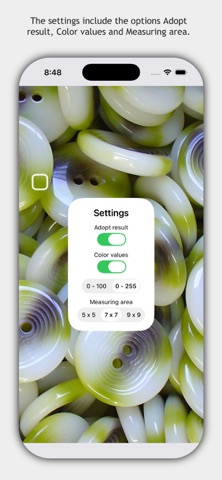
The default settings of the app are opened with the icon at the bottom left. Here you can find the options "Adopt result", "Color values" and "Measuring area". "Adopt result" means the determined color value is transferred to the next view. With the "Color values" option, you can display the color values for red, green and blue in addition to the determined color name. The color values can be displayed in increments from 0 to 100 and in increments from 0 to 255. "Measuring area" controls the number of pixels used to calculate the color name.
Important information
The naming of colors is a complex process that is influenced by general and individual color perception, experience and the current lighting situation. For this reason, a percentage value is calculated for each color name, which indicates how reliable the result is.
The app does not collect, store or transmit any personal data. The app is intended as an aid for colorblind people. The app is not suitable for a medical examination. Liability for the correctness of all color names determined with the app is not accepted.