It doesn't have enough ratings yet to judge what users think.
Nanonote Pro is made and published by
Toshitaka Agata.
AppBrain is an independent app data site and isn't affiliated with Toshitaka Agata.
The app name, icon, screenshots and description belong to Toshitaka Agata and are shown as
published on the App Store.
About Nanonote Pro
Nanonote Pro is a productivity app developed by Toshitaka Agata.
What is the rating of Nanonote Pro?
Nanonote Pro is rated 5.00 out of 5 stars, based on one rating ratings.
Is Nanonote Pro free?
Nanonote Pro is free. The app size is 117.67 MB. The latest version available is 1.9.0. The last update was on April 23, 2025.
What are the requirements for Nanonote Pro?
The app has a content rating of Everyone. The app has been available on the App Store since October 2024.
Description by Toshitaka Agata(from the App Store)
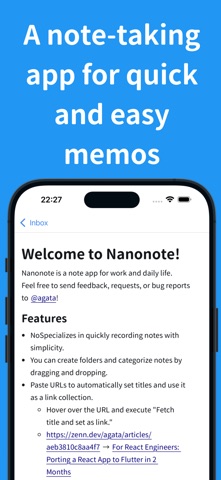
Nanonote is a note-taking app designed for people who want to capture their thoughts quickly. It's perfect for jotting down ideas, plans, to-do lists, and notes for work or hobbies.
Recommended for:
- Those who want to manage tasks and to-dos through notes - People who like to draft their writing while thinking - Anyone planning a trip and taking notes along the way - Users who want to record work processes - Those planning a new project
Seven Key Features
1. Simple Usability
Only the essential features are included, with a focus on ease of use. The intuitive interface allows you to concentrate on writing.
2. Secure Syncing
Encrypted cloud synchronization lets you access your notes from any device. There is no sharing feature, so you don’t need to worry about others accidentally viewing your notes. Your information will be retained even if you switch devices.
3. Offline Capability
You can create and edit notes without an internet connection.
4. Shortcuts
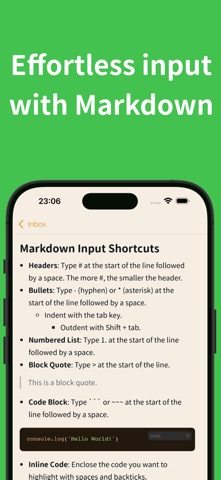
With Markdown shortcuts, you can quickly write notes.
Examples of shortcuts:
Heading: Type "# + space" at the beginning of a line. Each additional "#" makes the heading text smaller.
Bullet Points: Type "- + space" at the beginning of a line.
Quotes: Type "> + space" at the beginning of a line.
Code: Type "```" (backticks) at the beginning of a line, or surround text with "`" and press space.
5. Easy Link Collection
Simply paste a URL to automatically set the title, making it easy to use as a link collection.
6. Easy Organization
Create folders and organize your notes with drag-and-drop functionality.
7. Perfectly Tailored Appearance
Customize themes, background colors, and line spacing to suit your preferences.
Each subscription will automatically renew 3 days before the expiration date for
the same time period. Subscriptions can be cancelled at any time before the renewal.