

NativeScan: PDF Scanner AI
NativeScan: PDF Scanner AI is made and published by Artem Lapshin. AppBrain is an independent app data site and isn't affiliated with Artem Lapshin. The app name, icon, screenshots and description belong to Artem Lapshin and are shown as published on the App Store.
AppBrain's verdict
- Last updated
- October 25, 2026
Rankings
App Store top chartsApp Store Rankings for NativeScan: PDF Scanner AI
Releases
Updates seen on the App Store- Version
- 3.1.1
- Launched
- April 2026
No changelog data
User feedback
Ratings and reviews on the App StoreComments on NativeScan: PDF Scanner AI for iOS
We don't have enough comments to show example comments. Please check back later.
Technology
Found in the app by AppBrain- Price
- Free
- App size
- 13.4 MB
- Content rating
- Everyone
Technologies used by NativeScan: PDF Scanner AI
About the app and developer
About NativeScan: PDF Scanner AI
NativeScan: PDF Scanner AI is an utilities app developed by Artem Lapshin.
User Ratings
The app has no ratings yet.
App Information
NativeScan: PDF Scanner AI is freely available from the App Store. The app size is 13.42 MB. The latest version available is 3.1.1. The last update was on October 25, 2026.
Technical Requirements
The app has a content rating of Everyone. The app has been available on the App Store since April 2026.
Developer information for Artem Lapshin
Address:
Store listing
By Artem Lapshin, from the App Store




Description by Artem Lapshin Written by the developer, not by AppBrain. Click to read.
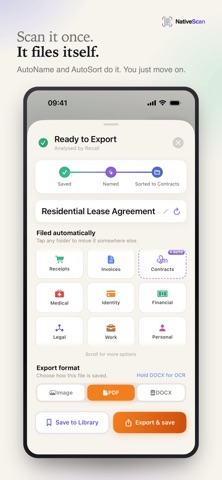
NativeScan turns your camera into a smart scanner — and your library into a place you can actually find things. Scan receipts, contracts, lecture notes, prescriptions, IDs, business cards. NativeScan handles edge detection, applies the right filter, and saves everything to your phone in seconds.
Then the AI does the boring work for you.
• AutoName — every scan gets a real title, written by AI. No more Scan_002_final_v3.pdf.
• AutoSort (Pro) — smart folders for Receipts, Invoices, Contracts, Medical, Identity, Financial, Legal, Work, Personal. Walk away and find your scan in the right place.
• Recall — your personal document AI. Ask anything: "What's the deductible on my dental plan?" "How much did I spend on coffee last quarter?" "Where's that warranty from December?" Recall reads your library and answers — no filenames, no folder hunting.
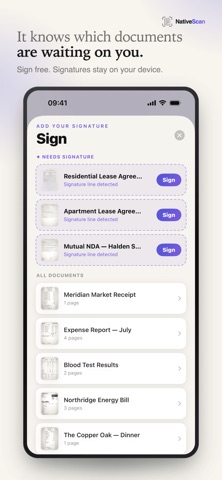
• Key dates — NativeScan spots deadlines in your scans (bills, renewals, passport expiry, a date you jotted next to a task) and reminds you 3 days before and on the day.
• ID photos — shoot a passport or visa photo and have head size, centring, lighting and tilt checked live against 8 official specs.
Built for how you actually work.
Non-destructive editing lets you re-crop, re-rotate, and re-filter without losing the original. Export as JPEG, PDF, or DOCX. Pro unlocks searchable PDFs and fully editable DOCX with embedded OCR text.
Your documents stay on your phone.
No NativeScan account. No login. No cloud library sync. Add a Face ID lock and your scans stay yours, even if someone has your unlocked phone. The on-device OCR runs locally. The AI features — AutoName, AutoSort, Recall, key-date detection and Recall’s suggested questions — send document text to a secure proxy for processing, which discards it after use.
Free includes:
• Unlimited scanning, JPEG and PDF export
• Custom folders + on-device OCR search
• Face ID lock
• 5 AutoName + 3 Recall questions per week
Pro ($9.99/year with 7-day free trial, or $1.99/week):
• Unlimited AutoName + Recall
• AutoSort smart folders
• Searchable PDF export + editable DOCX export
• Ad-free experience
Designed and built by one indie developer in Toronto. Optimized for iOS 26 with native Liquid Glass UI.
Questions or feedback? Tap Contact in Account.
Terms of Use (EULA): https://native-dev.com/nativescan/terms