

NAV- Navigation Assistant
NAV- Navigation Assistant is made and published by Ronald Fella. AppBrain is an independent app data site and isn't affiliated with Ronald Fella. The app name, icon, screenshots and description belong to Ronald Fella and are shown as published on the App Store.
AppBrain's verdict
- Rating on App Store
- 5.00
- 5 ratings
- Last updated
- September 2, 2026
It doesn't have enough ratings yet to judge what users think.
Rankings
App Store top chartsApp Store Rankings for NAV- Navigation Assistant
Competitors
Similar apps and more from Ronald FellaAlternatives to NAV- Navigation Assistant





More from Ronald Fella

Releases
Updates seen on the App Store- Version
- 8.2.1
- Launched
- March 2026
No changelog data
User feedback
Ratings and reviews on the App StoreComments on NAV- Navigation Assistant for iOS
We don't have enough comments to show example comments. Please check back later.
Technology
Found in the app by AppBrain- Price
- Free
- App size
- 6.48 MB
- Content rating
- Everyone
Technologies used by NAV- Navigation Assistant
About the app and developer
About NAV- Navigation Assistant
NAV- Navigation Assistant is a navigation app developed by Ronald Fella.
What is the rating of NAV- Navigation Assistant?
NAV- Navigation Assistant is rated 5.00 out of 5 stars, based on 5 ratings.
Is NAV- Navigation Assistant free?
NAV- Navigation Assistant is free. The app size is 6.48 MB. The latest version available is 8.2.1. The last update was on September 2, 2026.
What are the requirements for NAV- Navigation Assistant?
The app has a content rating of Everyone. The app has been available on the App Store since March 2026.
Developer information for Ronald Fella
Address:
Frequently asked questions about NAV- Navigation Assistant
Is NAV- Navigation Assistant free?
Yes. NAV- Navigation Assistant is free on the App Store.
Is NAV- Navigation Assistant still available?
Yes. NAV- Navigation Assistant is on the App Store, and the last update we saw was on September 2, 2026.
How large is NAV- Navigation Assistant?
NAV- Navigation Assistant is 6.48 MB.
Is NAV- Navigation Assistant suitable for children?
App Store rates the content of NAV- Navigation Assistant as suitable for everyone.
How do people rate NAV- Navigation Assistant?
NAV- Navigation Assistant scores 5.00 out of 5 stars, from 5 ratings on the App Store.
Who made NAV- Navigation Assistant?
NAV- Navigation Assistant was developed by Ronald Fella. It is listed in the navigation category on the App Store.
What are the best alternatives to NAV- Navigation Assistant?
People looking at NAV- Navigation Assistant also look at these navigation apps: Nearby Map - Where to Live, Live Earth GO+ : GPS Camera, ScanRoute - Plan & Optimize, Roadit, Auto Seguro Gps.
Store listing
By Ronald Fella, from the App Store

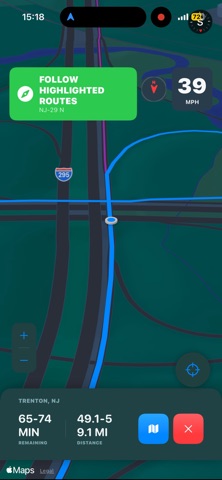


Description by Ronald Fella Written by the developer, not by AppBrain. Click to read.
Core Features
• Strategic Route Scanning: Analyze a primary route alongside multiple alternate routes with live travel time and distance comparisons.
• Mission Recon Summary: Review estimated travel distance, duration ranges, and arrival windows before starting navigation.
• Dynamic Route Switching: Automatically transitions to a more suitable scanned route if you naturally follow an alternate path.
• Adaptive Camera Intelligence: Speed-based camera automatically zooms in for city driving and out for highways.
• Manual Zoom Controls: Override the automatic camera with dedicated Zoom In, Zoom Out, and Auto Reset controls.
• Live Destination Intelligence: View satellite imagery, business information, phone numbers, websites, and destination weather before departure.
• Current & ETA Weather: Displays current weather at your location and forecasted conditions expected at your estimated arrival time.
• Toll Awareness: Identifies known toll facilities along scanned primary and alternate routes before navigation begins, while live toll detection continuously monitors nearby toll facilities as you drive. Voice alerts provide a caution when approaching a toll area. Toll awareness is also available in Manual Mission Mode (Portrait and Dashboard) and Dashboard Mode, helping you stay aware of tolls even without an active navigation route.
• Voice Guidance: Spoken navigation announcements, route summaries, arrival notifications, and toll approach alerts.
• Driver HUD: Live speed, compass heading, GPS accuracy, altitude, and route information presented in a clean, high-visibility interface.
• Tactical Map Mode: Monitor live traffic, speed, heading, and current street information without starting navigation.
• Manual Mission Mode: Track free-drive sessions without a destination while recording distance, speed, travel time, and a live breadcrumb trail. Choose between Portrait or Dashboard layouts.
• Dashboard Mode: Transform your iPhone into a landscape driving dashboard featuring navigation telemetry, traffic, weather, GPS precision, media controls, battery status, connectivity indicators, and mission tracking.
• Integrated Address Management: Save up to 48 destinations in your Address Book and maintain a Favorites list for one-tap navigation.
• Continuous Path Visualization: A live breadcrumb system creates a seamless visual trail behind your vehicle, providing a continuous record of your journey while maintaining a unified navigation experience.
• Mission Summary: Upon arrival, review a complete post-trip report featuring total distance, travel time, average speed, top speed, and an interactive Mission Map with color-coded speed visualization and route recap.
NAV combines Apple Maps, live traffic, weather intelligence, destination previews, toll awareness, and intelligent route monitoring into a single navigation experience designed to give drivers more information before and during every trip.
Always obey traffic laws, remain attentive while driving, and use NAV as a supplemental navigation aid.