

NBS Mobile Banking
NBS Mobile Banking is made and published by Nelson Building Society. AppBrain is an independent app data site and isn't affiliated with Nelson Building Society. The app name, icon, screenshots and description belong to Nelson Building Society and are shown as published on the App Store.
AppBrain's verdict
- Last updated
- September 15, 2026
- Size
- 53.7 MB
User feedback
Ratings and reviews on the App StoreComments on NBS Mobile Banking for iOS
We don't have enough comments to show example comments. Please check back later.
Store listing
By Nelson Building Society, from the App Store

Description by Nelson Building Society Written by the developer, not by AppBrain. Click to read.
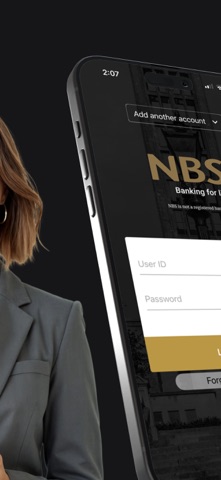
Log-in to our secure Mobile App to:
* Sign in quickly with a four digit PIN
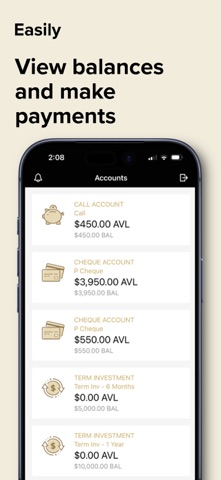
* Check account balances
* View transactions
* Transfer between your NBS accounts
* Pay existing Bill Payees
* Make one-off payments to a New Zealand bank account
* Create a New Payee
* Create an Automatic Payment using an existing Bill Payee
IMPORTANT: By downloading and completing the setup of NBS Mobile app you agree to NBS Electronic Banking Terms & Conditions forming part of NBS General Terms & Conditions available at www.nbs.co.nz.
How it works:
If you are an existing NBS Internet Banking customer then;
1. Download the NBS Mobile app;
2. Call into your nearest NBS Branch or phone 0800 101 700 to ensure all ID held on file, is current.
3. You are good to go!
If you are not a NBS Internet Banking customer or you know your ID is not current, call into your local Branch or phone us on 0800 101 700. Acceptable forms of ID are detailed below:
Photographic (Current and original)
* New Zealand Driver Licence
* New Zealand or Overseas Passport
* New Zealand Firearms Licence
Non Photographic (Current and original)
* New Zealand Birth Certificate or Certificate of New Zealand Citizenship
* An embossed Debit Card or Credit Card issued by a registered New Zealand bank
* A government agency issued card i.e. SuperGold Card
Address Verification (Less than three months old)
* A recent statement from any New Zealand bank. Must be on Bank Letterhead
* A utility bill such as power, gas, water, telephone or internet service provider
* Any official insurance policy that includes a name and address
Security
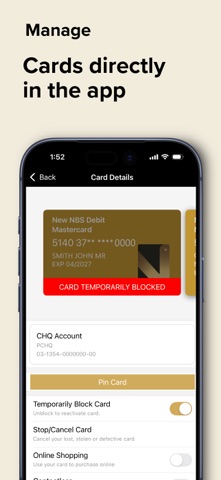
The NBS Mobile App is every bit as secure as NBS Internet Banking. You can choose your own four digit PIN to access the NBS Mobile App and if you lose your mobile device, access can be disabled by your local Branch.
Things you should know
NBS Mobile App is only available for NBS customers registered with NBS Internet Banking and using an appropriate Mobile device.
NBS recommends you always adhere to manufacturers software and support to ensure your mobile devices are covered by the latest software and security updates. If you are connecting via Wi-Fi a trusted network is recommended.
Downloading the NBS Mobile App is FREE, however internet data charges may be incurred through your mobile service provider.
All information submitted by you during the setup and use of NBS Mobile App will be retained by NBS and used in accordance with our Privacy obligations set out in NBS General Terms & Conditions.
NBS reserves the right to modify or withdraw this service at any time. Access is subject to availability and maintenance.
About NBS
A local, independent and mutually owned Building Society. You’ll find us in eight locations throughout Nelson, Tasman, Buller, West Coast, Golden Bay and Mid Canterbury. NBS - New Zealand’s Oldest Building Society, building lifestyles, dreams and a sense of local pride since 1862.
Need help?
Phone us on 0800 101 700 between 9.00am to 4.30pm business days, call into your local Branch or visit www.nbs.co.nz.
Safety and technology
Found in the app by AppBrain- Price
- Free
- App size
- 53.7 MB
- Content rating
- Everyone
Technologies used by NBS Mobile Banking
Releases
Updates seen on the App Store- Version
- 5.8.1
- Launched
- April 2014
No changelog data
Alternatives
Similar apps and more from Nelson Building SocietyAlternatives to NBS Mobile Banking



Rankings
App Store top chartsApp Store Rankings for NBS Mobile Banking
About the app and developer
About NBS Mobile Banking
NBS Mobile Banking is a finance app developed by Nelson Building Society.
User Ratings
The app has no ratings yet.
App Information
NBS Mobile Banking is freely available from the App Store. The app size is 53.74 MB. The latest version available is 5.8.1. The last update was on September 15, 2026.
Technical Requirements
The app has a content rating of Everyone. The app has been available on the App Store since April 2014.
Developer information for Nelson Building Society
Address:
Frequently asked questions about NBS Mobile Banking
Is NBS Mobile Banking free?
Yes. NBS Mobile Banking is free on the App Store.
Is NBS Mobile Banking still available?
Yes. NBS Mobile Banking is on the App Store, and the last update we saw was on September 15, 2026.
How large is NBS Mobile Banking?
NBS Mobile Banking is 53.74 MB.
Is NBS Mobile Banking suitable for children?
App Store rates the content of NBS Mobile Banking as suitable for everyone.
Who made NBS Mobile Banking?
NBS Mobile Banking was developed by Nelson Building Society. It is listed in the finance category on the App Store.
What are the best alternatives to NBS Mobile Banking?
People looking at NBS Mobile Banking also look at these finance apps: CrystalPayroll, SENDCHEAP, First Bank Mobile Business, The Co-operative Bank (NZ), Wilson State Bank.