AppBrain
AppBrain
  • Apps
  • Apps being viewed right now Trending apps today Most popular apps All-time most installed apps Top rated apps iPhone and iPad apps
  • Intelligence ▾
    Intelligence overview → Track any Android app or your whole market
    Track & analyze
    Keyword Tracker & OptimizerTrack & improve Play rankings App Performance ReportOne-off PDF for any app StatisticsFree Android & Play market stats
    Promote your app
    Featured Apps App Links
  • Intelligence
  • Pricing
  • Dashboard
  • Sign up
  • Log in
App Store Apps > Productivity > Nemos: Save, Find & Organize
App profile & analytics · Productivity · Data updated 2026-10-06
Nemos: Save, Find & Organize icon

Nemos: Save, Find & Organize

by Mohamed Taha Baalla · Free · Version 1.1.6
Availability On the App Store since September 2026 ↗
Rating on App Store
5.00/5
2 ratings
Rating
5.00
2 reviews
Best rank
–
not in the top lists
Last updated
October 5, 2026
1.1.6
AppBrain's verdict New

Nemos: Save, Find & Organize came out 39 days ago. It doesn't have enough ratings yet to judge what users think.

Nemos: Save, Find & Organize is made and published by Mohamed Taha Baalla. AppBrain is an independent app data site and isn't affiliated with Mohamed Taha Baalla. The app name, icon, screenshots and description belong to Mohamed Taha Baalla and are shown as published on the App Store.

About Nemos: Save, Find & Organize

Nemos: Save, Find & Organize is a productivity app developed by Mohamed Taha Baalla.

User Ratings

Nemos: Save, Find & Organize is rated 5.00 out of 5 stars. The rating is based on 2 ratings.

App Information

Nemos: Save, Find & Organize is freely available from the App Store. The app size is 392.09 MB. The latest version available is 1.1.6. The last update was on October 5, 2026.

Technical Requirements

The app has a content rating of Everyone. The app has been available on the App Store since September 2026.

Description by Mohamed Taha Baalla (from the App Store)
You saved it for a reason. Nemos finds it when you need it.

A link from a friend. A screenshot with a door code. A thought recorded on a walk. A PDF you meant to read. Nemos keeps them in one private library and gives them back the moment you search, so you never have to remember which app you used.

FIND WHAT YOU SAVED
One search runs across links, the text inside your screenshots, notes, voice transcripts and documents at once. Look for “boarding pass” and the screenshot surfaces, even though you never tagged or filed it. Search is in Spotlight too, so you can start from the Home Screen.

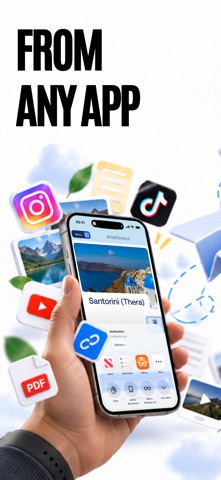
SAVE FROM ANY APP
Share to Nemos from Safari, Instagram, TikTok, Messages, Mail — anything with a share sheet. Links arrive with a real preview instead of a bare URL, and articles stay readable when you're offline. Nemos also keeps what you copy, so a code or an address from two hours ago is still there.

SCREENSHOTS THAT COME BACK
Every screenshot is read on your iPhone, so the words inside it become searchable. Keep screenshots in folders, or let smart folders sort them for you: everything from a trip, every receipt, every recipe.

NOTES, DOCUMENTS AND FILES
Write notes with images, links and checklists. Import PDFs, documents, spreadsheets and ebooks: they open without leaving the app and are searchable by what's inside them. Keep files in folders and tags, next to the notes they belong with.

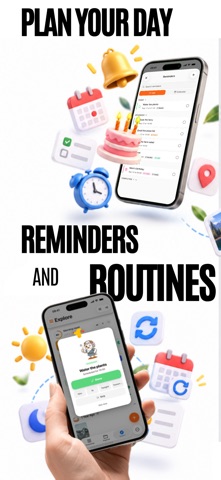
TASKS, TO-DOS AND ROUTINES
Turn anything you save into a task with a reminder. Keep a to-do list with subtasks, then schedule, snooze and check off each item. Build routines for the things you do every day, with the steps, times and notifications you choose, and attach the recipe, note or screenshot a step needs. Reminders and routines appear on the Lock Screen and in the Dynamic Island while they run.

EVERYDAY ORGANIZATION FOR ADHD
If you have ADHD and want help keeping track of plans and saved information, Nemos keeps the next step and what it needs in one place. Capture the thought, choose when to come back to it, and find it again with one search.

RECORD AND TRANSCRIBE
Record a voice note and Nemos writes it down: on your iPhone, or in the cloud for long and multi-speaker recordings. Start from Control Center or your watch face and follow it in the Dynamic Island.

PLACES
Save a restaurant, a shop, a viewpoint. They land on a map, so “that coffee place near the park” is a glance instead of a scroll through old messages.

ASK YOUR OWN LIBRARY
Ask a question and Nemos answers from what you've saved, quoting the note, screenshot or link it came from.

SHARE A FOLDER
Invite someone into a folder and you both watch it fill up: a trip, a project, a reading list. You decide who can add and who can only look.

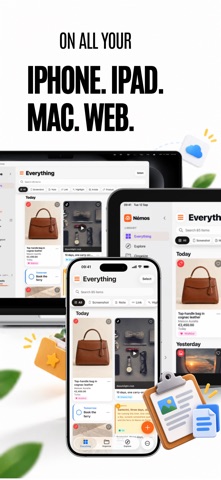
ON IPHONE, IPAD AND APPLE WATCH
Your library syncs through iCloud, so what you save on the phone is already on the iPad. One tap on the watch complication starts a voice note, and your next reminder and running routine sit beside it. Widgets, Shortcuts and Siri reach the rest. On a computer, the Nemos browser extension for Chrome, Safari and Firefox saves links and articles to the same library.

PRIVATE BY DEFAULT
Screenshot text recognition runs on your iPhone, and so does the writing model on devices that support it. Your library lives in your own iCloud account, not on our servers. The assistant only uses a cloud model if you turn that on. Long or multi-speaker recordings are transcribed in the cloud for accuracy, unless you turn on “Transcribe on this device” in Settings.

NEMOS PRO
Unlimited recording, unlimited active reminders, smart folders, more cloud transcription and the full assistant. The app shows plans, prices and any trial you're eligible for before you subscribe.

Questions or ideas: nemos@brainchild-co.com
Show more Show less

Screenshots

Nemos: Save, Find & Organize Screenshot 1 of 10
Nemos: Save, Find & Organize Screenshot 2 of 10
Nemos: Save, Find & Organize Screenshot 3 of 10
Nemos: Save, Find & Organize Screenshot 4 of 10
Nemos: Save, Find & Organize Screenshot 5 of 10
Nemos: Save, Find & Organize Screenshot 6 of 10
Nemos: Save, Find & Organize Screenshot 7 of 10
Nemos: Save, Find & Organize Screenshot 8 of 10
Nemos: Save, Find & Organize Screenshot 9 of 10
Nemos: Save, Find & Organize Screenshot 10 of 10
Screenshots by Mohamed Taha Baalla, from the the App Store listing
Official page on the App Store

Alternatives to Nemos: Save, Find & Organize

Voryn: AI Voice Notes & Diary icon Voryn: AI Voice Notes & Diary
JianFeng Gao
0.0
Free
Kept Clipboard icon Kept Clipboard
Kun Da WU
0.0
Free
Bubbly Thoughts icon Bubbly Thoughts
Yehuda Green
5.0
Free
6 ratings
MiniiMe icon MiniiMe
Colin Boykin
0.0
Free
My Next: List icon My Next: List
Lars Bruce
0.0
Free
Joblens: Project Photos icon Joblens: Project Photos
INTAGRI TECHNOLOGIES LLC
0.0
Free
PDF Search Kit icon PDF Search Kit
gokalp pacin
5.0
Free
5 ratings
Save & Organize: Links, Photos icon Save & Organize: Links, Photos
Alexandr Kuzminou
0.0
Free

Changelog of Nemos: Save, Find & Organize

No changelog data

Developer information for Mohamed Taha Baalla

Mohamed Taha Baalla

Address:

Share Nemos: Save, Find & Organize

Comments on Nemos: Save, Find & Organize for iOS

We don't have enough comments to show example comments. Please check back later.

App Store Rankings for Nemos: Save, Find & Organize

This app is not ranked

Technologies used by Nemos: Save, Find & Organize

Frequently asked questions about Nemos: Save, Find & Organize

Is Nemos: Save, Find & Organize free?

Yes. Nemos: Save, Find & Organize is free on the App Store.

Is Nemos: Save, Find & Organize still available?

Yes. Nemos: Save, Find & Organize is on the App Store, and the last update we saw was on October 5, 2026.

How large is Nemos: Save, Find & Organize?

Nemos: Save, Find & Organize is 392.09 MB.

Is Nemos: Save, Find & Organize suitable for children?

App Store rates the content of Nemos: Save, Find & Organize as suitable for everyone.

How do people rate Nemos: Save, Find & Organize?

Nemos: Save, Find & Organize scores 5.00 out of 5 stars, from 2 ratings on the App Store.

Who made Nemos: Save, Find & Organize?

Nemos: Save, Find & Organize was developed by Mohamed Taha Baalla. It is listed in the productivity category on the App Store.

What are the best alternatives to Nemos: Save, Find & Organize?

People looking at Nemos: Save, Find & Organize also look at these productivity apps: Voryn: AI Voice Notes & Diary, Kept Clipboard, Bubbly Thoughts, MiniiMe, My Next: List.

Today's trending apps Top new apps Price drops on Google Play Popular Productivity Apps Apps other people are watching
Voryn: AI Voice Notes & Diary icon Voryn: AI Voice Notes & Diary
Kept Clipboard icon Kept Clipboard
Bubbly Thoughts icon Bubbly Thoughts
MiniiMe icon MiniiMe
My Next: List icon My Next: List
Joblens: Project Photos icon Joblens: Project Photos
PDF Search Kit icon PDF Search Kit
Save & Organize: Links, Photos icon Save & Organize: Links, Photos
Overview Alternatives Reviews Rankings Technology
AppBrain Intelligence premium content

Subscribe now to get full and unlimited access to AppBrain Intelligence. You'll have access to:

  • App Intelligence dashboard (performance timeline, competitor comparison, country rankings, insight cards)
  • Detailed ranking data per app
  • Full timeline per developer
  • Device market shares data per country
  • Unlimited keyword tracking
1 Month

$75/mo
(billed every month)

SAVE 0%
Subscribe
3 Months

$65/mo
($195 billed every 3 months)

SAVE 13%
Subscribe
1 Year

$57.50/mo
($690 billed every year)

SAVE 23%
Subscribe
Each subscription will automatically renew 3 days before the expiration date for the same time period. Subscriptions can be cancelled at any time before the renewal.

AppBrain is an app data site, we track rankings, ratings, installs for all apps and games on Google Play and the App Store. AppBrain doesn't host app files or APKs, all install links go directly to the official store. All trademarks are owned by their respective owners.

More apps

  • Top Android apps being viewed
  • LandGlide: Land & Parcel Data
  • Madden NFL 27 Mobile Football
  • redONE 1App MY

App statistics

  • Android statistics
  • Google Play Developer stats
  • Trending Android Apps
  • Trending iOS apps
  • Top popular Apps
  • Buy the best Android phone
  • Buy & sell app businesses

About AppBrain

  • Contact
  • Privacy
  • Documentation
  • DMCA takedowns
  • Articles
  • Blog
  • Great popular casino apps
© 2010-2026 - AppBrain