

Nest Egg Watch is made and published by RUSO INC. AppBrain is an independent app data site and isn't affiliated with RUSO INC. The app name, icon, screenshots and description belong to RUSO INC. and are shown as published on the App Store.
AppBrain's verdict
- Last updated
- January 18, 2023
- Size
- 16.3 MB
User feedback
Ratings and reviews on the App StoreComments on Nest Egg Watch for iOS
We don't have enough comments to show example comments. Please check back later.
Store listing
By RUSO INC., from the App Store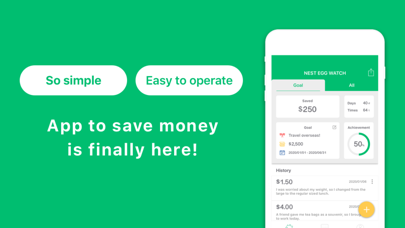
Description by RUSO INC. Written by the developer, not by AppBrain. Click to read.
“I’m trying my best to save money, but that is not visible to people around me.”
“Some friends are bad at saving. I want to help them.”
“Nest Egg Watch” was created for people worried about these things.
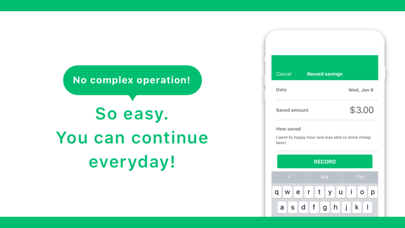
All you need to do is enter “how much money you saved for what” every day. By entering it then and there when you think, “I just saved money now!” you will always know how many times you have saved money, and how much money you have saved so far. Everyone can get used to saving and enjoy themselves while they keep saving.
[How to use: Basic]
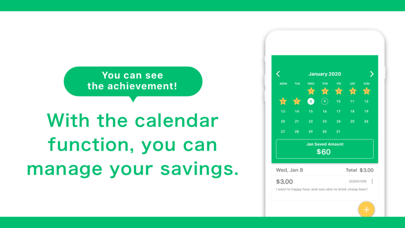
First, set the target amount to be saved, the period, and the purpose. Then all you need to do is enter the details of any savings, and the amount saved every day. Because it has a calendar function, you can keep a record of the times when you saved money as well.
On the confirmation screen, you can check the amount you saved so far, how many times you saved money, and how much money you need to save to reach the target. The target settings can be changed anytime, and your saving status can be shared on social media.
[Examples of entering savings information]
There are no rules about the information to enter. You are free to write, simply or in detail. Either is fine. We will show some example entries.
-A friend gave me tea bags as a souvenir, so I brought tea to work today. $4.00
-I went to happy hour and was able to drink cheap beer! $3.00
-I treated myself to an accessory. I received a 10% discount because it was my birth month! $10.00
Keep entering ways you save every day, like things you buy on sale and things you get from friends!
[Education for children]
When you think about how much money you saved for what, you need to calculate it in your mind. Children can develop accounting skills and get into the habit of making these calculations every day. Let your children enter savings information for each family member.
You can also use this application to help children get into the habit of saving money to buy what they want.
[Donating saved money]
We recommend you regularly donate a part of the money you’ve saved using ABC Watch. The story of how you saved money for the donation will increase your confidence and the recipient of the donation will be even more grateful.
[Charging]
The first 10 entries are free. Upon making your 11th, the fee selection screen is displayed. If the total amount you have saved in those 10 trial entries exceeds the cost of the app, this app is for you. It is important to be satisfied with the actual impact this app has on your savings. Value your own willpower.
●Fee
12 months USD 11.99
6 months USD 7.99
3 months USD 4.99
1 month USD 1.99
Restoring data after changing phones
After getting a new device, you can install the version you previously purchased for free. (Settings =>Restore purchases) Please log in to iTunes from your iPhone or iPad using the Apple ID you used when you purchased the app
●Confirmation and cancellation
Select “Recommend” shown at the bottom of the AppStore application ->Select Apple ID-> Select “Display Apple ID” -> Select “TITLE” from “Management” in subscription. On this screen, you can check the timing of the next automatic renewal or turn automatic updates on or off.
●Automatic continuous payment
If you don’t cancel the automatic renewal 24 hours before the period’s termination date, the contract period will be renewed automatically. Automatic renewals will be charged within 24 hours of the expiration of the contract period.
●Caution!
-Those who have paid in the application cannot cancel the contract in methods other than the above.
-We will not be able to accept cancellation for the present month.
-The fee is charged via your iTunes account.
●Terms of Service
http://setsuyakuwatch.com/static/ja/termsofuse.html
● Privacy Policy
http://setsuyakuwatch.com/static/ja/privacypolicy.html
Safety and technology
Found in the app by AppBrain- Price
- Free
- App size
- 16.3 MB
- Content rating
- Everyone
Technologies used by Nest Egg Watch
Releases
Updates seen on the App Store- Version
- 2.0.4
- Launched
- October 2019
No changelog data
Alternatives
Similar apps and more from RUSO INC.Alternatives to Nest Egg Watch







Rankings
App Store top chartsApp Store Rankings for Nest Egg Watch
About the app and developer
About Nest Egg Watch
Nest Egg Watch is a finance app developed by RUSO INC.
What is the rating of Nest Egg Watch?
Nest Egg Watch has no ratings yet.
Is Nest Egg Watch free?
Nest Egg Watch is free. The app size is 16.31 MB. The latest version available is 2.0.4. The last update was on January 18, 2023.
What are the requirements for Nest Egg Watch?
The app has a content rating of Everyone. The app has been available on the App Store since October 2019.
Developer information for RUSO INC.
Address:
Frequently asked questions about Nest Egg Watch
Is Nest Egg Watch free?
Yes. Nest Egg Watch is free on the App Store.
Is Nest Egg Watch still available?
Yes. Nest Egg Watch is on the App Store, and the last update we saw was on January 18, 2023.
How large is Nest Egg Watch?
Nest Egg Watch is 16.31 MB.
Is Nest Egg Watch suitable for children?
App Store rates the content of Nest Egg Watch as suitable for everyone.
Who made Nest Egg Watch?
Nest Egg Watch was developed by RUSO INC. It is listed in the finance category on the App Store.
What are the best alternatives to Nest Egg Watch?
People looking at Nest Egg Watch also look at these finance apps: Expense Tracker — Budget App, When Can I Retire Pro, CompBuddy: Total Compensation, Coast Line Credit Union, Tradefolio.