

Net Downloader is made and published by Wave-m. AppBrain is an independent app data site and isn't affiliated with Wave-m. The app name, icon, screenshots and description belong to Wave-m and are shown as published on the App Store.
AppBrain's verdict
- Last updated
- June 29, 2026
Rankings
App Store top chartsApp Store Rankings for Net Downloader
This app is not ranked
Competitors
Similar apps and more from Wave-mAlternatives to Net Downloader


Releases
Updates seen on the App Store- Version
- 1.0.3
- Launched
- December 2025
No changelog data
User feedback
Ratings and reviews on the App StoreComments on Net Downloader for iOS
We don't have enough comments to show example comments. Please check back later.
Technology
Found in the app by AppBrain- Price
- Free
- App size
- 6.12 MB
- Content rating
- High
Technologies used by Net Downloader
About the app and developer
About Net Downloader
Net Downloader is an utilities app developed by Wave-m.
What is the rating of Net Downloader?
Net Downloader has no ratings yet.
Is Net Downloader free?
Net Downloader is free. The app size is 6.12 MB. The latest version available is 1.0.3. The last update was on June 29, 2026.
What are the requirements for Net Downloader?
The app has a content rating of High Maturity. The app has been available on the App Store since December 2025.
Developer information for Wave-m
Address:
Store listing
By Wave-m, from the App Store


Screenshots by Wave-m, from the the App Store listing
Description by Wave-m Written by the developer, not by AppBrain. Click to read.
Meet Net Downloader. The fast, privacy-minded way to save videos and images from the pages you already visit. Browse any site, long-press media to download or copy the link, organize into folders & bookmarks, and view everything in the Files tab.
Why you’ll love it
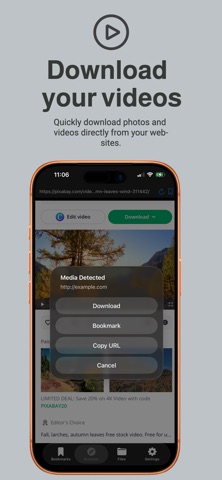
- Built-in Browser: Navigate to any page and long-press videos/images to Download or Copy URL.
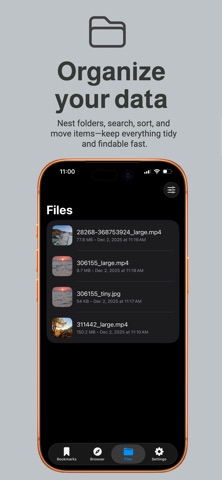
- Organize Everything: Bookmarks + Folders with nested subfolders, search, sort, and move.
- Files Tab: All saved media in one place with thumbnails, date, size, and quick actions.
- Share Extension: From Safari or any app, tap Share → Net Downloader to capture the URL.
- Bookmarks Enhancements: Auto-fetch site title/description, lazy-load thumbnails, collapsible folders.
- One-tap Actions: Save to Photos or Save to Files right from the download menu.
- Privacy-First: We don’t host your content, your downloads live on your device.
How it works
1. Open the Browser tab and enter a URL (or paste).
2. Long-press a video or image → choose Download, Copy URL, or Bookmark.
3. Find your media in Files, or your links in Bookmarks (with folders & search).
4. From Safari, use the Share Extension to send a page to [App Name] instantly.
5. Control which sites are allowed in Settings → Allowed Domains.
Important notes
- Respect website terms. Do not use Net Downloader to download content where it’s prohibited, or to circumvent DRM or paywalls.
- Not all media is downloadable, site rules and technical restrictions may apply.
Why you’ll love it
- Built-in Browser: Navigate to any page and long-press videos/images to Download or Copy URL.
- Organize Everything: Bookmarks + Folders with nested subfolders, search, sort, and move.
- Files Tab: All saved media in one place with thumbnails, date, size, and quick actions.
- Share Extension: From Safari or any app, tap Share → Net Downloader to capture the URL.
- Bookmarks Enhancements: Auto-fetch site title/description, lazy-load thumbnails, collapsible folders.
- One-tap Actions: Save to Photos or Save to Files right from the download menu.
- Privacy-First: We don’t host your content, your downloads live on your device.
How it works
1. Open the Browser tab and enter a URL (or paste).
2. Long-press a video or image → choose Download, Copy URL, or Bookmark.
3. Find your media in Files, or your links in Bookmarks (with folders & search).
4. From Safari, use the Share Extension to send a page to [App Name] instantly.
5. Control which sites are allowed in Settings → Allowed Domains.
Important notes
- Respect website terms. Do not use Net Downloader to download content where it’s prohibited, or to circumvent DRM or paywalls.
- Not all media is downloadable, site rules and technical restrictions may apply.