

NeuroCal – Weekly Planner
NeuroCal – Weekly Planner is made and published by Daniel Romero. AppBrain is an independent app data site and isn't affiliated with Daniel Romero. The app name, icon, screenshots and description belong to Daniel Romero and are shown as published on the App Store.
AppBrain's verdict
- Rating on App Store
- 5.00
- 1 ratings
- Last updated
- October 2, 2026
It doesn't have enough ratings yet to judge what users think.
Rankings
App Store top chartsApp Store Rankings for NeuroCal – Weekly Planner
Competitors
Similar apps and more from Daniel RomeroAlternatives to NeuroCal – Weekly Planner


Releases
Updates seen on the App Store- Version
- 2.2
- Launched
- November 2025
No changelog data
User feedback
Ratings and reviews on the App StoreComments on NeuroCal – Weekly Planner for iOS
We don't have enough comments to show example comments. Please check back later.
Technology
Found in the app by AppBrain- Price
- Free
- App size
- 22.2 MB
- Content rating
- Everyone
Technologies used by NeuroCal – Weekly Planner
About the app and developer
About NeuroCal – Weekly Planner
NeuroCal – Weekly Planner is a productivity app developed by Daniel Romero.
User Ratings
NeuroCal – Weekly Planner is rated 5.00 out of 5 stars. The rating is based on one rating ratings.
App Information
NeuroCal – Weekly Planner is freely available from the App Store. The app size is 22.22 MB. The latest version available is 2.2. The last update was on October 2, 2026.
Technical Requirements
The app has a content rating of Everyone. The app has been available on the App Store since November 2025.
Developer information for Daniel Romero
Address:
Frequently asked questions about NeuroCal – Weekly Planner
Is NeuroCal – Weekly Planner free?
Yes. NeuroCal – Weekly Planner is free on the App Store.
Is NeuroCal – Weekly Planner still available?
Yes. NeuroCal – Weekly Planner is on the App Store, and the last update we saw was on October 2, 2026.
How large is NeuroCal – Weekly Planner?
NeuroCal – Weekly Planner is 22.22 MB.
Is NeuroCal – Weekly Planner suitable for children?
App Store rates the content of NeuroCal – Weekly Planner as suitable for everyone.
How do people rate NeuroCal – Weekly Planner?
NeuroCal – Weekly Planner has one rating of 5.00 stars on the App Store.
Who made NeuroCal – Weekly Planner?
NeuroCal – Weekly Planner was developed by Daniel Romero. It is listed in the productivity category on the App Store.
What are the best alternatives to NeuroCal – Weekly Planner?
People looking at NeuroCal – Weekly Planner also look at these productivity apps: ZenSteps, Vast Vaults, DopaLoop: ADHD Habit Tracker, Damobo ADHD Time Block Planner, Hustla To-Do List Task Planner.
Store listing
By Daniel Romero, from the App Store


Description by Daniel Romero Written by the developer, not by AppBrain. Click to read.
NeuroCal is built for ADHD minds, and for anyone who feels overwhelmed by traditional calendars, rigid to-do lists, or complicated productivity systems. Instead of clutter, pressure, or endless categories, NeuroCal gives you a calm space to capture what's on your mind and let things organize themselves naturally. There are no red badges, no guilt, and no productivity shame — just a clearer head and a simpler way to think.
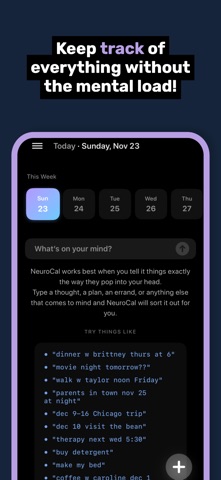
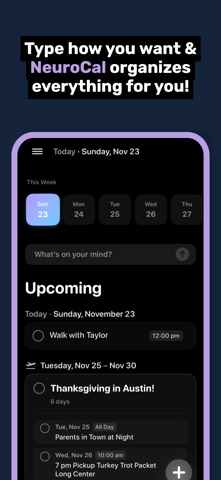
NeuroCal feels different from the moment you start using it. Capture a thought however it arrives: type it, say it out loud, or snap a photo. No menus, no categories, no friction. Type the way you naturally think — a quick phrase, a time and date, a grocery run, or a messy stream of ideas — and NeuroCal gently interprets it. Write "coffee tomorrow 2pm" or "therapy Thursday at 4" and it understands, placing things where they belong. Point your camera at a flyer, a screenshot, or an invitation, and NeuroCal reads it and offers to turn it into a plan.
Groceries land the same way. "Apples, milk, and eggs at Costco" becomes one Costco list — the same for H-E-B, Target, Walmart, Sam's, and other stores. The first item starts the list. Check things off as you shop, tap + when you remember something else, and clear what's done when you leave.
Not ready to decide? Drop anything — a photo, a half-formed idea — into your Remember Pile, and come back to it when you have the headspace. Snap now, sort later.
Your day is divided into Now and Upcoming. Anything without a date stays in your Now view. Anything with a date appears in a clean, simple timeline that helps you see what's ahead without overwhelming you. When you want to quiet your mind even further, Week Focus Mode hides everything beyond the next seven days, with a soft "Want to peek ahead?" option to reveal future plans on your own terms.
Life slips, and NeuroCal expects it. Miss something? There's no red-alert shame — just a gentle highlight and a one-tap way to push it to later, tomorrow, or next week. Bigger tasks can hold their own small steps, so something like "taxes" doesn't sit there as one intimidating block. And optional, kindly-worded check-ins help you circle back — never nagging, never guilt.
The design is intentionally ADHD-friendly: soft animations, calm colors, subtle haptics, and a comfortable, non-stimulating feel throughout. Completed items fade away so you get closure without clutter. Choose the look that suits you, and let the interface stay grounded and quiet.
NeuroCal is built for real minds — nonlinear thoughts, bursts of energy, forgotten tasks, random ideas, and last-minute changes. Instead of forcing structure, it adapts to how you actually think. Capture anything: tasks, plans, events, errands, grocery lists, reminders, stray thoughts, even full paragraphs. NeuroCal makes sense of each one and organizes it automatically, so everything you need lives in one simple, supportive space.
Every part of the app is designed with intention: low friction, low anxiety, low clutter, all in service of clarity and calm. It's a tool that helps you feel lighter the moment you open it — a place where your thoughts become easier to manage and your week feels more doable.