

Nia: AI Assistant
Nia: AI Assistant is made and published by ALEX CANO GALLEGO. AppBrain is an independent app data site and isn't affiliated with ALEX CANO GALLEGO. The app name, icon, screenshots and description belong to ALEX CANO GALLEGO and are shown as published on the App Store.
AppBrain's verdict
- Last updated
- October 6, 2026
Rankings
App Store top chartsApp Store Rankings for Nia: AI Assistant
Competitors
Similar apps and more from ALEX CANO GALLEGOAlternatives to Nia: AI Assistant


More from ALEX CANO GALLEGO

Releases
Updates seen on the App Store- Version
- 1.0.0
- Launched
- October 2026
No changelog data
User feedback
Ratings and reviews on the App StoreComments on Nia: AI Assistant for iOS
We don't have enough comments to show example comments. Please check back later.
Technology
Found in the app by AppBrain- Price
- Free
- App size
- 31.3 MB
- Content rating
- Everyone
Technologies used by Nia: AI Assistant
About the app and developer
About Nia: AI Assistant
Nia: AI Assistant is a productivity app developed by ALEX CANO GALLEGO.
User Ratings
The app has no ratings yet.
App Information
Nia: AI Assistant is freely available from the App Store. The app size is 31.29 MB. The latest version available is 1.0.0. The last update was on October 6, 2026.
Technical Requirements
The app has a content rating of Everyone. The app has been available on the App Store since October 2026.
Developer information for ALEX CANO GALLEGO
Address:
Frequently asked questions about Nia: AI Assistant
Is Nia: AI Assistant free?
Yes. Nia: AI Assistant is free on the App Store.
Is Nia: AI Assistant still available?
Yes. Nia: AI Assistant is on the App Store, and the last update we saw was on October 6, 2026.
How large is Nia: AI Assistant?
Nia: AI Assistant is 31.29 MB.
Is Nia: AI Assistant suitable for children?
App Store rates the content of Nia: AI Assistant as suitable for everyone.
Who made Nia: AI Assistant?
Nia: AI Assistant was developed by ALEX CANO GALLEGO. It is listed in the productivity category on the App Store.
What are the best alternatives to Nia: AI Assistant?
People looking at Nia: AI Assistant also look at these productivity apps: Verda: Smart AI Chat, Onboard AI, Moonwalk Mobile, Local AI - Private Offline AI, Moomo AI.
Store listing
By ALEX CANO GALLEGO, from the App Store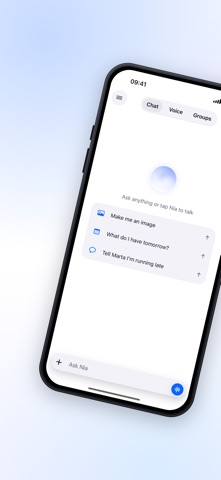




Description by ALEX CANO GALLEGO Written by the developer, not by AppBrain. Click to read.
WHAT YOU CAN ASK FOR
Calendar and reminders. Create, move and check events in the iPhone calendar and in Google Calendar. Set reminders with a time, a repeat or a place, so the shopping list shows up when you walk into the store.
Alarms and timers. Ask for an alarm at seven or a timer for the pasta and Nia sets it without you leaving the conversation.
Hands free, with your voice. Say the wake word and Nia starts listening with the phone still in your pocket. Cut in whenever you like: Nia stops talking and listens again.
Memory that stays. Tell Nia once that you prefer meetings in the morning and it will remember. Everything Nia learns about you can be read, changed and deleted whenever you want.
Routines and skills. Set up a routine that gets your week ready every Sunday evening, or teach Nia a new skill in your own words and call it by name when you need it.
Photos and Nia Studio. Create images from a description, edit the ones you already have, erase or replace a background, expand a photo past its edges and crop it to the size you need.
Email, files and documents. Get your inbox summarized, write replies, search Google Drive and ask questions about your own PDFs.
Translation and live interpreter. Translate text, or hold a conversation in two languages with Nia interpreting in between.
Scanning and meetings. Turn paper into a PDF, read a receipt, and record and transcribe a meeting on the phone itself.
Plans with other people. Create a group, suggest a plan, and everyone who accepts gets it written into their own calendar.
Places, music and getting around. Find places on a map, remember where you parked, start navigation and play music.
Health. Log your health data and ask Nia about it.
YOU DECIDE WHAT HAPPENS
Nia shows you what it is about to do and asks first before calling someone, sending a message, opening another app or doing anything outside the app. Photo editing, receipt reading and meeting transcription run on your iPhone.
ON YOUR HOME SCREEN
Widgets to start talking with one tap, a Live Activity while something is running, and support for Shortcuts and Siri so you can reach Nia from anywhere on the phone.
PLANS
Free: voice and chat, calendar, reminders, alarms, timers, places, navigation, music and one group.
Plus: wake word, memory, routines, skills, photo editing and Nia Studio, email, Drive, documents, translation, scanning, meetings and more groups.
Pro: video creation, health, the Pro model and the Gemini voice.
LANGUAGES
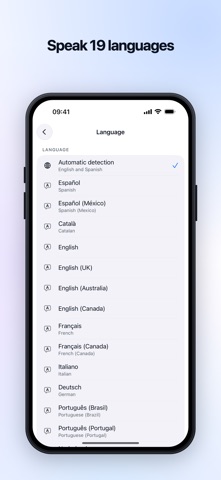
Nia works in 19 languages: Spanish, Catalan, English, French, Italian, German, Portuguese, Dutch, Swedish, Finnish, Norwegian, Japanese, Chinese, Thai, Korean, Hindi and Arabic. The interface follows the language of your iPhone, and Nia answers in the language you speak to it, with a native voice.
Terms of Use (EULA): https://niapersonal.com/en/eula/