

Nodi: Fridge Pantry Tracker
Nodi: Fridge Pantry Tracker is made and published by Pablo Grau. AppBrain is an independent app data site and isn't affiliated with Pablo Grau. The app name, icon, screenshots and description belong to Pablo Grau and are shown as published on the App Store.
AppBrain's verdict
- Last updated
- August 21, 2026
Rankings
App Store top chartsApp Store Rankings for Nodi: Fridge Pantry Tracker
Competitors
Similar apps and more from Pablo GrauAlternatives to Nodi: Fridge Pantry Tracker


More from Pablo Grau


Releases
Updates seen on the App Store- Version
- 1.2.2
- Launched
- May 2026
No changelog data
User feedback
Ratings and reviews on the App StoreComments on Nodi: Fridge Pantry Tracker for iOS
We don't have enough comments to show example comments. Please check back later.
Technology
Found in the app by AppBrain- Price
- Free
- App size
- 79.1 MB
- Content rating
- Everyone
Technologies used by Nodi: Fridge Pantry Tracker
About the app and developer
About Nodi: Fridge Pantry Tracker
Nodi: Fridge Pantry Tracker is a food & drink app developed by Pablo Grau.
User Ratings
The app has no ratings yet.
App Information
Nodi: Fridge Pantry Tracker is freely available from the App Store. The app size is 79.08 MB. The latest version available is 1.2.2. The last update was on August 21, 2026.
Technical Requirements
The app has a content rating of Everyone. The app has been available on the App Store since May 2026.
Developer information for Pablo Grau
Address:
Store listing
By Pablo Grau, from the App Store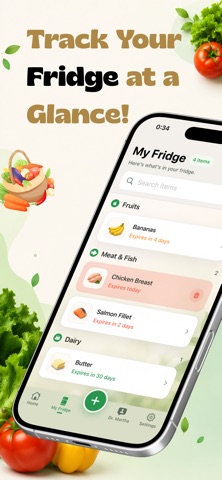

Description by Pablo Grau Written by the developer, not by AppBrain. Click to read.
Powered by Dr. Martha, your friendly AI kitchen companion, Refri keeps a watchful eye on your kitchen inventory so you don’t have to.
WHY NODI IS DIFFERENT
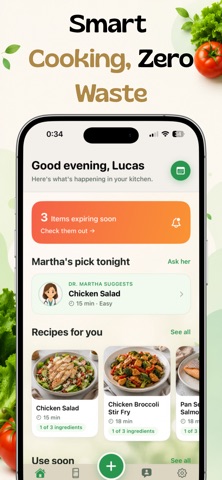
Most pantry apps are just digital clipboards. Nodi is an active assistant. Dr. Martha lives right in your phone to tell you exactly what you can cook with the fresh produce, dairy, and items you already have on hand.
KEY FEATURES
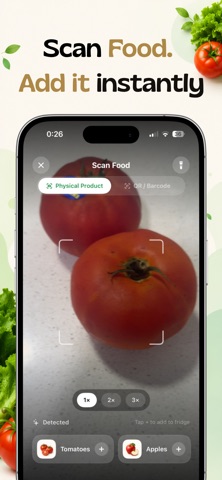
• Smart Fridge & Pantry Tracking: Easily log your food items and visualize your kitchen stock at a glance.
• Expiration Date Reminders: Receive timely push notifications before your food goes bad. No more hidden, spoiled surprises in the back of the shelf.
• AI Recipe Generator: Tell Dr. Martha what needs to be used up, and get instant, customized recipe ideas instantly.
• Integrated Meal Planner: Map out your week around your expiring ingredients to maximize your budget and minimize waste.
MEET DR. MARTHA
Think of Dr. Martha as the expert chef friend who lives in your fridge. Warm, personal, and highly knowledgeable, she guides you through onboarding, answers tricky food storage questions, and curates lifestyle advice tailored to your tastes.
GO PRO FOR UNLIMITED SUCCESS
Unlock Nodi Pro to experience unlimited ingredient tracking, hundreds of monthly AI interactions with Dr. Martha, and our premium Meal Planner.
LEGAL INFORMATION
Privacy Policy:
https://freshliapp.vercel.app/privacy
Terms of Use (EULA):
https://www.apple.com/legal/internet-services/itunes/dev/stdeula/
Subscriptions:
Subscriptions automatically renew unless canceled at least 24 hours before the end of the current period.
You can manage or cancel your subscription at any time from Settings > Apple ID > Subscriptions.