noesa: AI Chat & Planner came out 36 days ago. It doesn't have enough ratings yet to judge what users think.
noesa: AI Chat & Planner is made and published by
Karen Manukyan.
AppBrain is an independent app data site and isn't affiliated with Karen Manukyan.
The app name, icon, screenshots and description belong to Karen Manukyan and are shown as
published on the App Store.
About noesa: AI Chat & Planner
noesa: AI Chat & Planner is a productivity app developed by Karen Manukyan.
What is the rating of noesa: AI Chat & Planner?
noesa: AI Chat & Planner is rated 5.00 out of 5 stars, based on one rating ratings.
Is noesa: AI Chat & Planner free?
noesa: AI Chat & Planner is free. The app size is 34.79 MB. The latest version available is 1.0.7. The last update was on October 2, 2026.
What are the requirements for noesa: AI Chat & Planner?
The app has a content rating of Everyone. The app has been available on the App Store since September 2026.
Description by Karen Manukyan(from the App Store)
noesa is an AI assistant for work, study and everyday tasks. Edit photos, explore documents, run calculations and create files in one chat. Then turn ideas into action with a calendar, journal and habit tracker.
GPT MODELS FOR YOUR TASKS Develop ideas, draft content, explore complex questions and work with code. noesa offers GPT-6 Luna and GPT-6 Sol alongside the GPT-5.6 family. GPT-6 Astra is available on Pro and Max. Free and Mini use GPT-6 Luna in Auto; Plus and above include manual GPT-6 Luna/Sol selection and automatic selection between them.
PHOTOS AND IMAGES Attach a photo and describe an edit: replace the background, remove an unwanted object or try a different style. Create images from a description and refine them in the conversation. Ask AI to explain a photo or help you understand text in an image.
DOCUMENTS, SPREADSHEETS AND FILES Upload supported PDFs, documents and spreadsheets. Ask questions about their contents, summarize key points, compare data and prepare materials for work or study. Ask the assistant to create a file you can open and download.
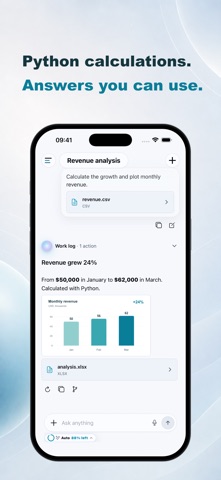
PYTHON CALCULATIONS AND WEB SEARCH Delegate calculations, spreadsheet processing and charts to AI, with Python running in an isolated environment. Explore current topics using web search with source links. Follow the activity and tools directly in your chat.
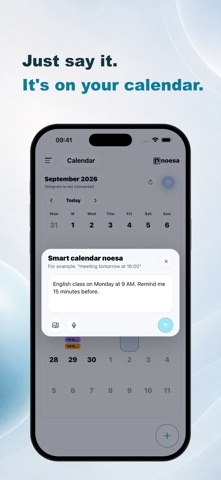
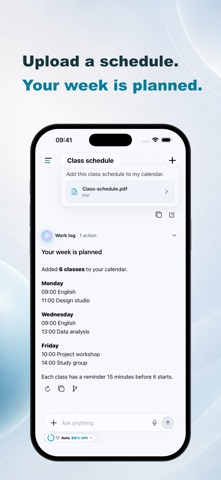
FROM A SCHEDULE TO YOUR CALENDAR Upload a file containing your schedule and ask the assistant to extract classes or meetings and add them to your noesa calendar. Check the recognized dates and times instead of entering every event by hand. You can also create events and tasks in everyday language, add notes and set reminders.
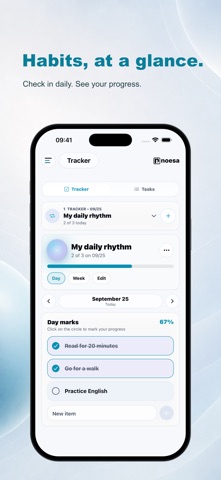
JOURNAL, NOTES AND HABITS Capture your thoughts, reflect on your day, record your mood and add photos. Track habits and follow your progress. Choose personal entries and other context to help the assistant understand your request.
ONE ACCOUNT ON IPHONE AND THE WEB Use noesa in the app and your browser. Explore the assistant's capabilities at https://noesa.ai/en
Core features are free with AI usage limits. Mini provides a larger allowance. Document uploads, file creation, Python, web search and model selection are available on applicable paid plans. Features, limits, prices and currency are shown in the app.
App Store subscriptions are monthly and renew automatically unless canceled at least 24 hours before the end of the current period. Payment is charged to your Apple Account. Manage or cancel your subscription in your Apple Account settings.
AI processing is provided by OpenAI OpCo, LLC with your separate permission. AI can make mistakes: check important information and results.
Terms of Use (EULA): https://www.apple.com/legal/internet-services/itunes/dev/stdeula/
Each subscription will automatically renew 3 days before the expiration date for
the same time period. Subscriptions can be cancelled at any time before the renewal.