

Noise Reducer & Audio Cleaner
Noise Reducer & Audio Cleaner is made and published by HyperMind Ltd. AppBrain is an independent app data site and isn't affiliated with HyperMind Ltd. The app name, icon, screenshots and description belong to HyperMind Ltd. and are shown as published on the App Store.
AppBrain's verdict
- Rating on App Store
- 4.53
- 19 ratings
- Last updated
- October 1, 2026
It doesn't have enough ratings yet to judge what users think.
Rankings
App Store top chartsApp Store Rankings for Noise Reducer & Audio Cleaner
Competitors
Similar apps and more from HyperMind Ltd.Alternatives to Noise Reducer & Audio Cleaner


More from HyperMind Ltd.


Releases
Updates seen on the App Store- Version
- 2.8
- Launched
- March 2026
No changelog data
User feedback
Ratings and reviews on the App StoreComments on Noise Reducer & Audio Cleaner for iOS
We don't have enough comments to show example comments. Please check back later.
Technology
Found in the app by AppBrain- Price
- Free
- App size
- 150.2 MB
- Content rating
- Everyone
Technologies used by Noise Reducer & Audio Cleaner
About the app and developer
About Noise Reducer & Audio Cleaner
Noise Reducer & Audio Cleaner is a music app developed by HyperMind Ltd.
What is the rating of Noise Reducer & Audio Cleaner?
Noise Reducer & Audio Cleaner is rated 4.53 out of 5 stars, based on 19 ratings.
Is Noise Reducer & Audio Cleaner free?
Noise Reducer & Audio Cleaner is free. The app size is 150.18 MB. The latest version available is 2.8. The last update was on October 1, 2026.
What are the requirements for Noise Reducer & Audio Cleaner?
The app has a content rating of Everyone. The app has been available on the App Store since March 2026.
Developer information for HyperMind Ltd.
Address:
Store listing
By HyperMind Ltd., from the App Store


Description by HyperMind Ltd. Written by the developer, not by AppBrain. Click to read.
Why people use this app:
• Remove background noise from audio files with AI-assisted denoise processing that targets hiss, hum, room noise, traffic, fan noise, and other steady distractions.
• Clean video sound by processing the audio track inside imported video files, so you can improve spoken content without rebuilding the whole video.
• Support many import paths including Files, Photo Library video import, Music library access, WiFi transfer, and AirDrop for flexible desktop-to-phone workflows.
• Preview before export so you can compare the original and cleaned result in real time instead of guessing.
• Export audio or video after cleanup and quickly save or share the processed file.
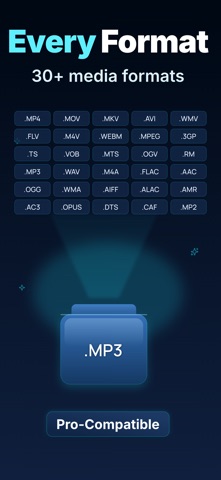
• Handle a wide range of formats for practical file-based work, including MP4, MOV, MP3, WAV, FLAC, AAC, OGG, WMA, M4A, ALAC, AIFF, AMR, AC3, Opus, CAF, DTS, WV, OGA, W64, VOC, and more.
• Fine-tune output with volume adjustment for clearer listening after noise removal.
• Use it for spoken voice, meetings, podcast material, lecture audio, archive clips, and music cleanup where noise gets in the way.
Common use cases:
• Meeting audio cleanup: remove air conditioner hum, office noise, keyboard sounds, or low room rumble from imported meeting recordings before sharing them.
• Podcast post-production prep: clean dialogue tracks that were recorded in less-than-ideal rooms before publishing or sending to a client.
• Lecture and classroom audio: make speech easier to hear in class recordings with background chatter or HVAC noise.
• Interview sound repair: improve imported interview clips captured outdoors or in public spaces where traffic and wind contaminate the audio.
Frequently asked questions
1) Can I remove background noise from video on iPhone?
Yes. You can import a video file, process its audio track for noise reduction, preview the result, and export a cleaner video file when the sound is ready.
2) Can I clean audio from an existing file instead of recording inside the app?
Yes. The app is designed around importing existing media from Files, Photos videos, Music, WiFi transfer, or AirDrop, then exporting a cleaned result.
3) What kinds of noise can this app help reduce?
It is built for common unwanted noise such as hiss, hum, fan noise, room tone, traffic, and other background interference that makes speech or music harder to hear.
4) Is this app only for voice recordings?
No. It can be used for voice, meetings, lectures, podcasts, music files, and video audio tracks, as long as the source file is imported into the app.
5) Can I hear the result before exporting?
Yes. Real-time preview helps you compare the original and processed version before you save or share the output.
Subscription Information:
- Subscription Options: Weekly, Monthly, and Lifetime Membership.
- Pricing: Weekly subscription at $2.99/week, Monthly subscription at $4.99/month, Lifetime membership at $8.99.
- Payment: Charges will be applied to your iTunes account upon confirmation of purchase.
Renewal: Your subscription will automatically renew within 24 hours prior to the end of the current period, and your iTunes account will be charged accordingly.
Cancellation: To cancel, please do so at least 24 hours before the end of the current period via Settings > iTunes & App Store > Apple ID > Subscriptions.
Privacy Policy: https://denoiseapp.netlify.app/noise/privacy
Terms of Service: https://denoiseapp.netlify.app/noise/terms