

Nook: Private Journal & Diary
Nook: Private Journal & Diary is made and published by AI Adviesbureau B.V. AppBrain is an independent app data site and isn't affiliated with AI Adviesbureau B.V. The app name, icon, screenshots and description belong to AI Adviesbureau B.V. and are shown as published on the App Store.
AppBrain's verdict
- Rating on App Store
- 4.50
- 2 ratings
- Last updated
- September 1, 2026
It doesn't have enough ratings yet to judge what users think.
Rankings
App Store top chartsApp Store Rankings for Nook: Private Journal & Diary
Competitors
Similar apps and more from AI Adviesbureau B.V.Alternatives to Nook: Private Journal & Diary


Releases
Updates seen on the App Store- Version
- 1.2.0
- Launched
- July 2026
No changelog data
User feedback
Ratings and reviews on the App StoreComments on Nook: Private Journal & Diary for iOS
We don't have enough comments to show example comments. Please check back later.
Technology
Found in the app by AppBrain- Price
- Free
- App size
- 3.60 MB
- Content rating
- Everyone
Technologies used by Nook: Private Journal & Diary
About the app and developer
About Nook: Private Journal & Diary
Nook: Private Journal & Diary is a productivity app developed by AI Adviesbureau B.V.
What is the rating of Nook: Private Journal & Diary?
Nook: Private Journal & Diary is rated 4.50 out of 5 stars, based on 2 ratings.
Is Nook: Private Journal & Diary free?
Nook: Private Journal & Diary is free. The app size is 3.60 MB. The latest version available is 1.2.0. The last update was on September 1, 2026.
What are the requirements for Nook: Private Journal & Diary?
The app has a content rating of Everyone. The app has been available on the App Store since July 2026.
Developer information for AI Adviesbureau B.V.
Address:
Store listing
By AI Adviesbureau B.V., from the App Store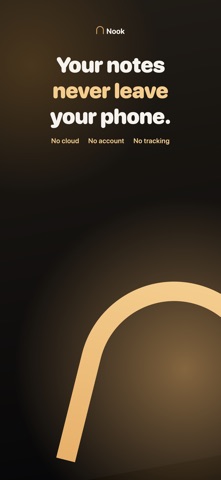




Description by AI Adviesbureau B.V. Written by the developer, not by AppBrain. Click to read.
Most note apps sell you the cloud. Nook does the opposite, and makes a promise you can actually verify: your notes are yours alone.
PRIVACY TYPING
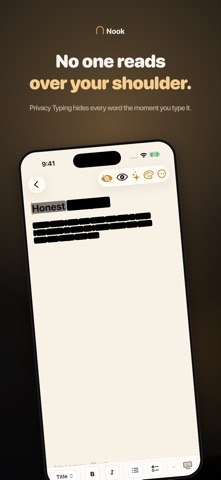
Something you have not seen before. Turn on Privacy Typing and every word you write is blacked out on screen the moment you finish it, so no one can read over your shoulder on the train, in a meeting, or at home. The word you are currently typing stays faintly visible just for you. Tap the eye to reveal the whole note, and Nook remembers the setting per note. You choose the bar color and how hidden the current word stays.
HIDDEN IN PLAIN SIGHT
Protecting a page while you write it does little if your list still reads like a table of contents. Tap the eye on the home screen and every title and preview is covered behind glass. Bring them all back with Face ID, or uncover one note at a time, which is safer still. Everything covers itself again the moment you leave the app, so Nook never opens onto your own words.
SOMEWHERE TO START
Fifty one writing prompts, written by hand and grouped by what you might need: today, how you are, the people in your head, looking back, looking ahead, the quiet ones, the unsaid ones. They work on every device, with no model required. On devices with Apple Intelligence, Nook can also suggest a topic or reflect on an entry using Apple's on-device Foundation Models, with no network call at any point.
WHY YOU WILL LOVE NOOK
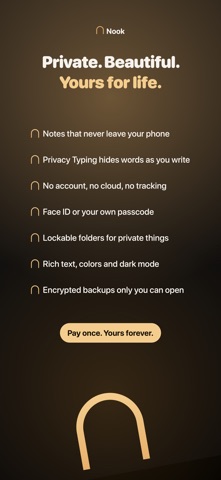
• Privacy Typing. Black out every word as you type, so no one reads over your shoulder.
• Hide your notes. Cover every title and preview in the list, and bring them back with Face ID, all at once or one note at a time.
• Truly private. No account, no email, no sign in. Open the app and start writing.
• Lives only on your phone. No cloud and no servers. Your notes are stored locally and protected on device.
• Locked for your eyes only. Choose Face ID, Touch ID, or your own passcode to open Nook.
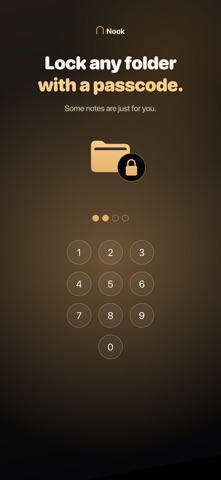
• Lockable folders. Put a passcode on any folder, and everything inside it stays private too.
• Write beautifully. Titles, headings, bold and italic, plus a page background and text color for every note.
• Beautifully organized. Nest folders as deep as you like, give them colors, pin what matters, and search everything in an instant.
• Yours to back up. Export an encrypted backup to Files or AirDrop. You choose the passphrase, so only you can ever open it.
• Prompts for empty days. Fifty one hand written prompts, plus on-device suggestions on Apple Intelligence devices.
• Made for iPad. A two column desk, folders down one side and your pages beside them.
• A widget that fits in. Quick capture from the Home Screen, following your own tint.
• Calm by design. A warm, focused interface with a gorgeous light and dark theme.
NO SUBSCRIPTION. EVER.
Try everything free for 7 days. If you love it, buy us a coffee just once and Nook is yours forever. One payment of $5.99. No subscription, no account, no cloud.
PRIVACY YOU CAN TRUST
Nook collects NO data. There is nothing to leak, nothing to sell, and nothing to track. Your App Store privacy label says it plainly: Data Not Collected.
Made with care by an independent couple. Buy us a coffee and keep your thoughts to yourself.