

NorVirtualNew is made and published by Norsonic AS. AppBrain is an independent app data site and isn't affiliated with Norsonic AS. The app name, icon, screenshots and description belong to Norsonic AS and are shown as published on the App Store.
AppBrain's verdict
- Last updated
- February 12, 2026
Rankings
App Store top chartsApp Store Rankings for NorVirtualNew
Competitors
Similar apps and more from Norsonic ASAlternatives to NorVirtualNew


Releases
Updates seen on the App Store- Version
- 2.3.7
- Launched
- December 2024
No changelog data
User feedback
Ratings and reviews on the App StoreComments on NorVirtualNew for iOS
We don't have enough comments to show example comments. Please check back later.
Technology
Found in the app by AppBrain- Price
- Free
- App size
- 124.3 MB
- Content rating
- Everyone
Technologies used by NorVirtualNew
About the app and developer
About NorVirtualNew
NorVirtualNew is an utilities app developed by Norsonic AS.
User Ratings
The app has no ratings yet.
App Information
NorVirtualNew is freely available from the App Store. The app size is 124.33 MB. The latest version available is 2.3.7. The last update was on February 12, 2026.
Technical Requirements
The app has a content rating of Everyone. The app has been available on the App Store since December 2024.
Developer information for Norsonic AS
Address:
Frequently asked questions about NorVirtualNew
Is NorVirtualNew free?
Yes. NorVirtualNew is free on the App Store.
Is NorVirtualNew still available?
Yes. NorVirtualNew is on the App Store, and the last update we saw was on February 12, 2026.
How large is NorVirtualNew?
NorVirtualNew is 124.33 MB.
Is NorVirtualNew suitable for children?
App Store rates the content of NorVirtualNew as suitable for everyone.
Who made NorVirtualNew?
NorVirtualNew was developed by Norsonic AS. It is listed in the utilities category on the App Store.
What are the best alternatives to NorVirtualNew?
People looking at NorVirtualNew also look at these utilities apps: Product Noise Partner, Building Acoustics Partner, Building Acoustics Pro, TimingMachine, Sound Power.
Store listing
By Norsonic AS, from the App Store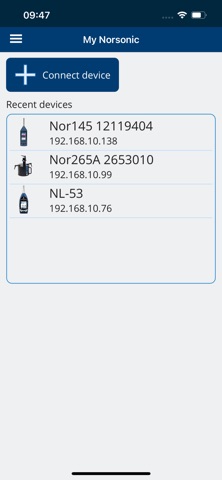


Description by Norsonic AS Written by the developer, not by AppBrain. Click to read.
Connect the mobile device and the Norsonic instrument with Wi-Fi in one of these ways:
- Use Wi-Fi network or router and connect both the mobile device and instrument to this network.
- Activate Hotspot / Access point on the mobile device and connect instrument Wi-Fi to this “network”.
- For Nor145 only: Activate Access point in the instrument and connect your mobile device to this “network”.
After starting the app, tap “Connect device” and select device type. The available devices will show up in a list. If the device in question does not show up, you may enter the IP address manually. Consult the device manual to find out where to locate the IP address.
If connection is lost, the live instrument display will stop. It can easily be restarted by right-dragging the instrument in question in the list of “Recent devices”.
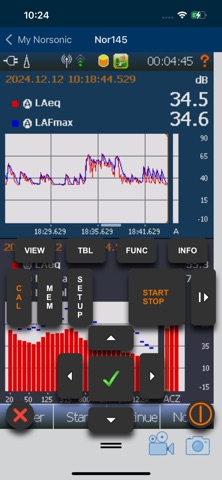
Sound level meter keyboard:
The keyboard can be opened by tapping the handle at the bottom of the screen.
Camera and Microphone:
When connected to a Nor145/150, it is possible to use the mobile device for taking pictures and making voice comments to attach to the measurements. These can be activated using icons at the bottom of the screen.
Be aware that pictures taken with the mobile device cannot be viewed in the instrument but can be viewed in NorConnect and NorReview.
Limitations:
The response when tapping and scrolling is quite slow compared to using the instrument directly.
Touch scroll/drag does not support “flick” (quick/accelerating drag).