

NotaioID is made and published by Bit4id s.r.l. AppBrain is an independent app data site and isn't affiliated with Bit4id s.r.l. The app name, icon, screenshots and description belong to Bit4id s.r.l and are shown as published on the App Store.
AppBrain's verdict
- Last updated
- July 23, 2025
Rankings
App Store top chartsApp Store Rankings for NotaioID
Competitors
Similar apps and more from Bit4id s.r.lAlternatives to NotaioID





More from Bit4id s.r.l




Releases
Updates seen on the App Store- Version
- 1.0.30
- Launched
- December 2020
No changelog data
User feedback
Ratings and reviews on the App StoreComments on NotaioID for iOS
We don't have enough comments to show example comments. Please check back later.
Technology
Found in the app by AppBrain- Price
- Free
- App size
- 19.3 MB
- Content rating
- Everyone
Technologies used by NotaioID
About the app and developer
About NotaioID
NotaioID is a productivity app developed by Bit4id s.r.l.
User Ratings
The app has no ratings yet.
App Information
NotaioID is freely available from the App Store. The app size is 19.31 MB. The latest version available is 1.0.30. The last update was on July 23, 2025.
Technical Requirements
The app has a content rating of Everyone. The app has been available on the App Store since December 2020.
Developer information for Bit4id s.r.l
Address:
Store listing
By Bit4id s.r.l, from the App Store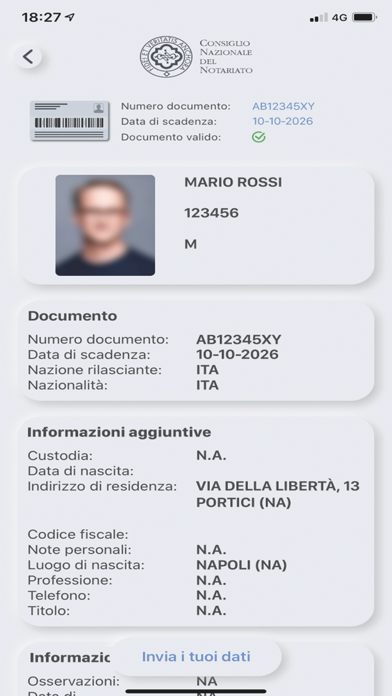
Description by Bit4id s.r.l Written by the developer, not by AppBrain. Click to read.
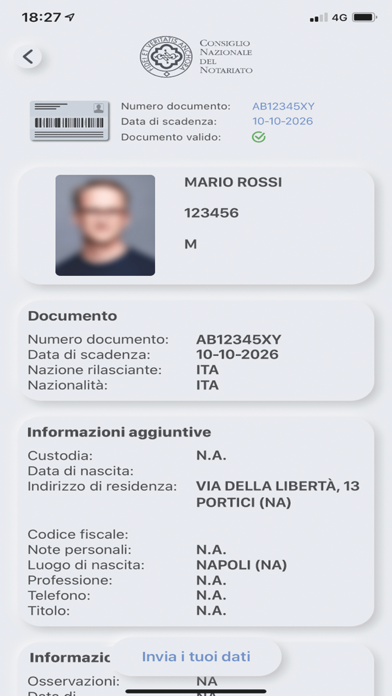
Per estrarre i dati anagrafici, basta inquadrare con la fotocamera il documento e poi avvicinarlo al retro dello smartphone, in corrispondenza del lettore NFC. Prima dell’invio, è sempre possibile verificare il risultato della scansione e l’esattezza dei dati riportati.
Come usare l’app:
• Verificare nelle Impostazioni dello smartphone che la funzione NFC sia abilitata;
• Lanciare l’app e avviare la scansione;
• Inquadrare con la fotocamera il codice presente sulla Carta d’Identità Elettronica o sul Passaporto Elettronico;
• Avvicinare il documento al retro dello smartphone per qualche secondo. Il lettore NFC potrà così leggere ed estrarre i dati presenti;
• Verificare la correttezza dei dati acquisiti tramite la scansione e cliccare sul pulsante “Invia i tuoi dati”; inserire il codice “ID Richiesta” fornito dal notaio.