

Notal: AI Expense Tracker
Notal: AI Expense Tracker is made and published by Oguzhan Demiroz. AppBrain is an independent app data site and isn't affiliated with Oguzhan Demiroz. The app name, icon, screenshots and description belong to Oguzhan Demiroz and are shown as published on the App Store.
AppBrain's verdict
- Best rank
- #42
- New Apps, Sweden
- Last updated
- October 18, 2026
Rankings
App Store top charts- Highest rank
- #42
- Chart
- New Apps
- Books
- Country
- Sweden
App Store Rankings for Notal: AI Expense Tracker
Top rankings
| Rank | Country | Category | List |
|---|---|---|---|
| 42 | Sweden | Books | New Apps |
| 42 | Sweden | Business | New Apps |
| 42 | Sweden | Education | New Apps |
| 42 | Sweden | Entertainment | New Apps |
| 42 | Sweden | Finance | New Apps |
| 42 | Sweden | Food & Drink | New Apps |
| 42 | Sweden | Games | New Apps |
| 42 | Sweden | Action Games | New Apps |
| 42 | Sweden | Adventure Games | New Apps |
| 42 | Sweden | Arcade Games | New Apps |
Ranking history in Sweden
Competitors
Similar apps and more from Oguzhan DemirozMore from Oguzhan Demiroz


Releases
Updates seen on the App Store- Version
- 1.0.0
- Launched
- October 2026
No changelog data
User feedback
Ratings and reviews on the App StoreComments on Notal: AI Expense Tracker for iOS
We don't have enough comments to show example comments. Please check back later.
Technology
Found in the app by AppBrain- Price
- Free
- App size
- 66.4 MB
- Content rating
- Everyone
Technologies used by Notal: AI Expense Tracker
About the app and developer
About Notal: AI Expense Tracker
Notal: AI Expense Tracker is a finance app developed by Oguzhan Demiroz.
User Ratings
The app has no ratings yet.
App Information
Notal: AI Expense Tracker is freely available from the App Store. The app size is 66.38 MB. The latest version available is 1.0.0. The last update was on October 18, 2026.
Technical Requirements
The app has a content rating of Everyone. The app has been available on the App Store since October 2026.
Developer information for Oguzhan Demiroz
Address:
Store listing
By Oguzhan Demiroz, from the App Store


Description by Oguzhan Demiroz Written by the developer, not by AppBrain. Click to read.
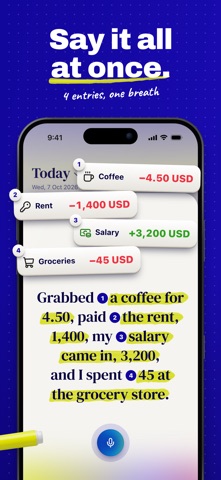
You can also say a line out loud or take a photo of a receipt. When Notal AI isn’t sure what you meant, it asks one short question, and that line stays out of your balance until you answer.
HOW IT WORKS
• Type “lunch 12” or “paycheck 3200” and it goes on today’s page.
• Name the day if it wasn’t today: “taxi home yesterday 20” goes on yesterday’s page.
• Tap the mic and say one line.
• Take a photo of a receipt or choose one from your photo library. Notal AI reads the store name, the total, and the date, and picks a category.
• If one line holds several purchases, Notal AI offers to split it into separate entries.
• If a word looks like a typo, Notal AI may suggest a fix when you open the entry. Ignore it and nothing changes.
• Undo a save or a delete right away, or open any entry to change it.
ONE BALANCE
Money in, money out, and what’s left. Each day has its own page: swipe between days, and every line shows its category as an icon. Tap the day’s totals to see income, spending, and the difference over a period.
INSIGHTS
The Insights tab shows how the month is going: what’s left, money in and out day by day with payday marked, where your money went by category, and how many days in a row you’ve written a line.
REPEATING PAYMENTS AND BILLS
When a line looks like something that comes back, such as rent, a subscription, or a bill, Notal AI asks if it repeats. Say yes and pick how often. If you already track a similar payment, you’ll see it first and decide whether it’s the same payment or a separate one. On the due day, the payment shows up for you to confirm, and you get a reminder.
REMINDERS
A daily reminder on days you haven’t written anything, a weekly summary, a monthly summary, and bill reminders. You can turn each one off in Settings.
CATEGORIES, TAGS, AND TRASH
Built-in categories, plus your own. Tags like #vacation or #work. Deleted lines stay in the trash for 30 days.
LANGUAGE AND CURRENCY
The app is in English and Turkish, and you can write your lines in any language. Voice notes are transcribed in the app’s language, English or Turkish. You pick your currency when you start (TL, USD, EUR, or GBP), and it stays fixed. A line in another currency is converted at a live rate you confirm.
SIGN IN
Sign in with Apple, Google, or email. If you forget your password, we’ll email you a code to set a new one. You can delete your account and all your entries in Settings.
FREE
A daily entry limit, the last 30 days of history, a few receipts a month, and a limited number of repeating payments.
PREMIUM
• No daily entry limit
• Your whole history
• More receipts each month
• Unlimited repeating payments
• Weekly, monthly, and yearly totals
• Past months, every category, and your biggest expense in Insights
• Restore deleted lines from the trash anytime
PRIVACY
What you type and the receipts you photograph go only to AI services that keep no copy and never train on them. Voice notes are different: a separate third-party service turns them into text, and those two promises don’t cover voice. Your data is never sold and never used for ads. Notal AI asks your permission before it reads anything. Notal doesn’t connect to your bank.
SUBSCRIPTION
Notal Premium is an auto-renewing subscription, billed monthly or annually. If you’re eligible, it starts with a free trial. Payment is charged to your Apple Account at confirmation of purchase. The subscription renews automatically unless it’s canceled at least 24 hours before the end of the current period. You can manage or cancel it anytime in your Apple Account settings. The price is shown in the app before you subscribe.
Terms of Use: https://theworkers.co/notal/terms/
Privacy Policy: https://theworkers.co/notal/privacy/