AppBrain
AppBrain
  • Apps
  • Apps being viewed right now Trending apps today Most popular apps All-time most installed apps Top rated apps iPhone and iPad apps
  • Intelligence ▾
    Intelligence overview → Track any Android app or your whole market
    Track & analyze
    Keyword Tracker & OptimizerTrack & improve Play rankings App Performance ReportOne-off PDF for any app StatisticsFree Android & Play market stats
    Promote your app
    Featured Apps App Links
  • Intelligence
  • Pricing
  • Dashboard
  • Sign up
  • Log in
App Store Apps > Productivity > Note1: Lock Screen Note
Note1: Lock Screen Note icon

Note1: Lock Screen Note

by Hosung Hwang · Productivity · Free
On the App Store since July 2026 · Data updated 2026-11-02

Note1: Lock Screen Note is made and published by Hosung Hwang. AppBrain is an independent app data site and isn't affiliated with Hosung Hwang. The app name, icon, screenshots and description belong to Hosung Hwang and are shown as published on the App Store.

AppBrain's verdict

Last updated
October 20, 2026
Size
20.1 MB
Official page on the App Store

User feedback

Ratings and reviews on the App Store

Comments on Note1: Lock Screen Note for iOS

We don't have enough comments to show example comments. Please check back later.

Store listing

By Hosung Hwang, from the App Store
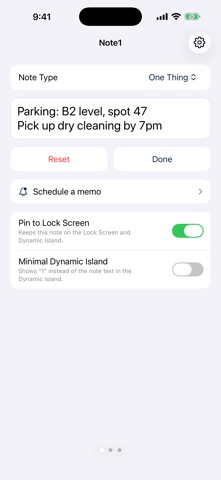
Note1: Lock Screen Note Screenshot 1 of 3
Note1: Lock Screen Note Screenshot 2 of 3
Note1: Lock Screen Note Screenshot 3 of 3
Screenshots by Hosung Hwang, from the the App Store listing
Description by Hosung Hwang Written by the developer, not by AppBrain. Click to read.
Note1 keeps one note in front of you.

No folders. No lists. No endless scrolling. You open the app and your note is already there, ready to edit.

PIN IT WHERE YOU LOOK
Pin a note to your Lock Screen and the Dynamic Island. A phone number you just heard, a parking spot, a shopping list, the thing you must not forget today. Glance at your phone and it is there.

THREE NOTES, ONE SWIPE APART
Swipe left and right to move between your notes. Each one can be pinned on its own, so you can keep today's errand on the Lock Screen while the other notes wait.

HOME SCREEN WIDGET
Put your note on the Home Screen. Choose which note each widget shows, place several, and tap one to jump straight to that note.

SCHEDULE A MEMO
Write a memo now and pick a time. When the time comes you get a notification, and one tap adds it to your note or deletes it. Plan tonight's shopping list or tomorrow morning's reminders ahead.

MADE TO STAY OUT OF THE WAY
- Opens straight into your note
- Adjustable text size and alignment
- Minimal display option for the Dynamic Island so a glance does not reveal everything
- Works offline. No account, no sign-up

YOUR NOTES STAY YOURS
Notes are stored on your device. We have no servers and cannot read what you write.

FREE AND PRO
The first note is free, forever. Note1 Pro unlocks all three notes for a monthly subscription. Pro also removes the limit on memo schedules (the free plan allows one).

Subscription renews automatically unless cancelled at least 24 hours before the end of the period. Manage or cancel anytime in your App Store account settings.

Terms of Use (EULA): https://www.apple.com/legal/internet-services/itunes/dev/stdeula/
Privacy Policy: https://cofounder.co.kr/note1/privacy
Official page on the App Store

Safety and technology

Found in the app by AppBrain
Price
Free
App size
20.1 MB
Content rating
Everyone

Technologies used by Note1: Lock Screen Note

Releases

Updates seen on the App Store
Version
1.2.0
Launched
July 2026

No changelog data

Alternatives

Similar apps and more from Hosung Hwang

Alternatives to Note1: Lock Screen Note

LockScreenNotes & Widget icon LockScreenNotes & Widget
Andrew Moroz
5.0
Free
4 ratings
Harvey Reminders icon Harvey Reminders
Andrew Evans
0.0
Free
Kantask: Task Manager icon Kantask: Task Manager
Habeeb Alao
0.0
Free
Anchor: Focus Timer icon Anchor: Focus Timer
Yagız UGURVEREN
0.0
Free
Lock Screen Memo: Note Widget icon Lock Screen Memo: Note Widget
BOOGIOS_STUDIO
0.0
Free
PinNote – Lock Screen Notes icon PinNote – Lock Screen Notes
Quentin Hocde
0.0
Free
Lock Screen Notes - PinNote icon Lock Screen Notes - PinNote
Najis Ezaz
0.0
Free
Quotra: Daily Quote Widget icon Quotra: Daily Quote Widget
Mehmet rasit Arisu
0.0
Free

More from Hosung Hwang

Pushup Form Counter: AI Reps icon Pushup Form Counter: AI Reps
Hosung Hwang
5.0
Free
2 ratings
Active Follow Cam icon Active Follow Cam
Hosung Hwang
0.0
Free
Wayline 3D icon Wayline 3D
Hosung Hwang
0.0
Free
Lockscreen Fasting Timer icon Lockscreen Fasting Timer
Hosung Hwang
0.0
Free
Old Video Camera icon Old Video Camera
Hosung Hwang
0.0
Free
99 Cam - Retro Film Camera icon 99 Cam - Retro Film Camera
Hosung Hwang
0.0
Free
Squat Form Counter: AI Reps icon Squat Form Counter: AI Reps
Hosung Hwang
0.0
Free
Plank Form Timer: AI Check icon Plank Form Timer: AI Check
Hosung Hwang
0.0
Free

Rankings

App Store top charts

App Store Rankings for Note1: Lock Screen Note

This app is not ranked

About the app and developer

About Note1: Lock Screen Note

Note1: Lock Screen Note is a productivity app developed by Hosung Hwang.

User Ratings

The app has no ratings yet.

App Information

Note1: Lock Screen Note is freely available from the App Store. The app size is 20.05 MB. The latest version available is 1.2.0. The last update was on October 20, 2026.

Technical Requirements

The app has a content rating of Everyone. The app has been available on the App Store since July 2026.

Developer information for Hosung Hwang

Hosung Hwang

Address:

Share Note1: Lock Screen Note

Price drops on Google Play Popular Productivity Apps Apps other people are watching Top new apps Today's trending apps
LockScreenNotes & Widget icon LockScreenNotes & Widget
Harvey Reminders icon Harvey Reminders
Kantask: Task Manager icon Kantask: Task Manager
Anchor: Focus Timer icon Anchor: Focus Timer
Lock Screen Memo: Note Widget icon Lock Screen Memo: Note Widget
PinNote – Lock Screen Notes icon PinNote – Lock Screen Notes
Lock Screen Notes - PinNote icon Lock Screen Notes - PinNote
Quotra: Daily Quote Widget icon Quotra: Daily Quote Widget
Overview Alternatives Reviews Rankings Technology
AppBrain Intelligence premium content

Subscribe now to get full and unlimited access to AppBrain Intelligence. You'll have access to:

  • App Intelligence dashboard (performance timeline, competitor comparison, country rankings, insight cards)
  • Detailed ranking data per app
  • Full timeline per developer
  • Device market shares data per country
  • Unlimited keyword tracking
1 Month

$75/mo
(billed every month)

SAVE 0%
Subscribe
3 Months

$65/mo
($195 billed every 3 months)

SAVE 13%
Subscribe
1 Year

$57.50/mo
($690 billed every year)

SAVE 23%
Subscribe
Each subscription will automatically renew 3 days before the expiration date for the same time period. Subscriptions can be cancelled at any time before the renewal.

AppBrain is an app data site, we track rankings, ratings, installs for all apps and games on Google Play and the App Store. AppBrain doesn't host app files or APKs, all install links go directly to the official store. All trademarks are owned by their respective owners.

More apps

  • Top Android apps being viewed
  • Dicey Dungeons
  • Crazy Soundboard - 100 Buttons
  • Muse from Meta

App statistics

  • Android statistics
  • Google Play Developer stats
  • Trending Android Apps
  • Trending iOS apps
  • Top popular Apps
  • Buy the best Android phone
  • Buy & sell app businesses

About AppBrain

  • Contact
  • Privacy
  • Documentation
  • DMCA takedowns
  • Blog
  • Free webpage for your Android app
© 2010-2026 - AppBrain