

Notebook: Smart Notes
Notebook: Smart Notes is made and published by Nguyen Anh. AppBrain is an independent app data site and isn't affiliated with Nguyen Anh. The app name, icon, screenshots and description belong to Nguyen Anh and are shown as published on the App Store.
AppBrain's verdict
- Last updated
- September 6, 2026
Rankings
App Store top chartsApp Store Rankings for Notebook: Smart Notes
Competitors
Similar apps and more from Nguyen AnhAlternatives to Notebook: Smart Notes


More from Nguyen Anh

Releases
Updates seen on the App Store- Version
- 1.1
- Launched
- August 2026
No changelog data
User feedback
Ratings and reviews on the App StoreComments on Notebook: Smart Notes for iOS
We don't have enough comments to show example comments. Please check back later.
Technology
Found in the app by AppBrain- Price
- Free
- App size
- 162.8 MB
- Content rating
- Everyone
Technologies used by Notebook: Smart Notes
About the app and developer
About Notebook: Smart Notes
Notebook: Smart Notes is a productivity app developed by Nguyen Anh.
What is the rating of Notebook: Smart Notes?
Notebook: Smart Notes has no ratings yet.
Is Notebook: Smart Notes free?
Notebook: Smart Notes is free. The app size is 162.83 MB. The latest version available is 1.1. The last update was on September 6, 2026.
What are the requirements for Notebook: Smart Notes?
The app has a content rating of Everyone. The app has been available on the App Store since August 2026.
Developer information for Nguyen Anh
Address:
Store listing
By Nguyen Anh, from the App Store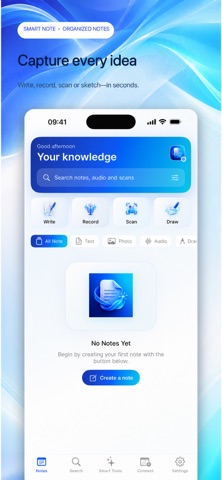


Description by Nguyen Anh Written by the developer, not by AppBrain. Click to read.
Smart Notes gives you one flexible workspace to capture ideas, organize information, and quickly find what matters. Write from scratch, record a conversation, scan printed text, import an image, or sketch freely—then turn that content into a useful note.
CAPTURE IDEAS YOUR WAY
• Write or paste text into a clean note editor
• Record conversations and turn speech into searchable text
• Scan documents with your camera
• Import images and extract text with OCR
• Draw, recognize handwriting, and export your canvas to PDF
TURN INFORMATION INTO ACTION
Create concise summaries, highlight key ideas, and organize important details into notes that are easier to review and share. Keep the original content alongside the summary whenever you need more context.
STAY READY FOR EVERY MEETING
Connect Google Calendar or use calendars already available on your iPhone or iPad. View upcoming events and open Google Meet links directly from your workspace.
KEEP EVERYTHING ORGANIZED
• Search across notes, recordings, and scans
• Filter notes by content type
• Pin important items for quick access
• Edit and revisit saved content
• Listen to supported notes with text-to-speech
BUILT FOR FOCUS
Smart Notes brings writing, recording, scanning, drawing, meetings, and organization into one streamlined experience across iPhone and iPad.
Capture the idea now. Organize it when you are ready.
Privacy Policy:
https://policy.nextteam.site/privacy
Terms of Use:
https://policy.nextteam.site/term