Download Android Apps and Games
AppBrain
  • Apps
  • Apps being viewed right now Trending apps today Most popular apps All-time most downloaded apps Top rated apps
  • Intelligence ▾
    Intelligence overview → Track any Android app or your whole market
    Track & analyze
    Keyword Tracker & OptimizerTrack & improve Play rankings App Performance ReportOne-off PDF for any app StatisticsFree Android & Play market stats
    Promote your app
    Featured Apps App Links
  • Intelligence
  • Pricing
  • Dashboard
  • Sign up
  • Log in
Last updated on: 2026-06-27
App Store Apps > Productivity > Notebooks: Write and Organize
Notebooks: Write and Organize icon

Notebooks: Write and Organize

13.2
Alfons Schmid
4.73
1,053 reviews
$17.99

Download from the App Store

About Notebooks: Write and Organize

Notebooks: Write and Organize is an overall app developed by Alfons Schmid.

Download Statistics

User Ratings

Notebooks: Write and Organize is rated 4.73 out of 5 stars. The rating is based on 1.1 thousand ratings.

App Information

Notebooks: Write and Organize costs $17.99 to download. The APK download size is 47.50 MB. The latest version available is 13.2. The last update was on June 20, 2026.

Technical Requirements

The app has a content rating of Everyone. The app has been available on Google Play January 2020.

Description
Own your notes — forever. Notebooks is a writing and organization app with no subscription, no lock-in, and no worries. Your documents are stored as standard files you can always access, export, or move freely. Pay once. Use for life.

Use Notebooks as a personal wiki, Zettelkasten, document archive, task manager, or long-term writing space. Capture quick notes, turn them into actionable tasks, combine text fragments into chapters, organize research, or keep business documents separate from personal journals — without ever switching apps.

Designed to help you stay focused and work at your own pace, Notebooks grows with your needs and is always ready to support you.

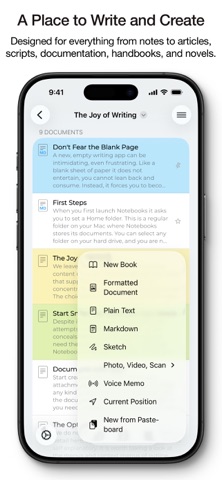
WRITE AND CREATE

Create beautifully formatted documents with styles, attachments, tables, checklists, and optional tables of contents. Choose from ready-made styles or design your own.

Write in different ways:

Formatted text (WYSIWYG)

Plain text, with smart handling of lists, automatic character pairing, and a focused writing view

Markdown, supporting MultiMarkdown and Discount, with syntax highlighting, dedicated keyboard keys, wiki-style links, and interactive checklists

Sketch ideas or annotate images and PDFs using Apple Pencil.

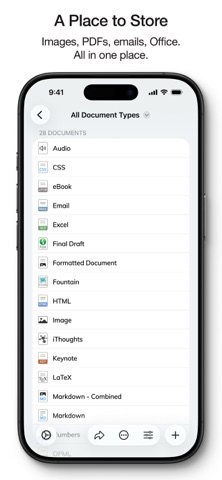
STORE AND ORGANIZE

Notebooks stores all documents as regular files in standard formats. You always remain in control — no lock-in, no export worries, fully compatible across devices and over time.

Organize your work in books and nested hierarchies without limits. Import PDFs, emails, web pages, MS Office and iWork documents, images, audio, video, and more. Use full-text search to find even the most deeply nested document.

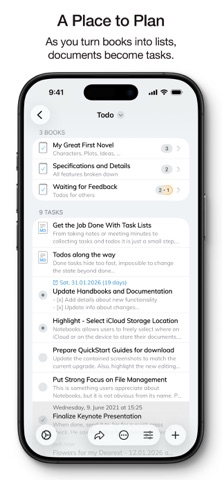
PLAN AND ACT

Turn books into project lists and documents into tasks. Assign due dates and alerts, create nested projects, and track progress naturally — right where your work lives.

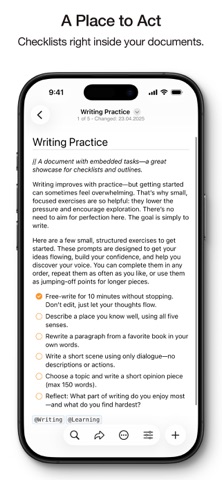
Use simple checklists in formatted documents or Markdown for lightweight task tracking.

STAY FOCUSED

Link documents together to build knowledge over time. Use wiki-style links, backlinks, contexts, and smart books to keep everything connected and within reach. When you rename or move documents, links stay intact.

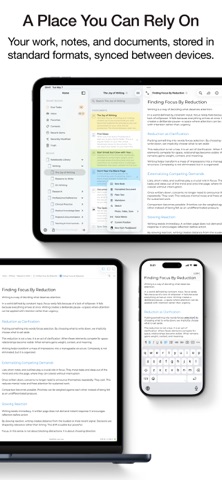
A PLACE YOU CAN RELY ON

Sync your documents between iPhone, iPad, Mac, and PC. Work on documents stored in other apps, compile selections into PDFs or eBooks, scan documents and extract text using OCR, and trust that your data stays accessible — now and in the future.

With time, Notebooks often becomes the one place users rely on to keep everything that matters close at hand.

WHAT USERS SAY

“Notebooks is a wonderful app — sophisticated in an unassuming way. I feel more productive without spending time managing the app itself.”

“You are GTD in every way that makes it efficient — and makes me efficient.”
Show more Show less

More data about Notebooks: Write and Organize

Price $17.99
Rating 4.73 based on 1.1 thousand ratings
Ranking Highly ranked
Version 13.2
App download size 47.5 MB
Suitable for Everyone

Alternative downloads for the Notebooks: Write and Organize app

1Writer - Markdown Text Editor icon 1Writer - Markdown Text Editor
Ngoc Luu
4.6
$4.99
388 ratings
DEVONthink To Go 3 icon DEVONthink To Go 3
DEVONtechnologies, LLC
4.8
Free
1.5K ratings
Zavala icon Zavala
Vincode, Inc
4.8
Free
67 ratings
Taskmator - TaskPaper Client icon Taskmator - TaskPaper Client
Amit Chaudhary
4.3
$4.99
231 ratings
iA Writer icon iA Writer
Information Architects AG
4.6
$19.99
1.5K ratings
Cloud Outliner - Nested Lists icon Cloud Outliner - Nested Lists
Denys Ievenko
4.5
Free
750 ratings
iWriter Pro icon iWriter Pro
Serpensoft Group
4.7
$5.99
127 ratings
Outliner icon Outliner
CarbonFin
4.8
$4.99
88 ratings

More from Alfons Schmid

Notebooks for iPhone icon Notebooks for iPhone
Alfons Schmid
4.7
Free
4.0K ratings
Notebooks: Write and Organize icon Notebooks: Write and Organize
Alfons Schmid
0.0
$43.99

Changelog of Notebooks: Write and Organize

No changelog data

Developer information for Alfons Schmid

Alfons Schmid

Address:

Share Notebooks: Write and Organize

Comments on Notebooks: Write and Organize for iOS

We don't have enough comments to show example comments. Please check back later.

App Store Rankings for Notebooks: Write and Organize

Top rankings

Rank Country Category List
43 United Kingdom Productivity Top Paid
46 Netherlands Productivity Top Paid
57 Australia Productivity Top Paid

Ranking history in United Kingdom

AppBrain offers valuable information about your app and those of your competitors. Join AppBrain for free and claim this app to view more ranking data, view history etc.
I'm the developer of this app

Technologies used by Notebooks: Write and Organize

Top new apps Today's trending apps Popular Overall Apps other people are watching Apps on sale
1Writer - Markdown Text Editor icon 1Writer - Markdown Text Editor
DEVONthink To Go 3 icon DEVONthink To Go 3
Zavala icon Zavala
Taskmator - TaskPaper Client icon Taskmator - TaskPaper Client
iA Writer icon iA Writer
Cloud Outliner - Nested Lists icon Cloud Outliner - Nested Lists
iWriter Pro icon iWriter Pro
Outliner icon Outliner

Back to top
AppBrain Intelligence premium content

Subscribe now to get full and unlimited access to AppBrain Intelligence. You'll have access to:

  • App Intelligence dashboard (performance timeline, competitor comparison, country rankings, insight cards)
  • Detailed ranking data per app
  • Full timeline per developer
  • Device market shares data per country
1 Month

$75/mo
(billed every month)

SAVE 0%
Subscribe
3 Months

$65/mo
($195 billed every 3 months)

SAVE 13%
Subscribe
1 Year

$57.50/mo
($690 billed every year)

SAVE 23%
Subscribe
Each subscription will automatically renew 3 days before the expiration date for the same time period. Subscriptions can be cancelled at any time before the renewal.

AppBrain is a directory focused on discovering great apps and games. We give statistics, rankings and search options that Google Play and the App Store don't have. All trademarks are owned by their respective owners. AppBrain doesn't offer APKs or binaries, and always lets users install the official version from Google Play or the App Store.

More apps

  • Top Android apps being viewed
  • Moshi: SSH & MOSH Terminal
  • Dealdog - Local Shopping Deals
  • The Office Restaurant & Lounge

Android Statistics

  • Android statistics
  • Google Play Developer stats
  • Trending Android Apps
  • Top popular Apps
  • Buy the best Android phone

About AppBrain

  • Contact
  • Privacy
  • Documentation
  • DMCA takedowns
  • Articles
  • Blog
  • Android Interstitial Ads: Best practices to optimize your app's earnings
© 2010-2026 - AppBrain