AppBrain
AppBrain
  • Apps
  • Apps being viewed right now Trending apps today Most popular apps All-time most installed apps Top rated apps iPhone and iPad apps
  • Intelligence ▾
    Intelligence overview → Track any Android app or your whole market
    Track & analyze
    Keyword Tracker & OptimizerTrack & improve Play rankings App Performance ReportOne-off PDF for any app StatisticsFree Android & Play market stats
    Promote your app
    Featured Apps App Links
  • Intelligence
  • Pricing
  • Dashboard
  • Sign up
  • Log in
App Store Apps > Productivity > NoteOCR - Handwriting to Text
NoteOCR - Handwriting to Text icon

NoteOCR - Handwriting to Text

1.0
CHUKWUDALU DANIEL ATU
0.00
0 reviews
Free

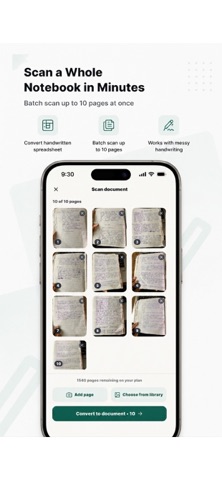
NoteOCR - Handwriting to Text Screenshot 1 of 5
NoteOCR - Handwriting to Text Screenshot 2 of 5
NoteOCR - Handwriting to Text Screenshot 3 of 5
NoteOCR - Handwriting to Text Screenshot 4 of 5
NoteOCR - Handwriting to Text Screenshot 5 of 5
Screenshots by CHUKWUDALU DANIEL ATU, from the the App Store listing
View on the App Store

About NoteOCR - Handwriting to Text

NoteOCR - Handwriting to Text is a productivity app developed by CHUKWUDALU DANIEL ATU.

User Ratings

The app has no ratings yet.

App Information

NoteOCR - Handwriting to Text is freely available from the App Store. The app size is 47.20 MB. The latest version available is 1.0. The last update was on September 8, 2026.

Technical Requirements

The app has a content rating of Everyone. The app has been available on the App Store since September 2026.

NoteOCR - Handwriting to Text is made and published by CHUKWUDALU DANIEL ATU. AppBrain is an independent app data site and isn't affiliated with CHUKWUDALU DANIEL ATU. The app name, icon, screenshots and description belong to CHUKWUDALU DANIEL ATU and are shown as published on the App Store.

Description by CHUKWUDALU DANIEL ATU (from the App Store)
NoteOCR – Handwriting to Text Converter

Turn handwritten notes into clean, formatted digital documents in seconds. NoteOCR uses AI-powered ICR (Intelligent Character Recognition) to scan your handwriting and convert it into editable Word and Excel files, not just raw text, but a properly formatted document that looks like the page you wrote.

WHY NOTEOCR

Most OCR scanner apps just dump your handwriting into a messy text box. NoteOCR is different: our Engine reads your handwriting, including cursive, and reconstructs the layout, headings, bullet points, tables, and paragraphs so you get a document ready to edit, not a wall of text to clean up.

KEY FEATURES

* Handwriting to text conversion — snap a photo of any handwritten page and transcribe it instantly, even messy handwriting or cursive
* Photo scan & image to text — turn any picture, screenshot, or scanned image into editable digital text
* Export to Word & Excel — download your notes as a formatted .docx or .xlsx file, ready to share or edit
* Smart document digitize — journal entries, class notes, meeting memos, receipts, letters, and old documents all convert cleanly
* Cloud storage — securely save and access your digitized notes and documents from any device
* Table & data recognition — convert handwritten tables, lists, and structured data into properly formatted spreadsheets
* Fast transcribe engine — get results in seconds, not minutes

WHO USES NOTEOCR

Students digitizing lecture notes and study guides. Professionals converting handwritten meeting memos into shareable Word documents. Anyone with a stack of paper notes, old journal entries, or handwritten receipts they want searchable and backed up. Writers transcribing handwritten drafts. Researchers and genealogists digitizing old letters and documents.

HOW IT WORKS

1. Take a photo or upload an image of your handwritten page
2. NoteOCR’s AI scans and transcribes the handwriting
3. Review your formatted document
4. Export as Word, Excel, or PDF, or save it to your NoteOCR cloud account

From a single handwritten note to a full notebook, NoteOCR turns your handwriting into a document you can actually use — search it, edit it, and share it in the format you need.

Download NoteOCR today and stop retyping your handwritten notes by hand.
Show more Show less

Alternatives to NoteOCR - Handwriting to Text

TableScan Studio icon TableScan Studio
Releve LLC
0.0
Free
HandNote: Handwriting OCR icon HandNote: Handwriting OCR
skybringup
0.0
Free
Handwriting to Text - Glyph icon Handwriting to Text - Glyph
Thijs Hiemstra
0.0
Free
Textify: Handwriting to Text icon Textify: Handwriting to Text
eamon hugh
0.0
Free
Unscribble Handwriting to Text icon Unscribble Handwriting to Text
Gold Bits LLC
0.0
Free
DefterPad: Handwritten Notes icon DefterPad: Handwritten Notes
AHMET OGUZHAN TEKIN
0.0
Free
ADHD Planner For Adults & Quiz icon ADHD Planner For Adults & Quiz
Ramazan Eles
0.0
Free
3 Things Pal : ADHD To-Do List icon 3 Things Pal : ADHD To-Do List
帅 陈
4.6
Free
10 ratings

Changelog of NoteOCR - Handwriting to Text

No changelog data

Developer information for CHUKWUDALU DANIEL ATU

CHUKWUDALU DANIEL ATU

Address:

Share NoteOCR - Handwriting to Text

Comments on NoteOCR - Handwriting to Text for iOS

We don't have enough comments to show example comments. Please check back later.

App Store Rankings for NoteOCR - Handwriting to Text

This app is not ranked

Technologies used by NoteOCR - Handwriting to Text

Frequently asked questions about NoteOCR - Handwriting to Text

Is NoteOCR - Handwriting to Text free?

Yes. NoteOCR - Handwriting to Text is free on the App Store.

Is NoteOCR - Handwriting to Text still available?

Yes. NoteOCR - Handwriting to Text is on the App Store, and the last update we saw was on September 8, 2026.

How large is NoteOCR - Handwriting to Text?

NoteOCR - Handwriting to Text is 47.20 MB.

Is NoteOCR - Handwriting to Text suitable for children?

App Store rates the content of NoteOCR - Handwriting to Text as suitable for everyone.

Who made NoteOCR - Handwriting to Text?

NoteOCR - Handwriting to Text was developed by CHUKWUDALU DANIEL ATU. It is listed in the productivity category on the App Store.

What are the best alternatives to NoteOCR - Handwriting to Text?

People looking at NoteOCR - Handwriting to Text also look at these productivity apps: TableScan Studio, HandNote: Handwriting OCR, Handwriting to Text - Glyph, Textify: Handwriting to Text, Unscribble Handwriting to Text.

Top new apps Apps other people are watching Popular Productivity Apps Price drops on Google Play Today's trending apps
TableScan Studio icon TableScan Studio
HandNote: Handwriting OCR icon HandNote: Handwriting OCR
Handwriting to Text - Glyph icon Handwriting to Text - Glyph
Textify: Handwriting to Text icon Textify: Handwriting to Text
Unscribble Handwriting to Text icon Unscribble Handwriting to Text
DefterPad: Handwritten Notes icon DefterPad: Handwritten Notes
ADHD Planner For Adults & Quiz icon ADHD Planner For Adults & Quiz
3 Things Pal : ADHD To-Do List icon 3 Things Pal : ADHD To-Do List
AppBrain Intelligence premium content

Subscribe now to get full and unlimited access to AppBrain Intelligence. You'll have access to:

  • App Intelligence dashboard (performance timeline, competitor comparison, country rankings, insight cards)
  • Detailed ranking data per app
  • Full timeline per developer
  • Device market shares data per country
  • Unlimited keyword tracking
1 Month

$75/mo
(billed every month)

SAVE 0%
Subscribe
3 Months

$65/mo
($195 billed every 3 months)

SAVE 13%
Subscribe
1 Year

$57.50/mo
($690 billed every year)

SAVE 23%
Subscribe
Each subscription will automatically renew 3 days before the expiration date for the same time period. Subscriptions can be cancelled at any time before the renewal.

AppBrain is an app data site, we track rankings, ratings, installs for all apps and games on Google Play and the App Store. AppBrain doesn't host app files or APKs, all install links go directly to the official store. All trademarks are owned by their respective owners.

More apps

  • Top Android apps being viewed
  • Gaster Dingbats: Wingdings
  • AmorShort for Android
  • Sky Kitchen

App statistics

  • Android statistics
  • Google Play Developer stats
  • Trending Android Apps
  • Trending iOS apps
  • Top popular Apps
  • Buy the best Android phone
  • Buy & sell app businesses

About AppBrain

  • Contact
  • Privacy
  • Documentation
  • DMCA takedowns
  • Blog
  • How to improve the earnings of your ad units
© 2010-2026 - AppBrain