

Notes-Pure
Notes-Pure is made and published by xiaorichang Technology Co., Ltd. AppBrain is an independent app data site and isn't affiliated with xiaorichang Technology Co., Ltd. The app name, icon, screenshots and description belong to xiaorichang Technology Co., Ltd. and are shown as published on the App Store.
AppBrain's verdict
- Rating on App Store
- 3.00
- 2 ratings
- Last updated
- December 23, 2025
It doesn't have enough ratings yet to judge what users think.
Rankings
App Store top chartsApp Store Rankings for Notes-Pure
Competitors
Similar apps and more from xiaorichang Technology Co., Ltd.More from xiaorichang Technology Co., Ltd.





Releases
Updates seen on the App Store- Version
- 1.4
- Launched
- September 2025
No changelog data
User feedback
Ratings and reviews on the App StoreComments on Notes-Pure for iOS
We don't have enough comments to show example comments. Please check back later.
Technology
Found in the app by AppBrain- Price
- Free
- App size
- 1.71 MB
- Content rating
- Everyone
Technologies used by Notes-Pure
About the app and developer
About Notes-Pure
Notes-Pure is a productivity app developed by xiaorichang Technology Co., Ltd.
User Ratings
Notes-Pure is rated 3.00 out of 5 stars. The rating is based on 2 ratings.
App Information
Notes-Pure is freely available from the App Store. The app size is 1.71 MB. The latest version available is 1.4. The last update was on December 23, 2025.
Technical Requirements
The app has a content rating of Everyone. The app has been available on the App Store since September 2025.
Developer information for xiaorichang Technology Co., Ltd.
xiaorichang Technology Co., Ltd.
Address:
Store listing
By xiaorichang Technology Co., Ltd., from the App Store


Description by xiaorichang Technology Co., Ltd. Written by the developer, not by AppBrain. Click to read.
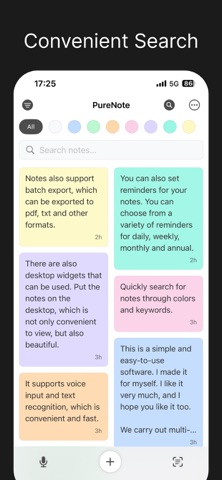
Quick Note-Taking: Open and start writing instantly, minimizing interruptions and distractions.
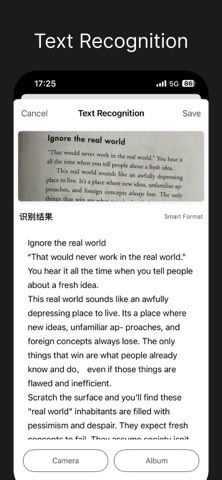
Photo Text Recognition (OCR): Extract text from images with one tap and convert it into editable content for more efficient organization and searching.
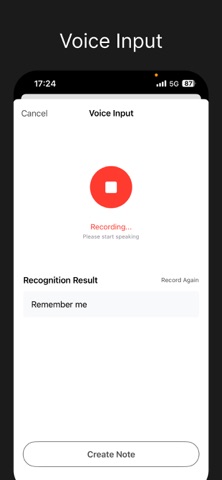
Voice Input: Convert speech to text in real time, freeing your hands to quickly capture ideas anytime, anywhere.
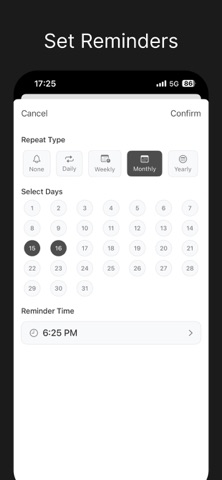
Reminder Setup: Add reminders to important notes so you never miss a critical moment.
Recycle Bin: Recover accidentally deleted notes for peace of mind when you make a mistake in editing or deletion.
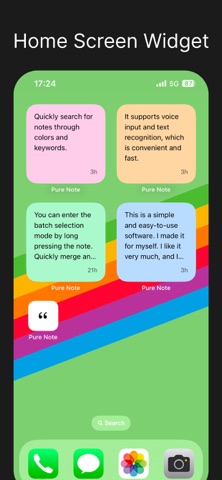
Widget: Quickly view or select notes directly from your home screen to access key information without opening the app.
iCloud (CloudKit) Sync: Keep notes consistent across all your devices for worry-free cross-device creation.
We care about your privacy. Your content is stored on your devices and iCloud account, with secure sync via Apple’s CloudKit; developers do not access your private note content.
Some advanced features may require a subscription to support ongoing development and maintenance (see in-app details for more). Whether you subscribe or not, Notes is committed to delivering a top-tier basic note-taking experience.
Who It’s For
- Anyone who needs to quickly and reliably document ideas, meeting key points, to-do lists, or study notes
- Users who prefer minimalist design and focus on content over complex menus
- Those who need seamless sync across devices like iPhone and iPad
What Makes Us Different
- Purity: No redundant settings—seize the "golden 3 seconds" for note-taking.
- Power: OCR, voice input, reminders, and widgets work together seamlessly, hitting the perfect balance.
- Peace of Mind: Data is stored in your iCloud, giving you greater privacy and control.
Auto-Renewal Membership Service Terms
Subscription Period
- Continuous Annual Subscription (1 year)
- Continuous Monthly Subscription (1 month)
Subscription Price
- The auto-renewal price for the Continuous Annual Membership is $9.99 per year.
- The auto-renewal price for the Continuous Monthly Membership is $0.99 per month.
Payment
Upon confirmation of purchase, the fee will be deducted from your iTunes account.
Auto-Renewal
The renewal fee will be deducted from your iTunes account 24 hours before the end of the current subscription period. Upon successful payment, the subscription period will be extended by one cycle.
Cancel Auto-Renewal
If you wish to cancel your subscription, manually open "Settings" on your iOS device --> tap "Apple ID", select "View Apple ID", enter the Account Settings page, tap "Subscriptions", then cancel the subscription. If you do not turn off the subscription at least 24 hours before the end of the subscription period, the subscription will auto-renew.
Subscription Terms
https://docs.qq.com/doc/DVXhmbmhiUkx5QURs