Noto: Notes, Lists & Journal is a productivity app developed by Soysauce Lab.
User Ratings
Noto: Notes, Lists & Journal is rated 4.62 out of 5 stars. The rating is based on 1.3 thousand ratings.
App Information
Noto: Notes, Lists & Journal is freely available from the App Store. The app size is 125.88 MB. The latest version available is 4.0.3. The last update was on November 24, 2026.
Technical Requirements
The app has a content rating of Everyone. The app has been available on the App Store since October 2019.
Noto: Notes, Lists & Journal is made and published by
Soysauce Lab.
AppBrain is an independent app data site and isn't affiliated with Soysauce Lab.
The app name, icon, screenshots and description belong to Soysauce Lab and are shown as published on the App Store.
Description by Soysauce Lab(from the App Store)
Notes, beautifully simple.
Trip plans, recipes, class notes, to-dos. Whatever you write, Noto makes it look good, on iPhone, iPad and Mac.
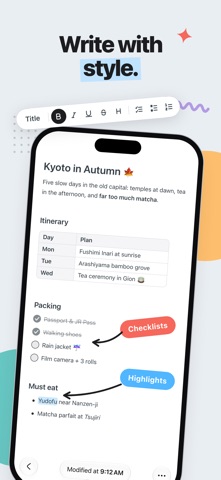
WRITE WITH STYLE • Titles, bold, italics, highlights and lists, one tap away as you type • Checklists you can tick off and drag into order • Like Markdown? Turn on its shortcuts and Noto formats as you type
PHOTOS, TABLES AND MORE • Photos, videos, files and PDFs, right inside your notes • Sketch with your finger or Apple Pencil • Scan paper documents with your camera • Tables with header rows and columns • Math equations, code blocks and link previews • Put photos, a place or a link at the top of a note
PLAN IT TOGETHER • Share a note through iCloud and edit it with friends and family • Share a whole folder, with every note in it, new ones included • Everyone's edits show in their own color, so you can see who changed what
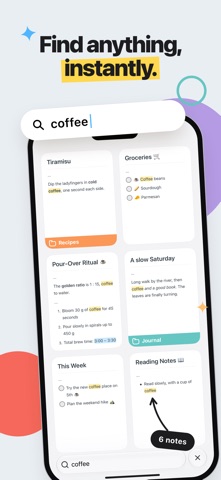
EVERYTHING IN ITS PLACE • Folders inside folders, pinned notes, and drag and drop • Search lights up matches as you type, across every note and folder • Widgets put a note or folder on your Home Screen, just as it looks in Noto, and a New Note button on your Lock Screen • On Apple Watch, read your notes, tick off checklists and dictate new ones • iCloud keeps your iPhone, iPad and Mac in sync. Edits made on different devices merge, so nothing gets overwritten.
EASY ON THE EYES • 18 themes, 9 light and 9 dark, that follow light and dark mode • Pick your font, including fonts you've installed yourself • A choice of app icons
PRIVATE BY DESIGN • No account to make. Your notes live on your devices and in your own iCloud. • Lock the app, or just your private notes, with a password, Face ID or Touch ID. Locked notes stay out of search.
NOTO PRO Noto is free, iCloud sync included. Noto Pro adds: • Photos, videos, files and PDFs • Drawing and the document scanner • Tables, math and code blocks • Shared notes and folders • Note lock • Export to PDF, Markdown and HTML • Saving from other apps
Pay monthly or yearly, or once for Lifetime. One purchase unlocks Noto Pro on iPhone, iPad and Mac with the same Apple Account.
Each subscription will automatically renew 3 days before the expiration date for
the same time period. Subscriptions can be cancelled at any time before the renewal.