

Notte AI Workspace
Notte AI Workspace is made and published by Mifiko Labs LTD. AppBrain is an independent app data site and isn't affiliated with Mifiko Labs LTD. The app name, icon, screenshots and description belong to Mifiko Labs LTD and are shown as published on the App Store.
AppBrain's verdict
- Last updated
- September 24, 2026
Rankings
App Store top chartsApp Store Rankings for Notte AI Workspace
Competitors
Similar apps and more from Mifiko Labs LTDAlternatives to Notte AI Workspace


Releases
Updates seen on the App Store- Version
- 1.3.1
- Launched
- June 2026
No changelog data
User feedback
Ratings and reviews on the App StoreComments on Notte AI Workspace for iOS
We don't have enough comments to show example comments. Please check back later.
Technology
Found in the app by AppBrain- Price
- Free
- App size
- 68.3 MB
- Content rating
- Everyone
Technologies used by Notte AI Workspace
About the app and developer
About Notte AI Workspace
Notte AI Workspace is a productivity app developed by Mifiko Labs LTD.
User Ratings
The app has no ratings yet.
App Information
Notte AI Workspace is freely available from the App Store. The app size is 68.27 MB. The latest version available is 1.3.1. The last update was on September 24, 2026.
Technical Requirements
The app has a content rating of Everyone. The app has been available on the App Store since June 2026.
Developer information for Mifiko Labs LTD
Address:
Frequently asked questions about Notte AI Workspace
Is Notte AI Workspace free?
Yes. Notte AI Workspace is free on the App Store.
Is Notte AI Workspace still available?
Yes. Notte AI Workspace is on the App Store, and the last update we saw was on September 24, 2026.
How large is Notte AI Workspace?
Notte AI Workspace is 68.27 MB.
Is Notte AI Workspace suitable for children?
App Store rates the content of Notte AI Workspace as suitable for everyone.
Who made Notte AI Workspace?
Notte AI Workspace was developed by Mifiko Labs LTD. It is listed in the productivity category on the App Store.
What are the best alternatives to Notte AI Workspace?
People looking at Notte AI Workspace also look at these productivity apps: Pellet - Notes, Tasks, PKM, Routine: Daily Habit Tracker, Torki: AI Chat, Image & Photo, dayGLANCE, Peek - Up Next.
Store listing
By Mifiko Labs LTD, from the App Store





Description by Mifiko Labs LTD Written by the developer, not by AppBrain. Click to read.
Most tools scatter your work across separate apps. Notte keeps everything in one place, with end-to-end encryption so your data stays yours.
— ONE WORKSPACE —
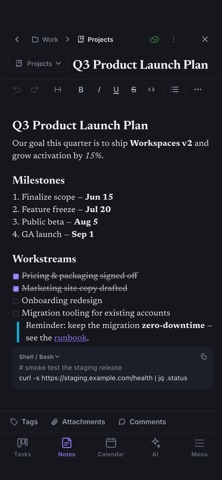
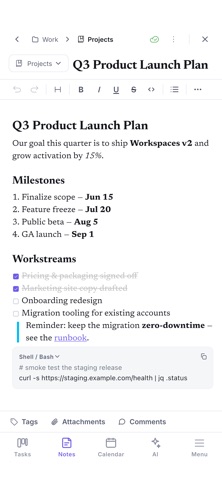
• Notes — a rich block editor with headings, lists, checklists, code blocks, tables, and slash commands. Organize with notebooks and tabs.
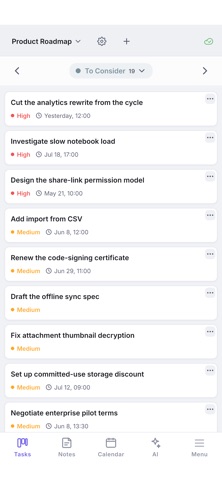
• Tasks — Kanban boards with custom statuses and priorities, drag-and-drop ordering, and aggregated board groups.
• Calendar — day, week, and month views with recurring events, reminders, and event notifications.
• Contacts — keep the people you work with alongside your notes and events.
— PRIVATE BY DESIGN —
• End-to-end encryption by default. Your notes, tasks, and events are encrypted on your device. We never read them — we can't.
• You own your keys. Zero-knowledge sync means the server only ever stores an encrypted blob.
• Two-factor authentication to protect your account.
• No behavioral tracking, no data mining, no third-party analytics.
— BUILT FOR iOS —
• Native iOS app with a clean, minimal interface that fits right in.
• Light and dark themes that follow your system appearance.
• Follows recommended UX patterns.
• Sign in with Apple supported.
— WORKS EVERYWHERE, EVEN OFFLINE —
• Full offline mode. Create and edit anything with no connection — changes sync automatically when you reconnect.
• Truly cross-platform: works on majority of modern desktop and mobile devices.
• Multi-device sync that just works.
— CONNECT YOUR CALENDARS —
• Two-way sync with Google Calendar and Microsoft Outlook Calendar.
• Create meetings with video links built in.
• Recurring events sync in both directions.
— BRING YOUR EXISTING NOTES —
• Import from Notion, Evernote, and Obsidian — pages, notebooks, and folder structure are preserved.
• Export your data anytime. No lock-in.
— AI ASSISTANT (limited) —
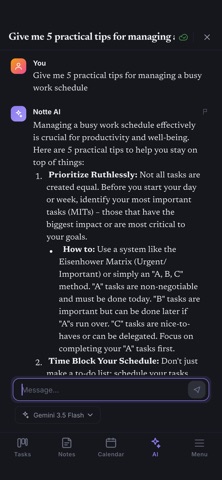
• Chat with an AI assistant that understands your workspace.
• Summarize notes, rephrase messy thoughts, and turn ideas into tasks.
— NEVER LOSE WORK —
• Version history on your notes and tasks.
• Recycle bin — deleted items are recoverable.
• Data safety is a core principle: nothing is removed unless you explicitly ask.
— FAST AND CALM —
• A minimal, beautiful interface built to disappear while you work.
• Keyboard-first for speed, mouse-friendly for comfort.
• Global search across everything you've written.
Start now — and never go back to fragmented work again.
Terms of Use (EULA): https://notte.com/terms
Privacy Policy: https://notte.com/privacy