It doesn't have enough ratings yet to judge what users think.
NumPad Pro: Number Keyboard is made and published by
Ihsan Ullah.
AppBrain is an independent app data site and isn't affiliated with Ihsan Ullah.
The app name, icon, screenshots and description belong to Ihsan Ullah and are shown as
published on the App Store.
About NumPad Pro: Number Keyboard
NumPad Pro: Number Keyboard is an utilities app developed by Ihsan Ullah.
User Ratings
NumPad Pro: Number Keyboard is rated 5.00 out of 5 stars. The rating is based on one rating ratings.
App Information
NumPad Pro: Number Keyboard is freely available from the App Store. The app size is 2.18 MB. The latest version available is 1.0.4. The last update was on October 16, 2026.
Technical Requirements
The app has a content rating of Everyone. The app has been available on the App Store since April 2026.
Description by Ihsan Ullah(from the App Store)
Type numbers faster than ever before.
NumPad Pro replaces the slow default keyboard with a dedicated numeric keypad you can use across your apps. Whether you're entering scores, working with finances or filling forms, switch to NumPad Pro and feel the speed difference instantly.
WHY NUMPAD PRO: Built for people who type numbers all day. No more switching to the symbols screen. No more tiny digit keys. Just a clean, big-button numpad that works system-wide in Notes, Messages, Mail, browsers, spreadsheets and more.
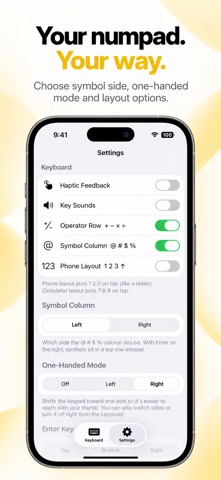
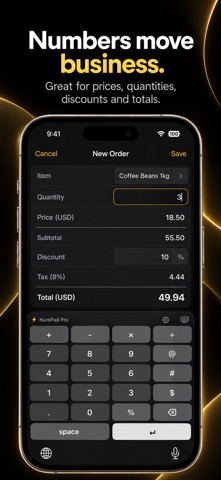
WHAT YOU GET: - Full numeric keypad with 0-9, decimal point, backspace and return - Light and Dark mode that matches the app you're typing in - Haptic feedback on every key press for a satisfying tactile feel - Optional key click sounds you can toggle anytime - Hold-to-delete that speeds up as you hold, just like Apple's keyboard - Live in-app preview to try the keyboard before switching - Native iOS look and feel - Operator Row: + − × ÷ above the numpad for instant math input - Symbol Column: @ # $ % beside the digits for emails, hashtags and prices - Phone or calculator digit order, with Enter at the top, bottom or right
PERFECT FOR: - Gamers entering codes, stats, IDs, scores and damage numbers - Traders and finance pros working with figures, percentages and formulas - Accountants and bookkeepers tired of toggling between keyboards - Spreadsheet users who need fast numeric input on the go - Form fillers entering prices, dates and ID numbers - Power users who value speed, precision and clean design
HOW TO ENABLE: 1. Open iPhone Settings 2. Tap General → Keyboard → Keyboards 3. Tap "Add New Keyboard…" 4. Select NumPad Pro from the list 5. Tap NumPad Pro and turn on Allow Full Access (enables haptics and syncs your settings from the app)
While typing, tap the globe key to switch to NumPad Pro. Switch back the same way.
PRIVACY FIRST: NumPad Pro never logs, stores or transmits anything you type. The keyboard works fully offline and your keystrokes stay on your device. No analytics, no third-party trackers, and no server that sees your data.
WORKS WHERE YOU TYPE NUMBERS: Notes, Messages, Mail, Safari, Chrome, Numbers, Excel, Google Sheets, form fields, search bars and more.
Subscriptions renew automatically unless cancelled at least 24 hours before the end of the current period. Manage or cancel anytime in your Apple Account settings.
Terms of Use (EULA): https://www.apple.com/legal/internet-services/itunes/dev/stdeula/ Privacy Policy: https://developermeow.s3.amazonaws.com/privacy-policy.html
SUPPORT: Questions, feedback or feature requests? We read every email. Reach us at codebuster2021@gmail.com and we usually reply the same day. The roadmap is shaped by people who actually use the app.
Each subscription will automatically renew 3 days before the expiration date for
the same time period. Subscriptions can be cancelled at any time before the renewal.