OBD2 Gauges is an utilities app developed by Edward Williams.
User Ratings
The app has no ratings yet.
App Information
OBD2 Gauges is freely available from the App Store. The app size is 52.11 MB. The latest version available is 2.1.0. The last update was on September 25, 2026.
Technical Requirements
The app has a content rating of High Maturity. The app has been available on the App Store since May 2026.
Description by Edward Williams(from the App Store)
OBD2 Gauges connects to your vehicle's OBD2 port via Bluetooth and displays real-time engine data as beautiful, customizable gauges.
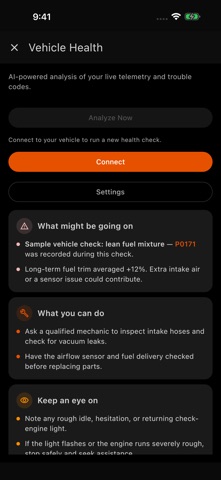
Features: - AI Vehicle Health: explanations of telemetry and trouble codes, recommended checks, and watch points - Saved health reports you can revisit offline - AI Lite: on-device analysis on compatible devices; AI Pro: on-device plus cloud analysis with explicit consent - Realistic gauge materials, four additional bezel finishes, and ten bezel shapes - Real-time speed, RPM, boost/vacuum, oil temperature, water temperature, intake air temperature, and fuel level gauges - Multiple gauge themes inspired by iconic vehicles: Supra Stock, Supra TRD, Nismo, Audi RS, G35 Rev-Up, and more - 100+ OBD2 parameters supported - Clean, modern interface with dark and light modes - Works with any ELM327-compatible Bluetooth OBD2 adapter - Customizable gauge layouts — single, dual, quad, or full dashboard views - On-device AI keeps analysis on your device. Optional cloud AI sends a telemetry summary to Google only after your consent.
Connect your OBD2 Bluetooth adapter, pair it with your device, and launch OBD2 Gauges to see your engine data come alive.
Requires an ELM327-compatible Bluetooth Low Energy (BLE) OBD2 adapter and a vehicle with an OBD2 port (1996+ model year).
Optional Subscription - Remove Ads (Monthly): auto-renewing subscription that removes all ads while active. Cancel anytime in Settings → Apple ID → Subscriptions. - Remove Ads (Lifetime): one-time purchase that removes all ads permanently. - AI Lite: monthly or lifetime access to ad-free, on-device AI Health on compatible devices. - AI Pro: monthly or lifetime access to ad-free AI Health with cloud analysis when on-device AI is unavailable.
Payment is charged to your Apple ID at confirmation of purchase. Subscriptions automatically renew unless auto-renew is turned off at least 24 hours before the end of the current period.
Terms of Use: https://www.lightcycleconsulting.com/terms-of-service Privacy Policy: https://www.lightcycleconsulting.com/privacy-policy
AI Health requires an AI Lite or AI Pro purchase. On-device AI depends on device and model availability. Cloud AI requires internet access, consent, and AI Pro, with up to 10 cloud analyses per 24-hour window. AI guidance is informational and does not replace a qualified mechanic.
Each subscription will automatically renew 3 days before the expiration date for
the same time period. Subscriptions can be cancelled at any time before the renewal.