

OBox MyCloud VPN·Self Host VPS
OBox MyCloud VPN·Self Host VPS is made and published by Situs Technologies LLC. AppBrain is an independent app data site and isn't affiliated with Situs Technologies LLC. The app name, icon, screenshots and description belong to Situs Technologies LLC and are shown as published on the App Store.
AppBrain's verdict
- Rating on App Store
- 5.00
- 3 ratings
- Last updated
- November 4, 2026
- Size
- 34.1 MB
It doesn't have enough ratings yet to judge what users think.
User feedback
Ratings and reviews on the App StoreComments on OBox MyCloud VPN·Self Host VPS for iOS
We don't have enough comments to show example comments. Please check back later.
Store listing
By Situs Technologies LLC, from the App Store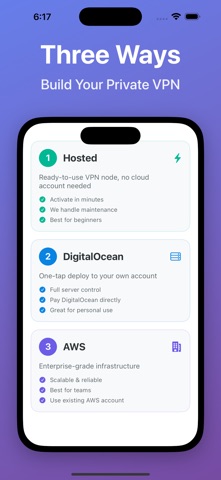


Description by Situs Technologies LLC Written by the developer, not by AppBrain. Click to read.
Self-host VLESS+Reality / Outline VPN Node — Your Private VPN
Get your own private VPN in minutes with dedicated IP. No coding, no command line.
Three Ways to Create Your VPN Node
1. Hosted Node (Easiest)
Purchase a ready-to-use VPN node. No cloud account needed.
- Activate and connect in minutes
- We handle setup and maintenance
- Perfect for beginners
2. DigitalOcean Deployment
One-tap deploy to your own DigitalOcean account.
- Full control over your server
- Pay DigitalOcean directly
- Great for personal use
3. AWS Deployment
Deploy on Amazon Web Services for enterprise-grade infrastructure.
- Scalable and reliable
- Ideal for teams and businesses
- Use your existing AWS account
Supported Clients
Outline, Shadowrocket, sing-box, Quantumult X, Clash and more.
All Platforms
iOS, macOS, Windows, Linux, OpenWRT
Why OBox MyCloud?
- Self-hosted node with dedicated IP, not shared with others
- Supports VLESS+Reality, Outline, sing-box protocols
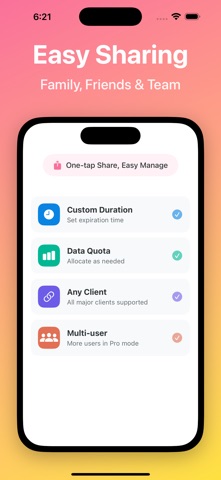
- Simple user and access management
- No traffic logging, no data resale
Who Is It For?
- Users who want a private VPN without technical hassle
- Users who prefer not to manage cloud accounts
- Families or small teams sharing a secure network
- Travelers and remote workers needing reliable access
Video Tutorials
https://www.youtube.com/@Situs-Technologies
Official Channel
https://t.me/obox_mycloud
User Guides: https://situstechnologies.com/guides
Privacy Policy: https://situstechnologies.com/pages/privacy-policy
Terms of Use: https://situstechnologies.com/pages/terms-conditions
Safety and technology
Found in the app by AppBrain- Price
- Free
- App size
- 34.1 MB
- Content rating
- Everyone
Technologies used by OBox MyCloud VPN·Self Host VPS
Releases
Updates seen on the App Store- Version
- 2.0.6
- Launched
- November 2025
No changelog data
Alternatives
Similar apps and more from Situs Technologies LLCAlternatives to OBox MyCloud VPN·Self Host VPS


More from Situs Technologies LLC

Rankings
App Store top chartsApp Store Rankings for OBox MyCloud VPN·Self Host VPS
About the app and developer
About OBox MyCloud VPN·Self Host VPS
OBox MyCloud VPN·Self Host VPS is an overall app developed by Situs Technologies LLC.
What is the rating of OBox MyCloud VPN·Self Host VPS?
OBox MyCloud VPN·Self Host VPS is rated 5.00 out of 5 stars, based on 3 ratings.
Is OBox MyCloud VPN·Self Host VPS free?
OBox MyCloud VPN·Self Host VPS is free. The app size is 34.08 MB. The latest version available is 2.0.6. The last update was on November 4, 2026.
What are the requirements for OBox MyCloud VPN·Self Host VPS?
The app has a content rating of Everyone. The app has been available on the App Store since November 2025.
Developer information for Situs Technologies LLC
Address: