

Odie: AI Voice Notes
Odie: AI Voice Notes is made and published by CLEMENTE JOS ORTUZAR ORELLANA. AppBrain is an independent app data site and isn't affiliated with CLEMENTE JOS ORTUZAR ORELLANA. The app name, icon, screenshots and description belong to CLEMENTE JOS ORTUZAR ORELLANA and are shown as published on the App Store.
AppBrain's verdict
- Last updated
- March 3, 2026
Rankings
App Store top chartsApp Store Rankings for Odie: AI Voice Notes
Competitors
Similar apps and more from CLEMENTE JOS ORTUZAR ORELLANAAlternatives to Odie: AI Voice Notes


Releases
Updates seen on the App Store- Version
- 1.0.4
- Launched
- January 2026
No changelog data
User feedback
Ratings and reviews on the App StoreComments on Odie: AI Voice Notes for iOS
We don't have enough comments to show example comments. Please check back later.
Technology
Found in the app by AppBrain- Price
- Free
- App size
- 55.7 MB
- Content rating
- Everyone
Technologies used by Odie: AI Voice Notes
About the app and developer
About Odie: AI Voice Notes
Odie: AI Voice Notes is a productivity app developed by CLEMENTE JOS ORTUZAR ORELLANA.
User Ratings
The app has no ratings yet.
App Information
Odie: AI Voice Notes is freely available from the App Store. The app size is 55.70 MB. The latest version available is 1.0.4. The last update was on March 3, 2026.
Technical Requirements
The app has a content rating of Everyone. The app has been available on the App Store since January 2026.
Developer information for CLEMENTE JOS ORTUZAR ORELLANA
Address:
Frequently asked questions about Odie: AI Voice Notes
Is Odie: AI Voice Notes free?
Yes. Odie: AI Voice Notes is free on the App Store.
Is Odie: AI Voice Notes still available?
Yes. Odie: AI Voice Notes is on the App Store, and the last update we saw was on March 3, 2026.
How large is Odie: AI Voice Notes?
Odie: AI Voice Notes is 55.70 MB.
Is Odie: AI Voice Notes suitable for children?
App Store rates the content of Odie: AI Voice Notes as suitable for everyone.
Who made Odie: AI Voice Notes?
Odie: AI Voice Notes was developed by CLEMENTE JOS ORTUZAR ORELLANA. It is listed in the productivity category on the App Store.
What are the best alternatives to Odie: AI Voice Notes?
People looking at Odie: AI Voice Notes also look at these productivity apps: Snipnote: Capture Ideas, Focus One - ADHD & Focus Timer, Hour Sense - Time master, Hustle Dial, Wavelogs: AI Voice Notes.
Store listing
By CLEMENTE JOS ORTUZAR ORELLANA, from the App Store
Description by CLEMENTE JOS ORTUZAR ORELLANA Written by the developer, not by AppBrain. Click to read.
Record your thoughts while walking, journaling, or in meetings. Odie takes care of turning speech into clear writing.
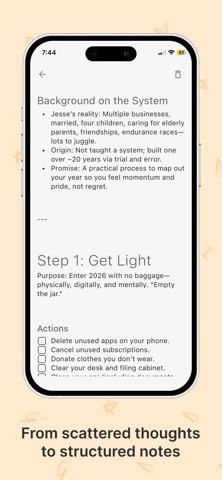
From voice to structured notes
Odie automatically cleans up your transcriptions, transforming rambling voice notes into readable paragraphs and sections. Your ideas stay true to how you speak, just clearer and easier to revisit. Want to add more ideas? Use our "Add to note" feature to keep recording.
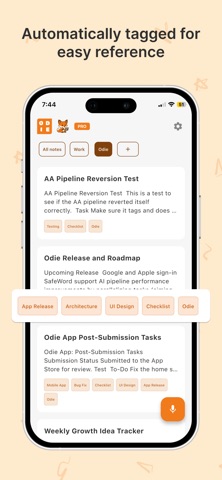
Automatically organized
Every note is automatically tagged so you can find ideas later without manual sorting. Whether you’re keeping a voice journal, capturing meeting notes, or saving ideas, Odie keeps everything organized.
Transform with AI
Take any existing note and generate a new version in seconds with Transform with AI. Choose from preset prompts when you want a fast rewrite, summary, or format shift, or enter your own custom prompt for exactly what you need. It’s the easiest way to repurpose one note into many useful outputs without starting from scratch.
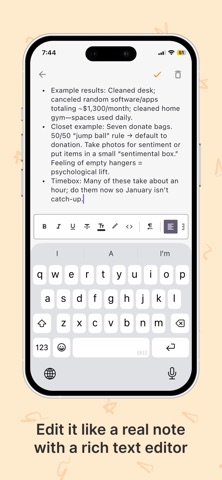
Edit like a real note
Odie includes a rich text editor so you can refine, rewrite, or expand your notes anytime. Edit freely, add structure, or keep your notes exactly as they were spoken.
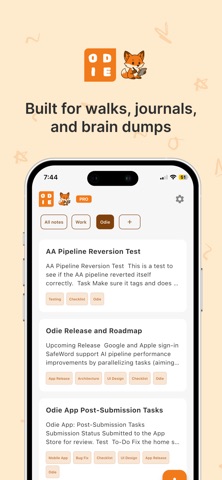
Built for everyday thinking
Odie is designed for people who prefer speaking over typing:
- Voice journaling
- Walking thoughts and reflections
- Meeting notes
- Personal ideas and reminders
No feeds. No pressure. Just a calm space for your thoughts.
Press record, speak naturally, and let Odie turn your voice into clear, structured notes you can come back to anytime.
Terms of Use: https://www.apple.com/legal/internet-services/itunes/dev/stdeula/