Download Android Apps and Games
AppBrain
  • Apps
  • Apps being viewed right now Trending apps today Most popular apps All-time most downloaded apps Top rated apps iPhone and iPad apps
  • Intelligence ▾
    Intelligence overview → Track any Android app or your whole market
    Track & analyze
    Keyword Tracker & OptimizerTrack & improve Play rankings App Performance ReportOne-off PDF for any app StatisticsFree Android & Play market stats
    Promote your app
    Featured Apps App Links
  • Intelligence
  • Pricing
  • Dashboard
  • Sign up
  • Log in
Last updated on: 2026-09-10
App Store Apps > Weather > ODODOCK
ODODOCK icon

ODODOCK

2.0
PixelBrick
0.00
0 reviews
Free

ODODOCK Screenshot 1 of 10
ODODOCK Screenshot 2 of 10
ODODOCK Screenshot 3 of 10
ODODOCK Screenshot 4 of 10
ODODOCK Screenshot 5 of 10
ODODOCK Screenshot 6 of 10
ODODOCK Screenshot 7 of 10
ODODOCK Screenshot 8 of 10
ODODOCK Screenshot 9 of 10
ODODOCK Screenshot 10 of 10
Download from the App Store

About ODODOCK

ODODOCK is a weather app developed by PixelBrick.

User Ratings

The app has no ratings yet.

App Information

ODODOCK is FREE to download. The download size is 320.84 MB. The latest version available is 2.0. The last update was on September 9, 2026.

Technical Requirements

The app has a content rating of Everyone. The app has been available on App Store 2 weeks ago.

Description
Put weather and useful information on your Lock Screen and Home Screen.

Ododock turns a photo into a wallpaper with weather, events, reminders, and more. Choose what to show, then adjust it directly in the preview.

Weather at a glance

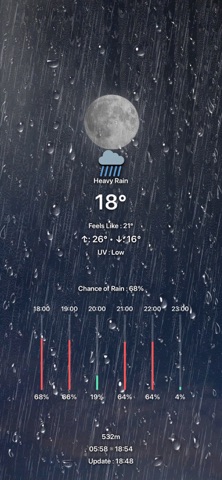
See the current and feels-like temperatures, daily highs and lows, and a four-day forecast. View hourly rain chances and temperature changes in graphs, and compare the temperature with the same time yesterday. Add humidity, wind, UV index, precipitation, and other details you need.

Separate Lock Screen and Home Screen layouts

Create four independent setups: day and night for both your Lock Screen and Home Screen. Swipe between screens in the preview and quickly copy backgrounds or item settings between setups.

Edit directly in the preview

Tap an item to edit it, or touch and hold to move it. Adjust size, alignment, colors, shadows, and icon styles. Reframe your photo and use depth effects or background blur to keep the layout clear.

Weather effects on your background

Dynamic Weather adds visual effects for rain, snow, fog, and other conditions. Color effects reflect the moments just after sunrise and before sunset. The sun and moon appear in positions that match the time, with support for moon phases and your own sun and moon images.

Events and everyday information

Show daily, weekly, or monthly events and reminders. Add a calendar, notes, a second time zone, month and year progress, battery level and changes, a mini map, or Google search trends.

Themes and backups

Preview and apply designs from the theme library. Export your own themes with their background photos and settings to keep a backup or import them on another device.

Connect with Apple Shortcuts

Generate separate Lock Screen and Home Screen wallpaper images from your saved settings. Connect them to Apple Shortcuts to simplify image creation and wallpaper updates. Wallpaper changes are carried out by shortcuts you configure.

Basic features are free. Some advanced features require Ododock PRO, available as a monthly subscription or a one-time lifetime purchase.

Weather data is provided by Apple Weather and search trends by Google Trends. Fetching updated weather requires an internet connection and location permission. Offline, the app uses saved data where available. Events and reminders require permission to access the corresponding data. Some information may be unavailable depending on your region or the data provider.

Feedback: brick@pixelbricktek.com

Privacy Policy: https://pixelbricktek.github.io/Ododock/privacy

Terms of Use (EULA): https://www.apple.com/legal/internet-services/itunes/dev/stdeula/
Show more Show less

More data about ODODOCK

Price Free to download
Rating No ratings
Ranking Top ranked
Version 2.0
App download size 320.8 MB
Suitable for Everyone

More from PixelBrick

Droppp - Local Wi-Fi File Drop icon Droppp - Local Wi-Fi File Drop
PixelBrick
5.0
$1.99
1 ratings
Mitchmo - Texting memo icon Mitchmo - Texting memo
PixelBrick
0.0
$0.99
SWAtlas - Shortwave Explorer icon SWAtlas - Shortwave Explorer
PixelBrick
0.0
$7.99
TorchPhoto - NAS Gallery icon TorchPhoto - NAS Gallery
PixelBrick
0.0
Free
REDREC - Offline Transcription icon REDREC - Offline Transcription
PixelBrick
0.0
$1.99
FomoWave - Trend Tracker icon FomoWave - Trend Tracker
PixelBrick
0.0
$1.99
SteelCargo - inventory manager icon SteelCargo - inventory manager
PixelBrick
0.0
$1.99

Changelog of ODODOCK

No changelog data

Developer information for PixelBrick

PixelBrick

Address:

Share ODODOCK

Comments on ODODOCK for iOS

We don't have enough comments to show example comments. Please check back later.

App Store Rankings for ODODOCK

Top rankings

Rank Country Category List
18 South Korea Weather Top Free
48 South Korea Weather Top Grossing

Ranking history in South Korea

Ranking history
Subscribe to see full ranking history in this country
AppBrain offers valuable information about your app and those of your competitors. Join AppBrain for free and claim this app to view more ranking data, view history etc.
I'm the developer of this app

Technologies used by ODODOCK

Frequently asked questions about ODODOCK

Is ODODOCK free?

Yes. ODODOCK is free to download from App Store.

Is ODODOCK still available?

Yes. ODODOCK is on App Store, and the last update we saw was on September 9, 2026.

How large is the ODODOCK download?

ODODOCK is 320.84 MB to download.

Is ODODOCK suitable for children?

App Store rates the content of ODODOCK as suitable for everyone.

Who made ODODOCK?

ODODOCK was developed by PixelBrick. It is listed in the weather category on App Store.

Apps other people are watching Top new apps Today's trending apps Popular Weather Apps Apps on sale
More hot apps 🔥

Back to top
AppBrain Intelligence premium content

Subscribe now to get full and unlimited access to AppBrain Intelligence. You'll have access to:

  • App Intelligence dashboard (performance timeline, competitor comparison, country rankings, insight cards)
  • Detailed ranking data per app
  • Full timeline per developer
  • Device market shares data per country
  • Unlimited keyword tracking
1 Month

$75/mo
(billed every month)

SAVE 0%
Subscribe
3 Months

$65/mo
($195 billed every 3 months)

SAVE 13%
Subscribe
1 Year

$57.50/mo
($690 billed every year)

SAVE 23%
Subscribe
Each subscription will automatically renew 3 days before the expiration date for the same time period. Subscriptions can be cancelled at any time before the renewal.

AppBrain is a directory focused on discovering great apps and games. We give statistics, rankings and search options that Google Play and the App Store don't have. All trademarks are owned by their respective owners. AppBrain doesn't offer APKs or binaries, and always lets users install the official version from Google Play or the App Store.

More apps

  • Top Android apps being viewed
  • Bilder: Global Account & Card
  • Face Warp: Funny Mirrors
  • Domain Expansion stats

App statistics

  • Android statistics
  • Google Play Developer stats
  • Trending Android Apps
  • Trending iOS apps
  • Top popular Apps
  • Buy the best Android phone

About AppBrain

  • Contact
  • Privacy
  • Documentation
  • DMCA takedowns
  • Articles
  • Blog
  • Tips to improve your Android promotional campaign
© 2010-2026 - AppBrain