




AppBrain's verdict
Loved by users- Rating on App Store
- 4.70
- 118 ratings
- Last updated
- January 19, 2026
- Size
- 106.8 MB
Users love it: 4.7 stars from 118 ratings.
User feedback
Ratings and reviews on the App StoreComments on Office Word Editor-Docs, Share for iOS
We don't have enough comments to show example comments. Please check back later.
Store listing
By Softcap, from the App StoreDescription by Softcap Written by the developer, not by AppBrain. Click to read.
Key Features:
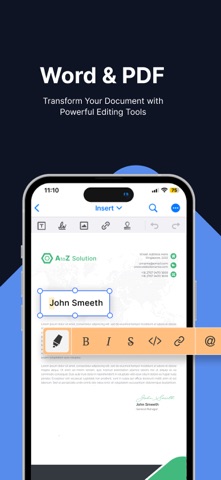
1. Document Creation and Editing: Create new documents or import existing ones from cloud storage services like iCloud, Dropbox, or Google Drive. Edit text, format fonts, apply styles, and modify layouts effortlessly.
2. Rich Formatting Options: Take full control of your document's appearance with a wide range of formatting tools. Adjust font styles, sizes, colors, and apply bold, italic, underline, or strikethrough effects. Format paragraphs with alignment, indentation, and line spacing options.
3. Document Collaboration: Seamlessly collaborate with others by sharing documents via email, AirDrop, or cloud storage services. Enable real-time co-editing to work simultaneously with teammates and track changes for easy review.
4. Review and Comments: Add comments, annotations, and track changes within the document. Efficiently review and address feedback from collaborators, ensuring a smooth editing process.
5. Document Management: Organize your documents into folders, rename files, and easily search for specific documents using keywords or file names. Sort and filter documents based on creation date, modification date, or alphabetical order.
6. File Compatibility: Document Editor supports a wide range of document formats, ensuring compatibility with files created on various platforms. Open and edit DOC, DOCX, and RTF files seamlessly.
7. Offline Editing: Enjoy the flexibility to work on your documents even without an internet connection. Edit offline, and once you're back online, the app will automatically sync your changes.
9. File Export and Sharing: Export your edited documents as Word files, PDFs, or HTML. Share them via email, messaging apps, or save them to cloud storage for easy sharing and collaboration.
Benefits:
1. Enhanced Mobility: Edit documents on the go using your iPhone or iPad, without the need for a computer. Stay productive and make edits whenever inspiration strikes.
2. Seamless Collaboration: Collaborate with colleagues, classmates, or clients in real-time, improving productivity and streamlining the editing process.
3. Convenient Editing Tools: Enjoy a feature-rich editing experience with a comprehensive set of formatting options, making it easy to create professional-looking documents on your iOS device.
4. Improved Organization: Keep your documents neatly organized, making it effortless to find and access specific files whenever you need them.
5. Compatibility and Flexibility: Work with various document formats, ensuring that you can seamlessly edit files created on different platforms and share them without compatibility issues.
6. Offline Access: Work on your documents even when you're offline, ensuring uninterrupted productivity, regardless of your internet connection.
7. Data Security: With cloud sync and backup, your documents are securely stored, preventing data loss and providing peace of mind.
3-DAY FREE TRIAL
• Try out all paid features free for 3 days
• Select a plan that best suits your needs
• Cancel anytime without any obligations
Yearly
- Monthly plans at 499 Rs/Month & Yearly Plans at 2999 Rs/Year
Subscription will be charged to your credit card through your App Store account. Your subscription will automatically renew unless canceled at least 24 hours before the end of the current period.
Privacy Policy : https://sites.google.com/view/text-style-privacy-policy/home
Terms of Services : https://sites.google.com/view/text-style-terms-of-use/home
Safety and technology
Found in the app by AppBrain- Price
- Free
- App size
- 106.8 MB
- Content rating
- Everyone
Technologies used by Office Word Editor-Docs, Share
Releases
Updates seen on the App Store- Version
- 2.4
- Launched
- April 2025
No changelog data
Alternatives
Similar apps and more from SoftcapMore from Softcap


Rankings
App Store top chartsApp Store Rankings for Office Word Editor-Docs, Share
About the app and developer
About Office Word Editor-Docs, Share
Office Word Editor-Docs, Share is a productivity app developed by Softcap.
What is the rating of Office Word Editor-Docs, Share?
Office Word Editor-Docs, Share is rated 4.70 out of 5 stars, based on 120 ratings.
Is Office Word Editor-Docs, Share free?
Office Word Editor-Docs, Share is free. The app size is 106.77 MB. The latest version available is 2.4. The last update was on January 19, 2026.
What are the requirements for Office Word Editor-Docs, Share?
The app has a content rating of Everyone. The app has been available on the App Store since April 2025.
Office Word Editor-Docs, Share is made and published by Softcap. AppBrain is an independent app data site and isn't affiliated with Softcap. The app name, icon, screenshots and description belong to Softcap and are shown as published on the App Store.
Developer information for Softcap
Address:
Frequently asked questions about Office Word Editor-Docs, Share
Is Office Word Editor-Docs, Share free?
Yes. Office Word Editor-Docs, Share is free on the App Store.
Is Office Word Editor-Docs, Share still available?
Yes. Office Word Editor-Docs, Share is on the App Store, and the last update we saw was on January 19, 2026.
How large is Office Word Editor-Docs, Share?
Office Word Editor-Docs, Share is 106.77 MB.
Is Office Word Editor-Docs, Share suitable for children?
App Store rates the content of Office Word Editor-Docs, Share as suitable for everyone.
How do people rate Office Word Editor-Docs, Share?
Office Word Editor-Docs, Share scores 4.70 out of 5 stars, from 118 ratings on the App Store.
Who made Office Word Editor-Docs, Share?
Office Word Editor-Docs, Share was developed by Softcap. It is listed in the productivity category on the App Store.