

Offline Cashbook
Offline Cashbook is made and published by Binaryscript Private Limited. AppBrain is an independent app data site and isn't affiliated with Binaryscript Private Limited. The app name, icon, screenshots and description belong to Binaryscript Private Limited and are shown as published on the App Store.
AppBrain's verdict
- Rating on App Store
- 2.00
- 1 ratings
- Last updated
- October 5, 2026
- Size
- 80.4 MB
It doesn't have enough ratings yet to judge what users think. Its best ranking is #23 in Top Grossing, Finance in Indonesia.
User feedback
Ratings and reviews on the App StoreComments on Offline Cashbook for iOS
We don't have enough comments to show example comments. Please check back later.
Store listing
By Binaryscript Private Limited, from the App Store




Description by Binaryscript Private Limited Written by the developer, not by AppBrain. Click to read.
WHAT YOU CAN DO
Record every entry
- Add income or an expense in a few taps
- Give it a category, a note and a date
- Filter by income, expense, today, this month or any date range
Keep separate books
- Run more than one cash book — personal, business, a travel fund
- Each book keeps its own balance and its own history
Credits: who owes whom
- Keep customers and suppliers, and what each one owes you or you owe them
- Record money you gave and got, with a running balance for each person
- Set a due date and get a reminder that morning
- Send a WhatsApp reminder and share a PDF statement
See where it goes
- Income against spending for this week, this month or three months
- A category breakdown that ranks every category by amount
- Your balance, income and spending, always up to date
Make it yours
- Add, rename or delete your own income and expense categories
- 51 currencies, in your own language
- Pick the date format you prefer
Your data
- Every entry is stored on your phone, not on a server
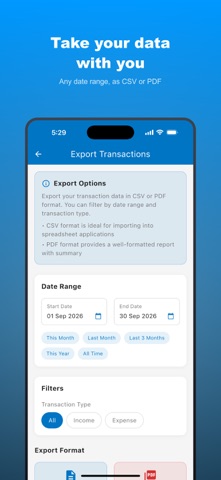
- Export any date range to CSV for a spreadsheet
- Export to PDF as a formatted report with totals
- Encrypted cloud backup, restored on a new phone
- Lock the app with your fingerprint or face
Built to work offline
- No connection needed to add, edit or review anything
- Works on a plane, in a basement or on a weak network
MADE FOR
Anyone tracking personal spending, small shop and business owners keeping a daily cash book, students on a budget, freelancers separating work money from personal money, and anyone who would rather their finances stayed on their own phone.
FREE TRIAL AND SUBSCRIPTION
Start with a free trial and use every feature.
After the trial, a subscription keeps everything unlocked — pay monthly, yearly, or once for lifetime access.
Sign in once, add your first entry, and your cash book is running.
LEGAL
Terms of Use (EULA): https://www.apple.com/legal/internet-services/itunes/dev/stdeula/
Terms of Service: https://binaryscript.com/offlinecashbook/terms/
Privacy Policy: https://binaryscript.com/offlinecashbook/privacy/
Refund Policy: https://binaryscript.com/offlinecashbook/refund-policy/
Auto-renewable subscriptions are charged to your Apple ID at confirmation of purchase. A subscription renews unless it is cancelled at least 24 hours before the end of the current period. Manage or cancel it in your Account Settings after purchase. The lifetime plan is a one-time purchase and does not renew.
Safety and technology
Found in the app by AppBrain- Price
- Free
- App size
- 80.4 MB
- Content rating
- Everyone
Technologies used by Offline Cashbook
Releases
Updates seen on the App Store- Version
- 1.21
- Launched
- March 2025
No changelog data
Alternatives
Similar apps and more from Binaryscript Private LimitedAlternatives to Offline Cashbook


More from Binaryscript Private Limited


Also available on Google Play

Rankings
App Store top charts- Highest rank
- #23
- Chart
- Top Grossing
- Finance
- Country
- Indonesia
About the app and developer
About Offline Cashbook
Offline Cashbook is a finance app developed by Binaryscript Private Limited.
User Ratings
Offline Cashbook is rated 2.00 out of 5 stars. The rating is based on one rating ratings.
App Information
Offline Cashbook is freely available from the App Store. The app size is 80.44 MB. The latest version available is 1.21. The last update was on October 5, 2026.
Technical Requirements
The app has a content rating of Everyone. The app has been available on the App Store since March 2025.
Developer information for Binaryscript Private Limited
Address:
Frequently asked questions about Offline Cashbook
Is Offline Cashbook free?
Yes. Offline Cashbook is free on the App Store.
Is Offline Cashbook still available?
Yes. Offline Cashbook is on the App Store, and the last update we saw was on October 5, 2026.
How large is Offline Cashbook?
Offline Cashbook is 80.44 MB.
Is Offline Cashbook suitable for children?
App Store rates the content of Offline Cashbook as suitable for everyone.
How do people rate Offline Cashbook?
Offline Cashbook has one rating of 2.00 stars on the App Store.
Who made Offline Cashbook?
Offline Cashbook was developed by Binaryscript Private Limited. It is listed in the finance category on the App Store.
What are the best alternatives to Offline Cashbook?
People looking at Offline Cashbook also look at these finance apps: Khata Connect: CashBook, Account & Expense Manager, Cash Book: Manage transactions, Ledger Book: Expense Tracker, Cashbook Lite - Expense/Income.