

Offline Notes AI is made and published by Yang Li. AppBrain is an independent app data site and isn't affiliated with Yang Li. The app name, icon, screenshots and description belong to Yang Li and are shown as published on the App Store.
AppBrain's verdict
- Last updated
- March 18, 2026
Rankings
App Store top chartsApp Store Rankings for Offline Notes AI
Competitors
Similar apps and more from Yang LiAlternatives to Offline Notes AI


Releases
Updates seen on the App Store- Version
- 1.1.0
- Launched
- March 2026
No changelog data
User feedback
Ratings and reviews on the App StoreComments on Offline Notes AI for iOS
We don't have enough comments to show example comments. Please check back later.
Technology
Found in the app by AppBrain- Price
- Free
- App size
- 111.9 MB
- Content rating
- Medium
Technologies used by Offline Notes AI
About the app and developer
About Offline Notes AI
Offline Notes AI is a productivity app developed by Yang Li.
User Ratings
The app has no ratings yet.
App Information
Offline Notes AI is freely available from the App Store. The app size is 111.93 MB. The latest version available is 1.1.0. The last update was on March 18, 2026.
Technical Requirements
The app has a content rating of Medium Maturity. The app has been available on the App Store since March 2026.
Developer information for Yang Li
Address:
Store listing
By Yang Li, from the App Store


Description by Yang Li Written by the developer, not by AppBrain. Click to read.
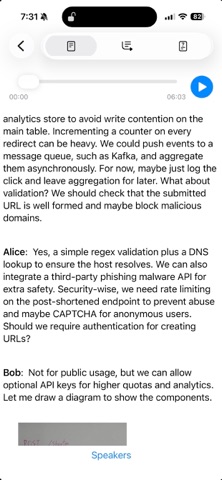
The meeting is more than a simple audio call—it enables interactive dialogue among participants. Your whiteboard sketches and notes are as valuable as the spoken conversation. The application seamlessly integrates voice transcription and camera captures into the meeting transcript, then generates a comprehensive summary that incorporates both forms of information.
Why pay for a subscription when your device already works like a mini‑supercomputer, transcribing and summarizing everything locally?
Offline Notes AI works entirely on your device, transforming spoken conversations and whiteboard drawings into accurate, searchable notes with zero internet connection. Just fast, private AI working for you.
Never miss a detail—without sacrificing privacy.
Perfect for Chalk Talk, Meetings, Interviews, Lectures, and anytime, anywhere.
Key Features
Transcribes spoken words in near real time and automatically separates each speaker.
Analyzes photos with a Vision‑powered Large Language Model. Instead of traditional OCR, the app looks at the image, recognizes objects, handwritten sketches, diagrams, and any text, and produces a natural‑language description that captures the full meaning of the picture.
Creates a single, searchable record that combines the spoken transcript and the Vision‑LLM description of every photo you captured.
Summarizes the entire session—both the conversation and the visual content—into a concise overview you can read in seconds.
Exports audio recordings, full transcripts, or summaries whenever you need them.
Zero cost, zero limits - The app is completely free, with no in‑app purchases, subscriptions, or usage caps. Record as many meetings as you need, capture unlimited photos, and ask unlimited questions.
How It Works
1. Record - Tap “Mic” button to start a recording. At anytime, tap the "Camera" button to add a photo
2. Transcribe - Speech and photo are transcribed to text automatically.
3. Summarize - Generate a clean, bullet-point summary.
4. Ask - Query the conversation or a photo to find key details fast.
5. Export - Save or share audio, transcripts, or summaries.
Alternatively, you may tap the "Camera" button to transcribe a single photo
Why Choose Offline Notes AI?
Privacy-first by design -Your data stays on your device.
Free forever - Full features with no hidden costs.
Everything in one app -Record, transcribe, summarize, and search effortlessly.
Compatibility
Transcribing Photo feature works only on iPhone/iPad with at least 6GB RAM, such as
iPhone 12 Pro and later
iPhone 14 and later
iPad (A16)
iPad Air M1 and later
iPad mini (A17 Pro)
iPad Pro 12.9‑inch (4th generation and later)
iPad Pro 11-inch (2nd generation and later)
Download now and experience the fast, private, and truly offline notes AI for your meetings.