

Oh Pi App is made and published by 演 李. AppBrain is an independent app data site and isn't affiliated with 演 李. The app name, icon, screenshots and description belong to 演 李 and are shown as published on the App Store.
AppBrain's verdict
- Last updated
- September 18, 2026
Rankings
App Store top chartsApp Store Rankings for Oh Pi App
This app is not ranked
Releases
Updates seen on the App Store- Version
- 2.3.4
- Launched
- September 2026
No changelog data
User feedback
Ratings and reviews on the App StoreComments on Oh Pi App for iOS
We don't have enough comments to show example comments. Please check back later.
Technology
Found in the app by AppBrain- Price
- Free
- App size
- 48.8 MB
- Content rating
- Low
Technologies used by Oh Pi App
About the app and developer
About Oh Pi App
Oh Pi App is an overall app developed by 演 李.
User Ratings
The app has no ratings yet.
App Information
Oh Pi App is freely available from the App Store. The app size is 48.82 MB. The latest version available is 2.3.4. The last update was on September 18, 2026.
Technical Requirements
The app has a content rating of Low Maturity. The app has been available on the App Store since September 2026.
Developer information for 演 李
Address:
Store listing
By 演 李, from the App Store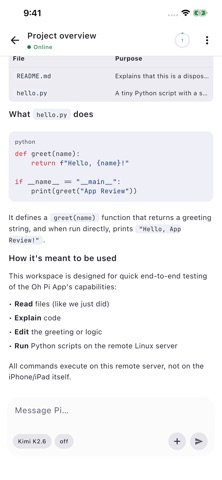
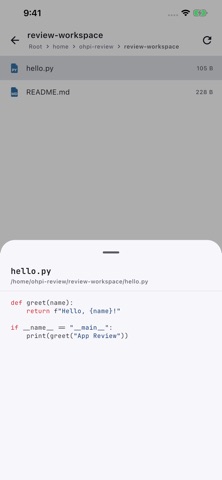

Screenshots by 演 李, from the the App Store listing
Description by 演 李 Written by the developer, not by AppBrain. Click to read.
Oh Pi App brings your self-hosted AI development workspace to iPhone and iPad. Connect to your own ohpi-gateway directly or through an encrypted SSH tunnel, then work with your files and AI tools wherever you are.
• Chat with your configured AI provider and follow streaming responses, reasoning and tool results.
• Create, resume, rename and delete conversations across multiple workspaces and servers.
• Browse remote files and inspect code, images and tool output.
• Schedule tasks and manage their execution from your device.
• Configure provider credentials on your server and choose models for each conversation.
• Use SSH password or private-key authentication with server fingerprint confirmation.
• Enjoy layouts for iPhone and iPad, light and dark appearance, and English and Simplified Chinese.
A compatible server and your own AI provider access are required for normal use. You can connect to an existing gateway or install one on a machine you control using SSH. AI requests and tools run on your configured server; provider charges and terms may apply.
Before sharing content with an AI provider, the app explains the data being sent and requests your permission. The Oh Pi developer does not operate a conversation relay server.
Privacy policy and support: https://yearsyan.github.io/oh-pi-app/
• Chat with your configured AI provider and follow streaming responses, reasoning and tool results.
• Create, resume, rename and delete conversations across multiple workspaces and servers.
• Browse remote files and inspect code, images and tool output.
• Schedule tasks and manage their execution from your device.
• Configure provider credentials on your server and choose models for each conversation.
• Use SSH password or private-key authentication with server fingerprint confirmation.
• Enjoy layouts for iPhone and iPad, light and dark appearance, and English and Simplified Chinese.
A compatible server and your own AI provider access are required for normal use. You can connect to an existing gateway or install one on a machine you control using SSH. AI requests and tools run on your configured server; provider charges and terms may apply.
Before sharing content with an AI provider, the app explains the data being sent and requests your permission. The Oh Pi developer does not operate a conversation relay server.
Privacy policy and support: https://yearsyan.github.io/oh-pi-app/