

OhMyLinux is made and published by 浩 黄. AppBrain is an independent app data site and isn't affiliated with 浩 黄. The app name, icon, screenshots and description belong to 浩 黄 and are shown as published on the App Store.
AppBrain's verdict
- Last updated
- May 14, 2026
- Size
- 9.15 MB
User feedback
Ratings and reviews on the App StoreComments on OhMyLinux for iOS
We don't have enough comments to show example comments. Please check back later.
Store listing
By 浩 黄, from the App Store


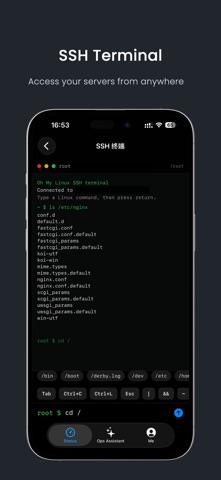
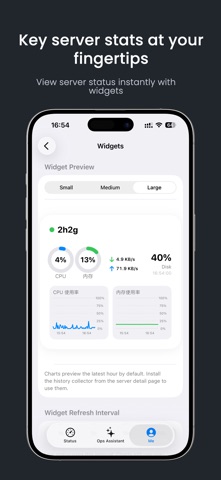
Screenshots by 浩 黄, from the the App Store listing
Description by 浩 黄 Written by the developer, not by AppBrain. Click to read.
Server status, clear at a glance
OhMyLinux is a mobile tool built specifically for Linux server management, currently supporting iPhone and iPad. It brings SSH access, server monitoring, Docker container management, command history, and an AI ops assistant into one app, helping you check server status, handle common issues, and keep track of key system metrics more easily.
Server Monitoring
View core server metrics including CPU usage, memory usage, disk usage, system load, uptime, network traffic, and process information. The clear dashboard helps you quickly understand server health and spot resource spikes or service issues in time.
SSH Access and Command Execution
After adding a server, you can connect to your Linux host via SSH and execute commands directly from the app.
Docker Container Management
Built-in Docker management is designed for users who maintain containerized services. You can view container lists, running status, resource usage, and logs, then start, stop, restart, or remove containers, making daily operations more intuitive and efficient.
AI Ops Assistant
The built-in AI ops assistant can help analyze server status, explain command output, generate troubleshooting ideas, and assist with common Linux operations. You can describe problems in natural language, such as a service failing to start, high memory usage, Docker issues, or low disk space, and the AI will provide suggestions based on the context.
To help prevent mistakes, all commands that may affect server state require your confirmation before execution.
Widgets
Use system widgets to quickly view important server metrics without opening the app.
Free Version Includes
• Manage up to 3 servers
• View basic server status
• Use the AI ops assistant
• Basic Docker management
• Command execution history
Pro Version Includes
• Multi-server management
• Widget support
• Advanced Docker management
• Token usage statistics
• Future Pro features and updates
Data Safety and Privacy
OhMyLinux is designed to connect to and manage Linux servers that you add yourself. To provide SSH access, server monitoring, Docker management, command history, and AI-assisted troubleshooting, the app stores server addresses, ports, usernames, connection settings, command history, monitoring data, and AI configuration locally on your device. Your data is not uploaded by OhMyLinux.
When using the AI ops assistant, the questions you enter, server status information, command output, or error logs may be sent to the AI service provider you configure in order to generate analysis and troubleshooting suggestions.
OhMyLinux does not automatically perform any high-risk operations. All commands that may affect server state require your confirmation before execution.
Subscription and Purchase Information
OhMyLinux offers an annual subscription and a lifetime Pro purchase.
The annual subscription includes a 7-day free trial and renews automatically after the trial ends. You can manage or cancel your subscription at any time in your App Store account settings. The lifetime version is a one-time purchase for users who want long-term access to all Pro features.
Privacy Policy: https://ohmylinux.maoleio.com/privacy.html
Terms of Use (EULA): https://www.apple.com/legal/internet-services/itunes/dev/stdeula/
OhMyLinux is a mobile tool built specifically for Linux server management, currently supporting iPhone and iPad. It brings SSH access, server monitoring, Docker container management, command history, and an AI ops assistant into one app, helping you check server status, handle common issues, and keep track of key system metrics more easily.
Server Monitoring
View core server metrics including CPU usage, memory usage, disk usage, system load, uptime, network traffic, and process information. The clear dashboard helps you quickly understand server health and spot resource spikes or service issues in time.
SSH Access and Command Execution
After adding a server, you can connect to your Linux host via SSH and execute commands directly from the app.
Docker Container Management
Built-in Docker management is designed for users who maintain containerized services. You can view container lists, running status, resource usage, and logs, then start, stop, restart, or remove containers, making daily operations more intuitive and efficient.
AI Ops Assistant
The built-in AI ops assistant can help analyze server status, explain command output, generate troubleshooting ideas, and assist with common Linux operations. You can describe problems in natural language, such as a service failing to start, high memory usage, Docker issues, or low disk space, and the AI will provide suggestions based on the context.
To help prevent mistakes, all commands that may affect server state require your confirmation before execution.
Widgets
Use system widgets to quickly view important server metrics without opening the app.
Free Version Includes
• Manage up to 3 servers
• View basic server status
• Use the AI ops assistant
• Basic Docker management
• Command execution history
Pro Version Includes
• Multi-server management
• Widget support
• Advanced Docker management
• Token usage statistics
• Future Pro features and updates
Data Safety and Privacy
OhMyLinux is designed to connect to and manage Linux servers that you add yourself. To provide SSH access, server monitoring, Docker management, command history, and AI-assisted troubleshooting, the app stores server addresses, ports, usernames, connection settings, command history, monitoring data, and AI configuration locally on your device. Your data is not uploaded by OhMyLinux.
When using the AI ops assistant, the questions you enter, server status information, command output, or error logs may be sent to the AI service provider you configure in order to generate analysis and troubleshooting suggestions.
OhMyLinux does not automatically perform any high-risk operations. All commands that may affect server state require your confirmation before execution.
Subscription and Purchase Information
OhMyLinux offers an annual subscription and a lifetime Pro purchase.
The annual subscription includes a 7-day free trial and renews automatically after the trial ends. You can manage or cancel your subscription at any time in your App Store account settings. The lifetime version is a one-time purchase for users who want long-term access to all Pro features.
Privacy Policy: https://ohmylinux.maoleio.com/privacy.html
Terms of Use (EULA): https://www.apple.com/legal/internet-services/itunes/dev/stdeula/
Safety and technology
Found in the app by AppBrain- Price
- Free
- App size
- 9.15 MB
- Content rating
- Everyone
Technologies used by OhMyLinux
Releases
Updates seen on the App Store- Version
- 1.0.0
- Launched
- May 2026
No changelog data
Alternatives
Similar apps and more from 浩 黄Alternatives to OhMyLinux


 Mira: AI Agent & Voice Notes
BRUNO LAUREANO DOS SANTOS CONSULTORIA EM TECNOLOGIA DA INFORMACAO LTDA
Free
1 ratings


Rankings
App Store top chartsApp Store Rankings for OhMyLinux
This app is not ranked
About the app and developer
About OhMyLinux
OhMyLinux is an utilities app developed by 浩 黄.
User Ratings
The app has no ratings yet.
App Information
OhMyLinux is freely available from the App Store. The app size is 9.15 MB. The latest version available is 1.0.0. The last update was on May 14, 2026.
Technical Requirements
The app has a content rating of Everyone. The app has been available on the App Store since May 2026.
Developer information for 浩 黄
Address: