

Omnido: Tasks & Sources
Omnido: Tasks & Sources is made and published by Sascha Henning. AppBrain is an independent app data site and isn't affiliated with Sascha Henning. The app name, icon, screenshots and description belong to Sascha Henning and are shown as published on the App Store.
AppBrain's verdict
- Last updated
- October 28, 2026
Rankings
App Store top chartsApp Store Rankings for Omnido: Tasks & Sources
Competitors
Similar apps and more from Sascha HenningMore from Sascha Henning

Releases
Updates seen on the App Store- Version
- 1.6
- Launched
- October 2026
No changelog data
User feedback
Ratings and reviews on the App StoreComments on Omnido: Tasks & Sources for iOS
We don't have enough comments to show example comments. Please check back later.
Technology
Found in the app by AppBrain- Price
- Free
- App size
- 5.14 MB
- Content rating
- Everyone
Technologies used by Omnido: Tasks & Sources
About the app and developer
About Omnido: Tasks & Sources
Omnido: Tasks & Sources is a productivity app developed by Sascha Henning.
User Ratings
The app has no ratings yet.
App Information
Omnido: Tasks & Sources is freely available from the App Store. The app size is 5.14 MB. The latest version available is 1.6. The last update was on October 28, 2026.
Technical Requirements
The app has a content rating of Everyone. The app has been available on the App Store since October 2026.
Developer information for Sascha Henning
Address:
Store listing
By Sascha Henning, from the App Store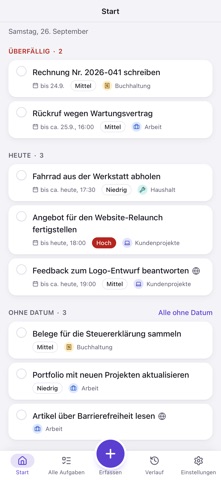


Description by Sascha Henning Written by the developer, not by AppBrain. Click to read.
brings your work and personal tasks together with their context: what needs doing,
where it came from and where you need to reply or act later.
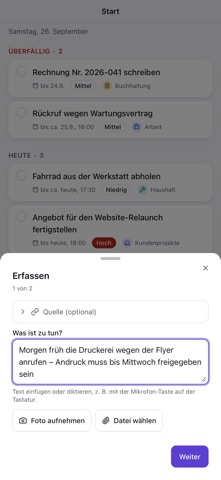
Capture, review, keep an overview
Type a task or share text, links, photos and PDFs from apps that provide supported
content through the share sheet. On iPhone and iPad, you can also scan a letter or
dictate text. Siri and Shortcuts provide further ways to capture tasks.
AI helps prepare tasks
With a subscription, Omnido suggests a title, description, category, priority and dates
from a capture; without one, a title and a short description.
Review and change the suggestions before accepting the task. Analysis can make
mistakes and needs a connection to the server.
Tasks with context
Organize tasks by areas and categories. Keep track of appointments, time windows and
recurring tasks. The due widget shows how many tasks are due today or overdue.
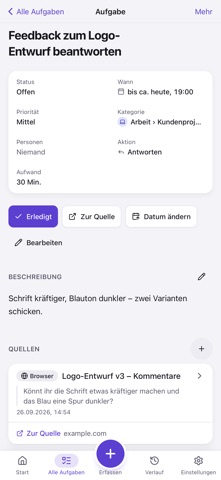
Back to the source
A task can retain excerpts and several sources. Use the available source link to
return to the original context. Depending on the source, it may open the exact content,
a chat or page, or only the app. Some sources have no return link.
Microsoft connections require a compatible account and the necessary permissions.
Continue on your devices
Use the same account for your tasks on iPhone, iPad, the web and the separate Mac app.
Captures can wait on the device when a connection fails. This is not a fully offline
task manager; do not sign out before pending captures have been sent.
Omnido requires an account. Sign in with a code sent by email or a passkey on supported
devices. Settings → Account lists your sessions and provides account deletion.
Omnido subscription: monthly or yearly, with a 7-day free trial the first time you subscribe. Payment is charged to your Apple Account. The subscription renews automatically unless you cancel it in your Apple Account settings at least 24 hours before the end of the current period.
Terms of Use (EULA): https://www.apple.com/legal/internet-services/itunes/dev/stdeula/
Privacy Policy: https://www.saschahenning.de/en/apps/omnido/privacy/