

On‑Device AI:Private Workspace
On‑Device AI:Private Workspace is made and published by Zijie Deng. AppBrain is an independent app data site and isn't affiliated with Zijie Deng. The app name, icon, screenshots and description belong to Zijie Deng and are shown as published on the App Store.
AppBrain's verdict
Well rated- Rating on App Store
- 4.38
- 162 ratings
- Last updated
- October 17, 2026
- Size
- 1.80 GB
Users rate it well: 4.4 stars from 162 ratings.
User feedback
Ratings and reviews on the App StoreComments on On‑Device AI:Private Workspace for iOS
We don't have enough comments to show example comments. Please check back later.
Store listing
By Zijie Deng, from the App Store


Description by Zijie Deng Written by the developer, not by AppBrain. Click to read.
Download a model once and keep working on a plane, on the subway, or without a signal. Chats, documents, recordings, and notes stay on your device. Online providers and web features are optional and work only after you enable them.
ONE APP, YOUR WAY
Open every workspace from a customizable Menu. Keep favorites under Pinned and everything else close by under Available.
AI CHAT
Chat with local or cloud models.
• Run local models from families such as Gemma, Qwen, DeepSeek, and Mistral, or connect your own provider account
• Browse, download, and manage models that fit your device, including ones for text, vision, reasoning, and tools
• Drop in documents, images, and scanned PDFs; approve private on-device OCR only when a PDF needs it
• Fork any conversation and compare several models on the same prompt
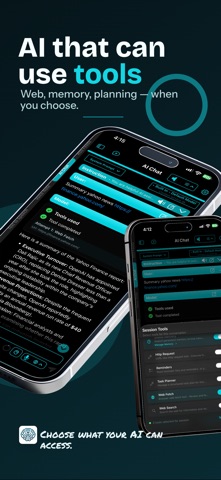
• Let the model use tools for calculations, web requests, documents, Calendar, and Reminders, and review proposed changes before they apply
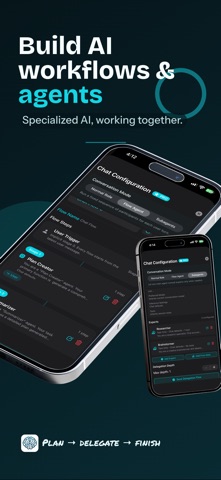
• Create reusable Agent Profiles, then add AI Skills, MCP servers, and tools from one clearer Agent Workflows setup
• Keep facts you repeat often in Global Memory
LISTEN LIBRARY AND RSS FEEDS
Read less, listen more.
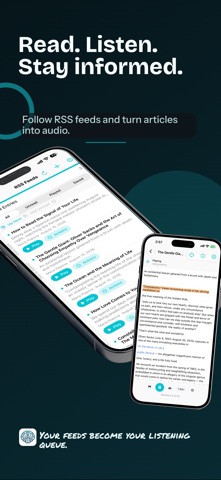
• Turn PDFs, Markdown, plain text, web articles, and scanned books into a listening queue
• Scan photographed pages, correct the OCR the app runs on device, and keep each page with its spoken text
• Follow sites through RSS, Atom, and JSON feeds, then send articles to Up Next
• Choose Apple voices or local neural voices, follow along in the reader, and set a sleep timer
VOICE NOTE, VOICE TYPING, AND TEXT TO SPEECH
Speak instead of typing, and listen instead of reading.
• Record and transcribe meetings, lectures, interviews, and quick ideas
• Dictate with Voice Typing on Mac or the voice keyboard on iPhone and iPad
• Transcribe with Apple Speech, Whisper, Parakeet, Nemotron, Qwen3-ASR, MOSS, and other engines
• Turn text, or text captured from a photo, into audio with Apple voices, Kokoro, Supertonic, VoxCPM2, IndexTTS2, and other engines
• Export transcripts as text, subtitles, or Markdown
AI SEARCH AND AI BROWSER
Research with a second pair of hands.
• Search the web in a conversation and let the model read the results for you
• Browse with tabs, profiles, history, and downloads, then ask your model to read, assist, or act on the page
• Hand a task to the browser agent, watch each step, and take over whenever you want
KNOWLEDGE AND TEXT NOTE
Give your AI your own material to work from.
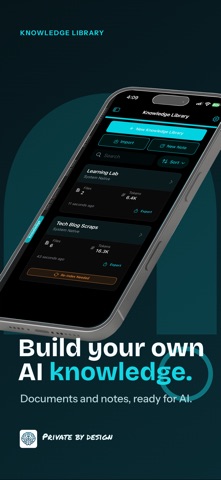
• Add PDFs, text, Markdown, code, images, and website content to a private searchable library
• Write and edit Markdown notes in the app
• Import AI chats, voice notes, Text to Speech items, and AI Search results
• Tune retrieval and index edited content again
APP HELP
Ask how a feature or setting works. App Help answers from a guide that ships inside the app, keeps help out of your saved chats, and points to the right settings.
MADE FOR APPLE DEVICES
• Native layouts adapt from focused navigation on iPhone to category sidebars on larger screens
• Settings are grouped by purpose, including Voice Typing, Agent Workflows, Models & Storage, Privacy & Data, Memory, and—on Mac—Instant Messaging
• Widgets for Listen, Voice Note, Text Note, and Quick Actions
• Siri, Apple Shortcuts, App Intents, the Mac menu bar, and keyboard shortcuts you can customize
• Apple hardware acceleration for supported local models
• Browse chat, transcription, speech, and embedding models in one Model Library
• Store models internally, on an external drive, or on a shared volume, with separate tools for cleanup and recovery
• Interface in English, Dutch, French, German, Italian, Japanese, Spanish, Portuguese, and Traditional Chinese
EULA: https://www.apple.com/legal/internet-services/itunes/dev/stdeula/
Safety and technology
Found in the app by AppBrain- Price
- Free
- App size
- 1.80 GB
- Content rating
- High
Technologies used by On‑Device AI:Private Workspace
Releases
Updates seen on the App Store- Version
- 1.52.0
- Launched
- April 2024
No changelog data
Alternatives
Similar apps and more from Zijie DengAlternatives to On‑Device AI:Private Workspace








More from Zijie Deng


Rankings
App Store top chartsApp Store Rankings for On‑Device AI:Private Workspace
About the app and developer
About On‑Device AI:Private Workspace
On‑Device AI:Private Workspace is an utilities app developed by Zijie Deng.
What is the rating of On‑Device AI:Private Workspace?
On‑Device AI:Private Workspace is rated 4.38 out of 5 stars, based on 160 ratings.
Is On‑Device AI:Private Workspace free?
On‑Device AI:Private Workspace is free. The app size is 1.80 GB. The latest version available is 1.52.0. The last update was on October 17, 2026.
What are the requirements for On‑Device AI:Private Workspace?
The app has a content rating of High Maturity. The app has been available on the App Store since April 2024.
Developer information for Zijie Deng
Address: