

ondot timer|No-Math Timer
ondot timer|No-Math Timer is made and published by Momoka Shiramizu. AppBrain is an independent app data site and isn't affiliated with Momoka Shiramizu. The app name, icon, screenshots and description belong to Momoka Shiramizu and are shown as published on the App Store.
AppBrain's verdict
- Last updated
- May 3, 2026
Rankings
App Store top chartsApp Store Rankings for ondot timer|No-Math Timer
Competitors
Similar apps and more from Momoka ShiramizuAlternatives to ondot timer|No-Math Timer


More from Momoka Shiramizu


Releases
Updates seen on the App Store- Version
- 1.0.3
- Launched
- April 2026
No changelog data
User feedback
Ratings and reviews on the App StoreComments on ondot timer|No-Math Timer for iOS
We don't have enough comments to show example comments. Please check back later.
Technology
Found in the app by AppBrain- Price
- Free
- App size
- 3.33 MB
- Content rating
- Everyone
Technologies used by ondot timer|No-Math Timer
About the app and developer
About ondot timer|No-Math Timer
ondot timer|No-Math Timer is an utilities app developed by Momoka Shiramizu.
User Ratings
The app has no ratings yet.
App Information
ondot timer|No-Math Timer is freely available from the App Store. The app size is 3.33 MB. The latest version available is 1.0.3. The last update was on May 3, 2026.
Technical Requirements
The app has a content rating of Everyone. The app has been available on the App Store since April 2026.
Developer information for Momoka Shiramizu
Address:
Store listing
By Momoka Shiramizu, from the App Store



Description by Momoka Shiramizu Written by the developer, not by AppBrain. Click to read.
"I need to leave by 10:50... how many minutes is that?"
"I have to get off at 14:51... how long do I have?"
You don't need to calculate anymore.
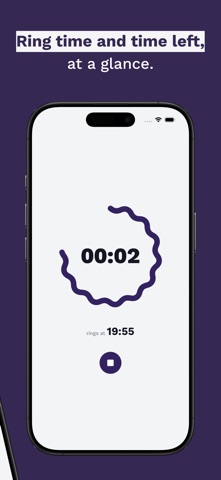
ondot timer starts from the time you want it to ring.
See both "when it rings" and "time remaining" at a glance.
■ for people who
・Find "how many minutes?" math annoying
・Want to know when the timer rings, not just the countdown
・Don't want to clutter their alarm list
・Want to timebox small tasks by clock time
■ perfect for
・Napping on trains — enter arrival time directly
・"Back by 1:00 PM" lunch break timer
・"Leave the cafe by 3:00" deadline
・Keeping housework from dragging on
■ end time mode — set the exact time to ring
"Ring at 14:51." That's it.
■ duration mode — start from minutes
"20 minute timer" works too.
Shows the exact time it will ring, so you always know when it ends.
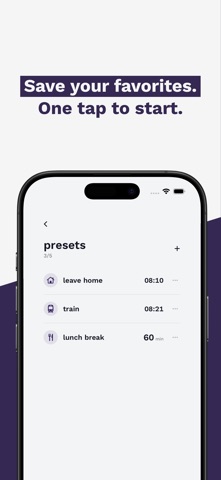
■ presets
Save your frequent settings.
Add a title. One tap to start.
■ Apple Watch
Check the countdown on your wrist.
Works independently without iPhone.
■ Live Activity
Real-time display on Lock Screen and Dynamic Island.
Check the timer while using other apps.
*Supported devices only
Free. No ads. No account required.