

One-Tap Shifts
One-Tap Shifts is made and published by Koji Shimizu. AppBrain is an independent app data site and isn't affiliated with Koji Shimizu. The app name, icon, screenshots and description belong to Koji Shimizu and are shown as published on the App Store.
AppBrain's verdict
- Last updated
- September 9, 2026
Rankings
App Store top chartsApp Store Rankings for One-Tap Shifts
Competitors
Similar apps and more from Koji ShimizuAlternatives to One-Tap Shifts


Releases
Updates seen on the App Store- Version
- 2.10.3
- Launched
- November 2025
No changelog data
User feedback
Ratings and reviews on the App StoreComments on One-Tap Shifts for iOS
We don't have enough comments to show example comments. Please check back later.
Technology
Found in the app by AppBrain- Price
- Free
- App size
- 92.5 MB
- Content rating
- Everyone
Technologies used by One-Tap Shifts
About the app and developer
About One-Tap Shifts
One-Tap Shifts is a productivity app developed by Koji Shimizu.
User Ratings
The app has no ratings yet.
App Information
One-Tap Shifts is freely available from the App Store. The app size is 92.45 MB. The latest version available is 2.10.3. The last update was on September 9, 2026.
Technical Requirements
The app has a content rating of Everyone. The app has been available on the App Store since November 2025.
Developer information for Koji Shimizu
Address:
Store listing
By Koji Shimizu, from the App Store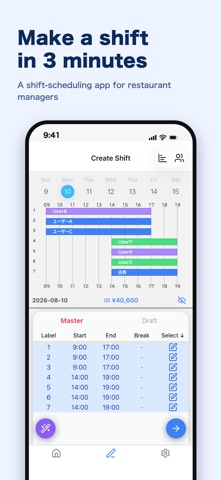



Description by Koji Shimizu Written by the developer, not by AppBrain. Click to read.
Minna no Shift is a shift scheduling app for busy managers in restaurants, cafes, retail, and beyond. Build next week's schedule and share it with your staff — all from your phone, with one hand.
■ Say goodbye to
・Fiddly spreadsheets and paper rotas
・Rebuilding the schedule from scratch every week
・The hassle of sending shifts to each staff member
■ What you can do
・One-handed and simple: build a schedule right on your phone
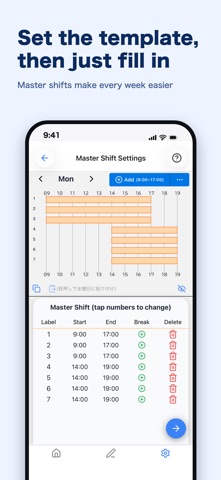
・Master shift saves you time every week: set your weekly template once, then just fill it in
・Staff management: add staff and assign them straight into shifts
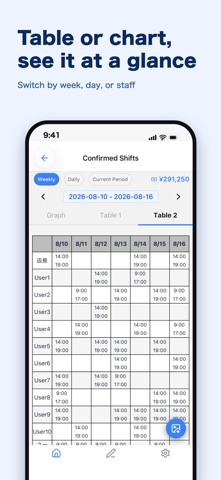
・Clear table & graph views: switch by week, day, or staff member at a glance
・Share in one image: save the finished schedule as a screenshot to send on chat, or export to PDF and print
■ Get started in 3 steps
1. Create your master shift
Set up your one-week template. It becomes the base for every schedule.
2. Add your staff
Assign your registered staff straight into shifts.
3. Build and share
See your schedule at a glance on the Top screen, then share by screenshot or print.
■ Premium plan
Extra tools to make scheduling even easier.
・Break scheduling: manage breaks for each staff member
・Auto shift creation (Beta): generate a draft schedule from your settings
Built by a working restaurant manager — the shift app we actually want to use. Your feedback is always welcome.