

One Touch Paste Keyboard
One Touch Paste Keyboard is made and published by Kankoda Sweden AB. AppBrain is an independent app data site and isn't affiliated with Kankoda Sweden AB. The app name, icon, screenshots and description belong to Kankoda Sweden AB and are shown as published on the App Store.
AppBrain's verdict
- Rating on App Store
- 5.00
- 3 ratings
- Last updated
- October 10, 2026
It doesn't have enough ratings yet to judge what users think.
Rankings
App Store top chartsApp Store Rankings for One Touch Paste Keyboard
Competitors
Similar apps and more from Kankoda Sweden ABAlternatives to One Touch Paste Keyboard






More from Kankoda Sweden AB





Releases
Updates seen on the App Store- Version
- 2.3.0
- Launched
- May 2024
No changelog data
User feedback
Ratings and reviews on the App StoreComments on One Touch Paste Keyboard for iOS
We don't have enough comments to show example comments. Please check back later.
Technology
Found in the app by AppBrain- Price
- Free
- App size
- 38.7 MB
- Content rating
- Everyone
Technologies used by One Touch Paste Keyboard
About the app and developer
About One Touch Paste Keyboard
One Touch Paste Keyboard is an utilities app developed by Kankoda Sweden AB.
What is the rating of One Touch Paste Keyboard?
One Touch Paste Keyboard is rated 5.00 out of 5 stars, based on 3 ratings.
Is One Touch Paste Keyboard free?
One Touch Paste Keyboard is free. The app size is 38.71 MB. The latest version available is 2.3.0. The last update was on October 10, 2026.
What are the requirements for One Touch Paste Keyboard?
The app has a content rating of Everyone. The app has been available on the App Store since May 2024.
Developer information for Kankoda Sweden AB
Address:
Frequently asked questions about One Touch Paste Keyboard
Is One Touch Paste Keyboard free?
Yes. One Touch Paste Keyboard is free on the App Store.
Is One Touch Paste Keyboard still available?
Yes. One Touch Paste Keyboard is on the App Store, and the last update we saw was on October 10, 2026.
How large is One Touch Paste Keyboard?
One Touch Paste Keyboard is 38.71 MB.
Is One Touch Paste Keyboard suitable for children?
App Store rates the content of One Touch Paste Keyboard as suitable for everyone.
How do people rate One Touch Paste Keyboard?
One Touch Paste Keyboard scores 5.00 out of 5 stars, from 3 ratings on the App Store.
Who made One Touch Paste Keyboard?
One Touch Paste Keyboard was developed by Kankoda Sweden AB. It is listed in the utilities category on the App Store.
What are the best alternatives to One Touch Paste Keyboard?
People looking at One Touch Paste Keyboard also look at these utilities apps: Auto Paste - Keyboard Shortcut, Flash Retailers, UnoTally Score Tracker for Uno, CopyCut: Clipboard & Fonts, PBoard - Paste Keyboard.
Store listing
By Kankoda Sweden AB, from the App Store



Description by Kankoda Sweden AB Written by the developer, not by AppBrain. Click to read.
The One Touch Paste keyboard lets you paste text clips and snippets into any app, at any time.
Boost your productivity with reusable text clips, that you can easily paste into any app, chat, or e-mail.
This keyboard is perfect for quickly replying to emails, re-sending the same message through multiple channels like Whatsapp, Telegram, Linkedin, Instagram, YouTube, etc.
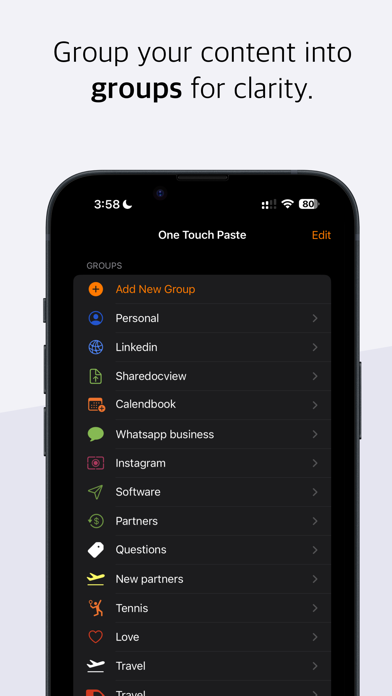
You can also create different groups for different apps and use cases:
- Personal: addresses, bank account details to get paid and not mess up a digit
- Work: web links
- Linkedin: text to connect or standard replies (ex. Ask people to send written info before calling)
- Instagram: send texts to brands to ask them for collaborations
- YouTube: Thank your viewers and followers for their comments on your video.
- Gmail: snippets of typical responses (ex. Thank you I’m interested please book a time on calendbook.com)
- Facebook: write typical replies to your followers and connections
- Indeed Job Search: thank you notes to HR managers before and after interviews, snippets that summarize your
- Reddit: save texts of typical replies that you often add on specific topics
- Messenger: save texts that can help you answer questions you often get
- Zoom: save the sentence “are you joining the Zoom meeting?”
- Paypal: save your payment link and a sentence like “please make a payment at paypal.com/yourusername”
- Microsoft Outlook: texts and replies that would help you get to inbox zero faster
- X (formerly Twitter): replies that would help you answer tweets and mentions in a faster way
- TikTok: reply to messages faster as well as add comments on videos that could help you gain more followers
- Telegram: send messages work or fun messages with one click depending on what you use this powerful messaging app for.
- Cash app: save a text with your link and details to get paid
- Doordash: save a text asking “When is the food coming?”
- Discord: create messages for different communities you are part of, for example save texts like “Anyone wants to play?” for gaming communities
- Zelle: save payment information and send it with one simple touch.
- Airbnb: create text that you often use both as a traveler or host for instance “Hi, can I check it earlier?” or instructions on how to check out, leave keys when the guest is about to leave.
- Duolingo: save new phrases in a new language as you are talking to new friends
- Venmo: save your payment link and send it with one touch
- Microsoft Teams: reply to your colleagues when you are OOO (out of the office) that you will get back to them on Monday and that you will focus on enjoying the weekend
- Google Docs: you could save links to useful google docs that you are often sharing with colleagues and partners
- Google Translate: after you learn a new phrases in another language save it in a group dedicated to that language so that you can more easily apply it
- Eventbrite: if you tend to create events that could have a similar description save that text in a dedicated group so that you could save time and effort even compared to find the text in the notes
- TextNow: save snippets for SMS that you want for work or personal purposes
- Google Sheets: save some formulas that you’ve learned so that you can apply them more easily
- Ebay: save text snippets that you can send as a buyer or seller, for instance “Sorry no discounts” or “Could I have a discount code?”
- Tinder: save text ideas for your dates such as “where are you from originally?” which is supposedly one of the questions that is most likely to be answered by most people
- Snapchat: texts for secret convos
One Touch Paste keyboard supports 73 locales, and other features like autocomplete, keyboard adjustments, etc.
Terms and conditions:
https://www.apple.com/legal/internet-services/itunes/dev/stdeula/