

OneBeat Guitar Tools
OneBeat Guitar Tools is made and published by Cleber Neitzke. AppBrain is an independent app data site and isn't affiliated with Cleber Neitzke. The app name, icon, screenshots and description belong to Cleber Neitzke and are shown as published on the App Store.
AppBrain's verdict
- Last updated
- September 24, 2026
Rankings
App Store top chartsApp Store Rankings for OneBeat Guitar Tools
Competitors
Similar apps and more from Cleber NeitzkeMore from Cleber Neitzke


Releases
Updates seen on the App Store- Version
- 1.85.1
- Launched
- May 2025
No changelog data
User feedback
Ratings and reviews on the App StoreComments on OneBeat Guitar Tools for iOS
We don't have enough comments to show example comments. Please check back later.
Technology
Found in the app by AppBrain- Price
- Free
- App size
- 3.29 MB
- Content rating
- Everyone
Technologies used by OneBeat Guitar Tools
About the app and developer
About OneBeat Guitar Tools
OneBeat Guitar Tools is a music app developed by Cleber Neitzke.
What is the rating of OneBeat Guitar Tools?
OneBeat Guitar Tools has no ratings yet.
Is OneBeat Guitar Tools free?
OneBeat Guitar Tools is free. The app size is 3.29 MB. The latest version available is 1.85.1. The last update was on September 24, 2026.
What are the requirements for OneBeat Guitar Tools?
The app has a content rating of Everyone. The app has been available on the App Store since May 2025.
Developer information for Cleber Neitzke
Address:
Frequently asked questions about OneBeat Guitar Tools
Is OneBeat Guitar Tools free?
Yes. OneBeat Guitar Tools is free on the App Store.
Is OneBeat Guitar Tools still available?
Yes. OneBeat Guitar Tools is on the App Store, and the last update we saw was on September 24, 2026.
How large is OneBeat Guitar Tools?
OneBeat Guitar Tools is 3.29 MB.
Is OneBeat Guitar Tools suitable for children?
App Store rates the content of OneBeat Guitar Tools as suitable for everyone.
Who made OneBeat Guitar Tools?
OneBeat Guitar Tools was developed by Cleber Neitzke. It is listed in the music category on the App Store.
Store listing
By Cleber Neitzke, from the App Store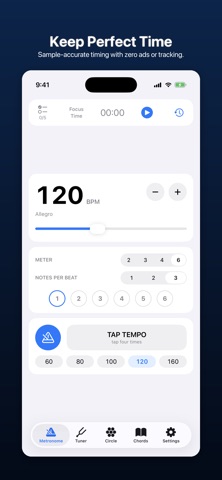


Description by Cleber Neitzke Written by the developer, not by AppBrain. Click to read.
Zero ads, no accounts, and no subscriptions required for core tools.
METRONOME
Tap tempo, adjustable accent patterns, subdivisions, and a range from 40 to 240 BPM. Each beat is scheduled directly to audio hardware ahead of time rather than fired from a software timer, so the pulse stays sample-accurate instead of drifting or jittering mid-bar. Move the tempo slider while playing and it smoothly retunes the pulse without restarting the bar.
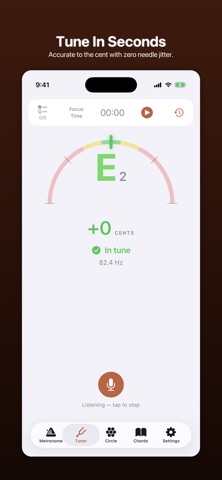
TUNER
Real-time, ultra-responsive pitch detection with a clear gauge showing exactly how sharp or flat you are, down to the cent and Hz. Built with acoustic stabilization: the reading only updates when the note behind it is steady, settling on an accurate reading instead of flickering erratically.
CIRCLE OF FIFTHS
An interactive circle showing major keys, relative minors, and key signatures at a glance. Tap any key wedge to inspect its accidentals and relative minor chords, and the chord library will follow you there automatically.
CHORDS
Major, minor, dominant 7th, and minor 7th voicings across all twelve roots. Clear fretboard diagrams with open and muted string indicators, fingerings, and notes spelled out under each voicing. The diagram follows your chosen board look — Maple, Rosewood, Ebony or Lines, with dot or trapezoid inlays.
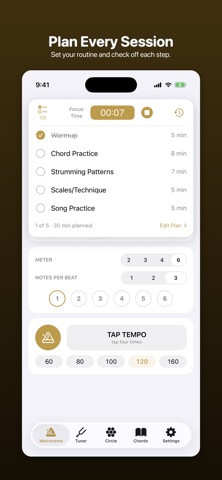
PRACTICE PLAN & FOCUS TIMER
A session stopwatch and structured routine checklist right at the top of every screen: • Set your daily practice routine and time budget (warmups, scales, chord changes, songs). • Check off exercises as you complete them during your session. • Track your focus time with automatic session logging. • Review your complete practice history, daily breakdown, and weekly totals.
BUILT FOR DISTRACTION-FREE PRACTICE
• 100% Ad-Free: Zero banner ads, zero full-screen video interruptions, and zero tracking. • No Account Needed: Everything runs completely on-device. No logins or cloud sync required. • Keeps Screen Awake: The display stays on while your metronome or tuner is active. • Universal Design: Optimized layout for iPhone and iPad.
ONEBEAT TOOLS PRO
The metronome, tuner, circle of fifths, chord reference, practice plan, and session logs are 100% free and always will be. An optional Pro subscription unlocks the appearance settings — custom accent colors and themes (Terracotta, Sage, Soft Plum, Mustard, Dusty Rose, Dusty Blue) plus four fretboard styles and two inlay styles for the chord diagrams — and supports independent development.
• Monthly — auto-renews every month • Yearly — auto-renews every year
Payment is charged to your Apple Account at confirmation of purchase. Subscriptions renew automatically unless auto-renew is turned off at least 24 hours before the end of the current period. You can manage or cancel your subscription in your Apple Account settings.
Terms of Use (EULA): https://www.apple.com/legal/internet-services/itunes/dev/stdeula/ Privacy Policy: https://www.neitzke.ca/app-privacy-policy
OneBeat Tools is part of the OneBeat family, alongside OneBeat Play (fretboard trainer) and OneBeat Ear (ear trainer).