

OneBill-Simple Expense Tracker
OneBill-Simple Expense Tracker is made and published by Qingqing Huang. AppBrain is an independent app data site and isn't affiliated with Qingqing Huang. The app name, icon, screenshots and description belong to Qingqing Huang and are shown as published on the App Store.
AppBrain's verdict
- Last updated
- October 1, 2026
Rankings
App Store top chartsApp Store Rankings for OneBill-Simple Expense Tracker
Competitors
Similar apps and more from Qingqing HuangAlternatives to OneBill-Simple Expense Tracker


More from Qingqing Huang

Releases
Updates seen on the App Store- Version
- 1.0.0
- Launched
- September 2026
No changelog data
User feedback
Ratings and reviews on the App StoreComments on OneBill-Simple Expense Tracker for iOS
We don't have enough comments to show example comments. Please check back later.
Technology
Found in the app by AppBrain- Price
- Free
- App size
- 16.9 MB
- Content rating
- Everyone
Technologies used by OneBill-Simple Expense Tracker
About the app and developer
About OneBill-Simple Expense Tracker
OneBill-Simple Expense Tracker is a finance app developed by Qingqing Huang.
User Ratings
The app has no ratings yet.
App Information
OneBill-Simple Expense Tracker is freely available from the App Store. The app size is 16.92 MB. The latest version available is 1.0.0. The last update was on October 1, 2026.
Technical Requirements
The app has a content rating of Everyone. The app has been available on the App Store since September 2026.
Developer information for Qingqing Huang
Address:
Store listing
By Qingqing Huang, from the App Store


Description by Qingqing Huang Written by the developer, not by AppBrain. Click to read.
1. Quick Expense Tracking
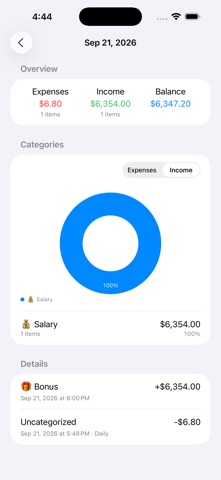
Easily record every expense and income. Select a category, amount, and date to quickly complete your entry.
2. Bill Statistics
View your transactions by date, income or expense type, and category to better understand your daily spending and income.
3. Category Management
Create and customize categories to organize and manage your transactions the way you prefer.
4. Import & Export
Import and export transactions using CSV files for easy backup, migration, and management of your financial records.
5. Recurring Transactions
Set up recurring transactions to automatically create regular income and expense entries, saving you time and effort.
6. iCloud Sync
Sync your transaction data across devices with iCloud, keeping your records up to date wherever you go.
OneBill — track every expense and make bookkeeping simple.
Terms of Use:
https://www.apple.com/legal/internet-services/itunes/dev/stdeula/