

OneClickCamera
OneClickCamera is made and published by Gillian Scharf. AppBrain is an independent app data site and isn't affiliated with Gillian Scharf. The app name, icon, screenshots and description belong to Gillian Scharf and are shown as published on the App Store.
AppBrain's verdict
- Last updated
- October 8, 2026
- Size
- 9.36 MB
User feedback
Ratings and reviews on the App StoreComments on OneClickCamera for iOS
We don't have enough comments to show example comments. Please check back later.
Store listing
By Gillian Scharf, from the App Store

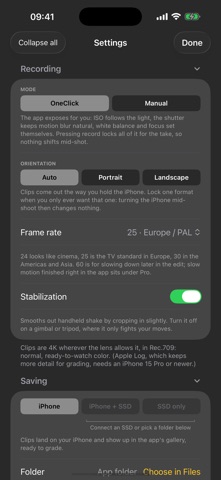
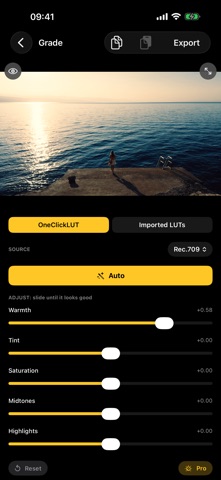
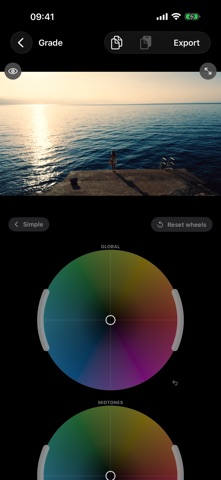
Description by Gillian Scharf Written by the developer, not by AppBrain. Click to read.
Press record. The app shoots Apple Log (on supported iPhones) with the 180° shutter rule handled automatically, locks exposure and white balance for the take, and shows you the image through a real monitoring LUT. What you see already looks like the film you're making.
Need to say something to camera? Switch on the teleprompter. Your script sits over the selfie camera, transparent enough to see yourself, and scrolls along as you speak. Pause, and it waits. It keeps working while you record.
Then grade the clip right in the app: your footage gets the OneClickLUT look, and five simple sliders (warmth, tint, saturation, midtones, highlights) are all you need to make it yours. Want more control? Open Pro mode and grade with full color wheels: Global, Midtones, Shadows, Highlights, each with saturation and brightness wings, applied on the log image under the LUT, exactly like a professional color pipeline. Or tap Auto and let the app measure the clip and move the dials for you.
WHY IT LOOKS RIGHT
• Apple Log capture in HEVC 10-bit (Rec.709 on other models, and it just works)
• Automatic 180° shutter for natural motion blur, with a smart low-light ladder
• Exposure and white balance lock on record, with one-tap unlock
• A real monitoring LUT in the viewfinder, not a guess
• Lens changes handled like the built-in camera, also while recording
WHY IT'S FAST
• Zebras, grid and level always on, each with its own strength slider, zero setup
• AF-L holds focus right where it is with one tap, also mid-take; press and hold to focus on a spot and keep it there
• Lock the lens for a take, swipe down for a clean viewfinder
• Quality zoom stops (0.5/1/2/4/8 on supported iPhones): tap, don't fiddle
• Plug in a microphone and the app switches to it by itself
THE TELEPROMPTER
• Your script over the selfie camera, with adjustable transparency, text size and speed
• Voice-follow scrolls at your reading pace and waits when you pause
• Several scripts, kept on your phone
THE GRADE
• One look, done: OneClickLUT applied at full strength, always last in the chain
• Five sliders for taste, color wheels for control, both combine
• Auto grade measures the clip and suggests a starting point
• Grade footage from other cameras too: DJI, GoPro, Insta360, Sony, Panasonic, Canon, Nikon and Fujifilm log, or import your own .cube LUTs
• Fullscreen check: rotate your phone, judge your colors edge to edge
PRO WHEN YOU NEED IT
• Manual mode: ISO, shutter angle, white balance, tint and focus, Blackmagic-style, each with its own A to hand it back to auto; on the iPhone 18 Pro also the iris, stepless from f/1.5 to f/4
• Multicam over Wi-Fi or wired LAN: every camera with a letter shows up on a monitor with live view and status, and one tap starts them all
• Works on iPad: the whole app, and an iPad makes the ideal monitor for the phones
• ProRes RAW and ProRes RAW HQ on the iPhone 17 Pro and newer: into Apple's Pro Video Storage (iOS 27) or onto a connected USB-C SSD
• Record HEVC straight to SSD, or mirror every clip to SSD automatically
• HDMI and SDI monitoring: the live picture goes out over USB-C to an HDMI screen, clean or with the viewfinder tools, and through an HDMI to SDI converter into any SDI monitor or switcher
• Multicam letters ride in every file name, so the angles sort themselves out on the desk
• Front camera landscape capture while holding the phone upright (square sensor)
WHAT IT COSTS
Filming is free and stays free: film as much as you like, keep every original on your iPhone or on an SSD, grade it, and export the finished clip with OneClickLUT burned in, or take the original into Final Cut or Resolve. Right now every feature is free, export included, and there is no subscription.
No account. No tracking. Your clips stay on your device.
Made in Vienna by videowien, the makers of OneClickLUT.
Safety and technology
Found in the app by AppBrain- Price
- Free
- App size
- 9.36 MB
- Content rating
- Everyone
Technologies used by OneClickCamera
Releases
Updates seen on the App Store- Version
- 1.0.3
- Launched
- August 2026
No changelog data
Alternatives
Similar apps and more from Gillian ScharfAlternatives to OneClickCamera


More from Gillian Scharf

Rankings
App Store top chartsApp Store Rankings for OneClickCamera
About the app and developer
About OneClickCamera
OneClickCamera is a photo & video app developed by Gillian Scharf.
User Ratings
The app has no ratings yet.
App Information
OneClickCamera is freely available from the App Store. The app size is 9.36 MB. The latest version available is 1.0.3. The last update was on October 8, 2026.
Technical Requirements
The app has a content rating of Everyone. The app has been available on the App Store since August 2026.
Developer information for Gillian Scharf
Address: