

OneLimit: Parental Controls
OneLimit: Parental Controls is made and published by Rene Winkelmeyer. AppBrain is an independent app data site and isn't affiliated with Rene Winkelmeyer. The app name, icon, screenshots and description belong to Rene Winkelmeyer and are shown as published on the App Store.
AppBrain's verdict
- Rating on App Store
- 1.00
- 1 ratings
- Last updated
- October 24, 2026
- Size
- 15.7 MB
It doesn't have enough ratings yet to judge what users think.
User feedback
Ratings and reviews on the App StoreComments on OneLimit: Parental Controls for iOS
We don't have enough comments to show example comments. Please check back later.
Store listing
By Rene Winkelmeyer, from the App Store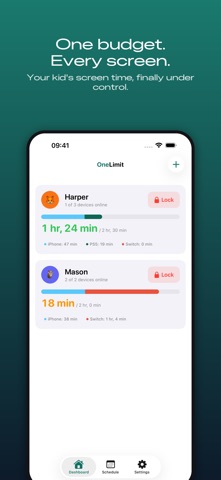


Description by Rene Winkelmeyer Written by the developer, not by AppBrain. Click to read.
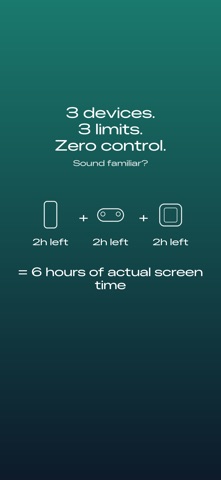
OneLimit gives your family one daily screen time budget that counts down across every device - iPhone, PlayStation 5, Nintendo Switch, Xbox, and Windows PC. When time runs out on one, it runs out on all of them. No loopholes.
HOW IT WORKS
Set a daily budget for each child (say, 2 hours on weekdays, 3 on weekends). OneLimit tracks usage across all linked devices in near-real-time. On iOS your child sees a budget ring that fills up as they play and browse. When the budget is spent, every device locks. Simple.
KEY FEATURES
- Unified budget: One pool of time shared across iPhone, PS5, Switch, Xbox, and Windows. No more device-hopping.
- Budget ring: A clear, color-coded gauge shows exactly how much time is left. Green, amber, red - your child always knows where they stand.
- Streaks: Kids earn streaks for staying within their daily budget. Positive reinforcement, not just restriction.
- Ask for more time: Your child can request extra minutes directly from their app. You approve or deny with one tap.
- Emergency lock: Lock all devices instantly from the dashboard. One tap, no confirmation needed. Unlock when you are ready.
- Bonus time: Grant +30 minutes with a single tap when plans change.
- Activity log: See which devices were used, for how long, and when. No guesswork.
- Schedules: Set weekday and weekend budgets, bedtime lockout windows, and per-device overrides.
- Vacation mode: Relax the limits without deleting your settings. Toggle it on, toggle it off.
- Bedtime countdown: Automatic lockout windows keep devices off at night.
- Co-parenting ready: Designed for households where both parents need visibility.
- Widget: Check each child's remaining budget from your iPhone home screen without opening the app.
- Daily summary: A warm "good night" notification recaps the day. "Today was a 2h 14m day. Busiest: PS5."
- Weekly email: A concise weekly report delivered to your inbox (optional).
SUPPORTED PLATFORMS
- iPhone / iPad
- PlayStation 5
- Nintendo Switch
- Xbox (Series X|S, One)
- Windows PC
PRIVACY FIRST
OneLimit collects only what is necessary to track screen time budgets. We do not monitor content, read messages, track location, or store photos. All data is encrypted in transit and at rest.
Terms of Use (EULA): https://www.apple.com/legal/internet-services/itunes/dev/stdeula/
Safety and technology
Found in the app by AppBrain- Price
- Free
- App size
- 15.7 MB
- Content rating
- Everyone
Technologies used by OneLimit: Parental Controls
Releases
Updates seen on the App Store- Version
- 1.2.1
- Launched
- June 2026
No changelog data
Alternatives
Similar apps and more from Rene WinkelmeyerAlternatives to OneLimit: Parental Controls


More from Rene Winkelmeyer


Rankings
App Store top chartsApp Store Rankings for OneLimit: Parental Controls
About the app and developer
About OneLimit: Parental Controls
OneLimit: Parental Controls is a lifestyle app developed by Rene Winkelmeyer.
User Ratings
OneLimit: Parental Controls is rated 1.00 out of 5 stars. The rating is based on one rating ratings.
App Information
OneLimit: Parental Controls is freely available from the App Store. The app size is 15.71 MB. The latest version available is 1.2.1. The last update was on October 24, 2026.
Technical Requirements
The app has a content rating of Everyone. The app has been available on the App Store since June 2026.
Developer information for Rene Winkelmeyer
Address:
Frequently asked questions about OneLimit: Parental Controls
Is OneLimit: Parental Controls free?
Yes. OneLimit: Parental Controls is free on the App Store.
Is OneLimit: Parental Controls still available?
Yes. OneLimit: Parental Controls is on the App Store, and the last update we saw was on October 24, 2026.
How large is OneLimit: Parental Controls?
OneLimit: Parental Controls is 15.71 MB.
Is OneLimit: Parental Controls suitable for children?
App Store rates the content of OneLimit: Parental Controls as suitable for everyone.
How do people rate OneLimit: Parental Controls?
OneLimit: Parental Controls has one rating of 1.00 stars on the App Store.
Who made OneLimit: Parental Controls?
OneLimit: Parental Controls was developed by Rene Winkelmeyer. It is listed in the lifestyle category on the App Store.
What are the best alternatives to OneLimit: Parental Controls?
People looking at OneLimit: Parental Controls also look at these lifestyle apps: Parental Control App – KidSure, Niyam - Digital Parenting, Ally: Screen Time & Tasks, Ourlittlebird Parent Control, Zentime: Parental Control App.