

OneMockup - Make Custom Mockup
OneMockup - Make Custom Mockup is made and published by Chengdu Reinvent Technology Co., Ltd. AppBrain is an independent app data site and isn't affiliated with Chengdu Reinvent Technology Co., Ltd. The app name, icon, screenshots and description belong to Chengdu Reinvent Technology Co., Ltd. and are shown as published on the App Store.
AppBrain's verdict
EstablishedWell rated- Rating on App Store
- 4.31
- 115 ratings
- Last updated
- September 22, 2026
Users rate it well: 4.3 stars from 115 ratings.
Rankings
App Store top chartsApp Store Rankings for OneMockup - Make Custom Mockup
Competitors
Similar apps and more from Chengdu Reinvent Technology Co., Ltd.Alternatives to OneMockup - Make Custom Mockup



More from Chengdu Reinvent Technology Co., Ltd.



Releases
Updates seen on the App Store- Version
- 5.0.4
- Launched
- March 2018
No changelog data
User feedback
Ratings and reviews on the App StoreComments on OneMockup - Make Custom Mockup for iOS
We don't have enough comments to show example comments. Please check back later.
Technology
Found in the app by AppBrain- Price
- Free
- App size
- 384.2 MB
- Content rating
- Everyone
Technologies used by OneMockup - Make Custom Mockup
About the app and developer
About OneMockup - Make Custom Mockup
OneMockup - Make Custom Mockup is an utilities app developed by Chengdu Reinvent Technology Co., Ltd.
User Ratings
OneMockup - Make Custom Mockup is rated 4.31 out of 5 stars. The rating is based on 120 ratings.
App Information
OneMockup - Make Custom Mockup is freely available from the App Store. The app size is 384.24 MB. The latest version available is 5.0.4. The last update was on September 22, 2026.
Technical Requirements
The app has a content rating of Everyone. The app has been available on the App Store since March 2018.
Developer information for Chengdu Reinvent Technology Co., Ltd.
Frequently asked questions about OneMockup - Make Custom Mockup
Is OneMockup - Make Custom Mockup free?
Yes. OneMockup - Make Custom Mockup is free on the App Store.
Is OneMockup - Make Custom Mockup still available?
Yes. OneMockup - Make Custom Mockup is on the App Store, and the last update we saw was on September 22, 2026.
How large is OneMockup - Make Custom Mockup?
OneMockup - Make Custom Mockup is 384.24 MB.
Is OneMockup - Make Custom Mockup suitable for children?
App Store rates the content of OneMockup - Make Custom Mockup as suitable for everyone.
How do people rate OneMockup - Make Custom Mockup?
OneMockup - Make Custom Mockup scores 4.31 out of 5 stars, from 115 ratings on the App Store.
Who made OneMockup - Make Custom Mockup?
OneMockup - Make Custom Mockup was developed by Chengdu Reinvent Technology Co., Ltd. It is listed in the utilities category on the App Store.
What are the best alternatives to OneMockup - Make Custom Mockup?
People looking at OneMockup - Make Custom Mockup also look at these utilities apps: Record Maker, Turtle Wrapper-Screenshot, Sub Count, WoodBox - Useful Toolbox, Power Reverse Image Search.
Store listing
By Chengdu Reinvent Technology Co., Ltd., from the App Store

Description by Chengdu Reinvent Technology Co., Ltd. Written by the developer, not by AppBrain. Click to read.
This is a new mockup app.
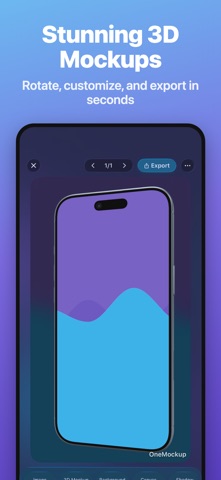
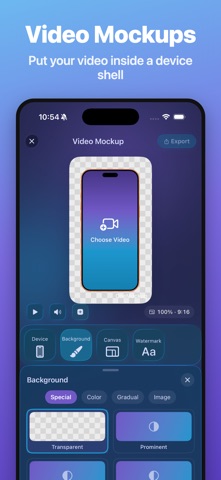
OneMockup is a excellent iOS Design Tool to create attractive mobile mockups. Create custom mockup images from over a dozen popular devices using your own uploaded screen captures.
With OneScreen, you can choose suitable device mockup or template, add 3D Rotate、background、shadow、shift、scale、canvas... and other custom features.No Photoshop、No Sketch,Just OneScreen.
You can chose different models,different angles,different backgrounds to start.
#New Way#
There are many ways to make your work:
The Standard Mode/The Template Modem/The Effect Mode
#Mockup Maker#
1. Select any pictures in the album.
2. Support multiple models including X.
3. There are three types of common models.
4. Support 30 custom background colors.
5. Fast share to WeChat or save to album.
6.iPhone/iPad/iWatch Templates
7.Action Extension
8.Today Extension
9.Support URL Scheme
#From Templates#
1. Take two steps to create the mockup.
2. Browse the favorite templates in two ways.
3. Support common screen size.
4. The production process can quickly switch the template.
#New Features
1.Add Twitter Entry
2.Add Notch Template
3.Add Automatic Identification
4.Add Animation to Editing Buttons
5.Add Animation to Editing Process
6.Displays Two Columns by Default
7. Redesign the Mockup mode
8. Redesign the Template mode
9. Add pure picture effect mode
10. Add customization of 3D rotation, shadow, canvas, displacement, zoom, image filling, image rotation and image rounded corners
11. You can customize parameters,or adjusted using built-in parameters
#Upcoming#
1. All colors of all models support three angles.
2. Support multiple languages.
3. Add a variety of template sizes.
4. Optimize page dynamics and logic.
5. Sharing of new social platforms.
…
OneMockup offers auto-renewable subscriptions.
- Available plans, durations, and localized prices are shown on the purchase screen. Prices may vary by country or region.
- Payment will be charged to your Apple Account when you confirm the purchase.
- The subscription renews automatically unless you turn off auto-renew at least 24 hours before the end of the current period.
- Your Apple Account will be charged for renewal within 24 hours before the end of the current period.
- You can manage or cancel subscriptions in your App Store account settings after purchase.
- Any unused portion of a free trial, if offered, will be forfeited when you purchase a subscription.
Privacy Policy: https://docs.onenice.tech/#/OneMockup/privacy
Terms of Service: https://docs.onenice.tech/#/OneMockup/terms
Contact us: hi@onenice.tech
Twitter: @onexdavis