

OnePutt – Golf Putting AI
OnePutt – Golf Putting AI is made and published by 리소컨버젼스. AppBrain is an independent app data site and isn't affiliated with 리소컨버젼스. The app name, icon, screenshots and description belong to 리소컨버젼스 and are shown as published on the App Store.
AppBrain's verdict
- Rating on App Store
- 4.50
- 14 ratings
- Last updated
- September 11, 2026
- Size
- 252.0 MB
It doesn't have enough ratings yet to judge what users think. Its best ranking is #79 in Top Grossing, Sports in South Korea.
User feedback
Ratings and reviews on the App StoreComments on OnePutt – Golf Putting AI for iOS
We don't have enough comments to show example comments. Please check back later.
Store listing
By 리소컨버젼스, from the App Store



Description by 리소컨버젼스 Written by the developer, not by AppBrain. Click to read.
“green reading app”, “golf putting practice”, “AR golf training”.
In golf, your putting game can make or break your score.
That’s why reading the green and finding the right putting line is essential.
OnePutt is an AI-powered golf putting guide that helps you read every green with precision — analyzing break, slope, and distance to visualize the ideal putt line in real time.
Visualize the break. Read the green. Align with confidence.
Whether you're learning putting fundamentals or sharpening your short game, OnePutt helps golfers of all levels sink more putts, more consistently.
No more guessing. No more missed reads. Just follow the putting line — and roll it in with confidence.
Download OnePutt and take your golf putting to the next level.
---
**Features**
**AI Green Reading** – Instantly analyze slope, break, and distance
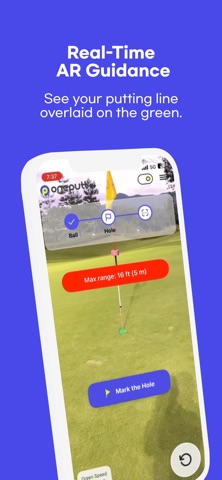
**Real-Time Visualization** – See your putting line overlaid on the green
**Break Line Prediction** – Adjusts for elevation, aim point, and green speed
**Ball Tracking** – Monitor your stroke performance over time
**What’s Different (Why OnePutt Stands Out)**
**Real-Time AR Guidance**: Unlike apps that provide static diagrams or post-putt feedback, OnePutt gives you a live, interactive visual line on the actual green — before you putt.
**On-Course Ready**: Designed for real course conditions, not just indoor putting mats or simulations.
**AI + LiDAR Precision**: Combines deep learning with advanced LiDAR scanning for unmatched accuracy in green reading.
**No Sensors or Extra Gear Needed**: All you need is your phone — no special balls, putters, or wearables required.
**Tour-Level Insights for Amateurs**: Visualize green speed, break severity, and slope angle like the pros — even if you're just starting out.
Key OnePutt Options :
Green Speed
Aim Point
Display Success Rate by Distance
Hole Marker
Aim Line
Break Line
Available Devices :
iPhone 12 Pro/ProMax
iPhone 13 Pro/ProMax
iPhone 14 Pro/ProMax
iPhone 15 Pro/ProMax
iPhone 16 Pro/ProMax
**How to Use OnePutt**
**Step 1 – Mark the Ball**
Align the first guide marker with your golf ball.
Tap **"Mark Ball"** to confirm the position.
**Step 2 – Mark the Hole**
Move your phone until the second guide marker overlaps the hole.
Tap **"Mark the Hole"** to lock the target.
**Step 3 – Scan the Line**
Gently move your phone between the ball and the hole.
OnePutt will scan the green’s slope and surface.
**Step 4 – View Results**
After scanning, you'll see:
- **Break direction**
- **Distance to hole**
- **Putt difficulty (cup count)**
- **Success rate by distance**
**Step 5 – Reset Anytime**
Tap **"Reset"** on the bottom-right to start a new scan.
**Use Tips**
- Best scanning accuracy is within 3 meters.
- For putts over 5 meters, the scan may be less accurate as distance increases. For best results, stay within 3 meters.
- After positioning markers, pause briefly before tapping to improve precision.
- Adjust **green speed** from 2.0 to 3.5 using the dial (default is 2.6).
**Make every putt count.**
Download OnePutt and start reading greens like a pro — today.
*Privacy Policy
https://www.apple.com/legal/internet-services/itunes/dev/stdeula/
Safety and technology
Found in the app by AppBrain- Price
- Free
- App size
- 252.0 MB
- Content rating
- Everyone
Technologies used by OnePutt – Golf Putting AI
Releases
Updates seen on the App Store- Version
- 1.6.4
- Launched
- March 2025
No changelog data
Alternatives
Similar apps and more from 리소컨버젼스More from 리소컨버젼스



Rankings
App Store top charts- Highest rank
- #79
- Chart
- Top Grossing
- Sports
- Country
- South Korea
App Store Rankings for OnePutt – Golf Putting AI
Top rankings
| Rank | Country | Category | List |
|---|---|---|---|
| 79 | South Korea | Sports | Top Grossing |
Ranking history in South Korea
About the app and developer
About OnePutt – Golf Putting AI
OnePutt – Golf Putting AI is a sports app developed by 리소컨버젼스.
What is the rating of OnePutt – Golf Putting AI?
OnePutt – Golf Putting AI is rated 4.50 out of 5 stars, based on 14 ratings.
Is OnePutt – Golf Putting AI free?
OnePutt – Golf Putting AI is free. The app size is 251.99 MB. The latest version available is 1.6.4. The last update was on September 11, 2026.
What are the requirements for OnePutt – Golf Putting AI?
The app has a content rating of Everyone. The app has been available on the App Store since March 2025.
Developer information for 리소컨버젼스
Address:
Frequently asked questions about OnePutt – Golf Putting AI
Is OnePutt – Golf Putting AI free?
Yes. OnePutt – Golf Putting AI is free on the App Store.
Is OnePutt – Golf Putting AI still available?
Yes. OnePutt – Golf Putting AI is on the App Store, and the last update we saw was on September 11, 2026.
How large is OnePutt – Golf Putting AI?
OnePutt – Golf Putting AI is 251.99 MB.
Is OnePutt – Golf Putting AI suitable for children?
App Store rates the content of OnePutt – Golf Putting AI as suitable for everyone.
How do people rate OnePutt – Golf Putting AI?
OnePutt – Golf Putting AI scores 4.50 out of 5 stars, from 14 ratings on the App Store.
Who made OnePutt – Golf Putting AI?
OnePutt – Golf Putting AI was developed by 리소컨버젼스. It is listed in the sports category on the App Store.