

OneVerse: Bible Verse Lock
OneVerse: Bible Verse Lock is made and published by Shikhar Kunal. AppBrain is an independent app data site and isn't affiliated with Shikhar Kunal. The app name, icon, screenshots and description belong to Shikhar Kunal and are shown as published on the App Store.
AppBrain's verdict
New- Rating on App Store
- 5.00
- 1 ratings
- Last updated
- September 21, 2026
OneVerse: Bible Verse Lock came out 80 days ago. It doesn't have enough ratings yet to judge what users think.
Rankings
App Store top chartsApp Store Rankings for OneVerse: Bible Verse Lock
Competitors
Similar apps and more from Shikhar KunalAlternatives to OneVerse: Bible Verse Lock


Releases
Updates seen on the App Store- Version
- 1.2
- Launched
- July 2026
No changelog data
User feedback
Ratings and reviews on the App StoreComments on OneVerse: Bible Verse Lock for iOS
We don't have enough comments to show example comments. Please check back later.
Technology
Found in the app by AppBrain- Price
- Free
- App size
- 19.1 MB
- Content rating
- Everyone
Technologies used by OneVerse: Bible Verse Lock
About the app and developer
About OneVerse: Bible Verse Lock
OneVerse: Bible Verse Lock is a reference app developed by Shikhar Kunal.
User Ratings
OneVerse: Bible Verse Lock is rated 5.00 out of 5 stars. The rating is based on one rating ratings.
App Information
OneVerse: Bible Verse Lock is freely available from the App Store. The app size is 19.12 MB. The latest version available is 1.2. The last update was on September 21, 2026.
Technical Requirements
The app has a content rating of Everyone. The app has been available on the App Store since July 2026.
Developer information for Shikhar Kunal
Address:
Frequently asked questions about OneVerse: Bible Verse Lock
Is OneVerse: Bible Verse Lock free?
Yes. OneVerse: Bible Verse Lock is free on the App Store.
Is OneVerse: Bible Verse Lock still available?
Yes. OneVerse: Bible Verse Lock is on the App Store, and the last update we saw was on September 21, 2026.
How large is OneVerse: Bible Verse Lock?
OneVerse: Bible Verse Lock is 19.12 MB.
Is OneVerse: Bible Verse Lock suitable for children?
App Store rates the content of OneVerse: Bible Verse Lock as suitable for everyone.
How do people rate OneVerse: Bible Verse Lock?
OneVerse: Bible Verse Lock has one rating of 5.00 stars on the App Store.
Who made OneVerse: Bible Verse Lock?
OneVerse: Bible Verse Lock was developed by Shikhar Kunal. It is listed in the reference category on the App Store.
What are the best alternatives to OneVerse: Bible Verse Lock?
People looking at OneVerse: Bible Verse Lock also look at these reference apps: Bible Lock: Christian Prayer, Daily Christians, Rhemack: Bible App Blocker, Prayer Lock: Bible App Blocker, Disciple Mode: Bible Lock.
Store listing
By Shikhar Kunal, from the App Store


Description by Shikhar Kunal Written by the developer, not by AppBrain. Click to read.
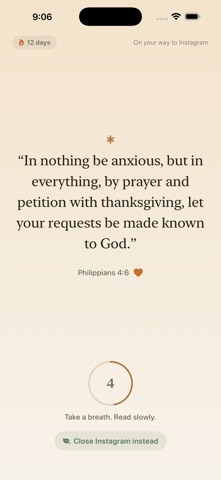
Reach for Instagram, TikTok, YouTube or X and OneVerse pauses it. To get back in, you open OneVerse and read today's verse — and that app unlocks for 15 minutes. Your most distracting habit becomes a daily moment with Scripture, and your screen time starts to fall.
HOW IT WORKS
1. You reach for a distracting app — it's paused, powered by Apple Screen Time.
2. You open OneVerse and read today's verse: a calm, beautiful screen and one breath.
3. The app unlocks for 15 minutes — then it quietly locks again. Or just walk away; closing the feed is the real win.
WHY ONEVERSE WORKS
• Your own habit is the trigger — no remembering to open yet another app.
• A real pause, not a tap-through. Strict mode is on by default, so the verse — not a shortcut — is the way through. You can loosen it, but you have to mean it.
• Calm, never punishing. A warm, editorial reading room — not a red "BLOCKED" wall.
• Every scroll you skip is a small win, counted along with the minutes you take back.
READ THE WHOLE BIBLE, ONE VERSE AT A TIME
• The complete World English Bible — 31,095 verses, in order.
• Per-book progress across all 66 books, so the goal is always in sight.
• Your place is never lost, even across devices — private iCloud sync, no account, no server.
DAILY DEVOTIONALS & READING PLANS
• Topical plans for real life: Peace over Anxiety, A Grateful Heart, Strength & Courage, On Love, Rest for the Weary, and the Sermon on the Mount.
• Start "Peace over Anxiety" free.
BUILD A STREAK YOU DON'T WANT TO BREAK
• A reading streak for every day you spend a moment in Scripture.
• A streak freeze, so one busy day doesn't reset you to zero.
• Milestones to celebrate — your first verse, a seven-day streak, a finished book, 100 scrolls skipped.
SEE YOUR TIME COME BACK
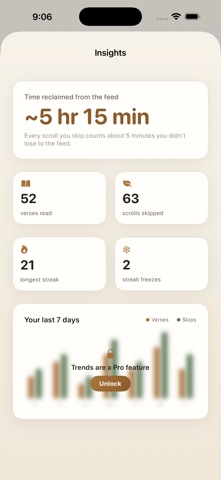
• Scrolls skipped, verses read, and estimated time reclaimed from the feed.
• A gentle morning verse and evening recap — two a day at most, never spam.
SAVE & SHARE WHAT SPEAKS TO YOU
• Heart any verse to keep it in your saved collection.
• Share beautiful verse cards with friends and family.
• Find verses, plans, and favorites right from Spotlight search.
ONEVERSE PRO
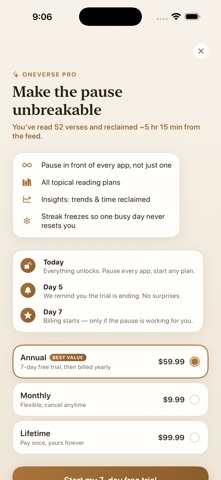
Go deeper with Pro: lock unlimited apps (not just one), unlock every reading plan, see your full insights and trends, and get more streak freezes.
• OneVerse Pro Annual — $59.99 per year (that's $5.00 a month), starting with a 7-day free trial.
• OneVerse Pro Monthly — $9.99 per month.
• OneVerse Pro Lifetime — $99.99 one time, no subscription.
Payment is charged to your Apple ID at confirmation of purchase. Subscriptions renew automatically at the same price unless cancelled at least 24 hours before the current period ends; manage or cancel anytime in your App Store account settings. If you take the free trial, any unused portion is forfeited when you buy a subscription. Prices are in USD and may vary by region.
Terms of Use (EULA): https://www.apple.com/legal/internet-services/itunes/dev/stdeula/
Privacy Policy: https://oneverseapp.com/privacy
PRIVATE BY DESIGN
No account. No tracking. Your reading progress lives on your device and your own iCloud — nowhere else. App blocking is powered by Apple Screen Time and never leaves your phone.
Read one verse. Skip one scroll. Come back to what matters.