

Onit: AI To-Do List Planner
Onit: AI To-Do List Planner is made and published by Meezyo LLC. AppBrain is an independent app data site and isn't affiliated with Meezyo LLC. The app name, icon, screenshots and description belong to Meezyo LLC and are shown as published on the App Store.
AppBrain's verdict
- Last updated
- October 10, 2026
Rankings
App Store top chartsApp Store Rankings for Onit: AI To-Do List Planner
Competitors
Similar apps and more from Meezyo LLCAlternatives to Onit: AI To-Do List Planner


More from Meezyo LLC


Releases
Updates seen on the App Store- Version
- 1.0.7
- Launched
- August 2026
No changelog data
User feedback
Ratings and reviews on the App StoreComments on Onit: AI To-Do List Planner for iOS
We don't have enough comments to show example comments. Please check back later.
Technology
Found in the app by AppBrain- Price
- Free
- App size
- 149.9 MB
- Content rating
- Everyone
Technologies used by Onit: AI To-Do List Planner
About the app and developer
About Onit: AI To-Do List Planner
Onit: AI To-Do List Planner is a productivity app developed by Meezyo LLC.
What is the rating of Onit: AI To-Do List Planner?
Onit: AI To-Do List Planner has no ratings yet.
Is Onit: AI To-Do List Planner free?
Onit: AI To-Do List Planner is free. The app size is 149.94 MB. The latest version available is 1.0.7. The last update was on October 10, 2026.
What are the requirements for Onit: AI To-Do List Planner?
The app has a content rating of Everyone. The app has been available on the App Store since August 2026.
Developer information for Meezyo LLC
Address:
Store listing
By Meezyo LLC, from the App Store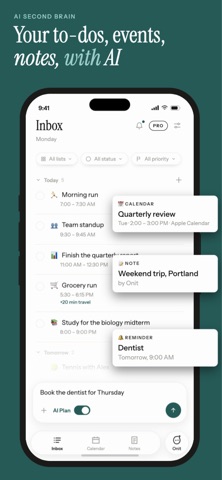



Description by Meezyo LLC Written by the developer, not by AppBrain. Click to read.
Two AI surfaces, one loop: a Co-Planner that builds your day, and a Co-Worker that steps inside a task and does the work — summaries, checklists, drafts, and more.
Your manual to-do list is free and unlimited. Forever.
— MEET THE CO-PLANNER —
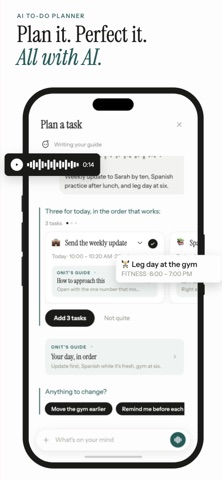
No forms. No fields. Just tell Onit what's on your mind.
- Type one line, speak it, snap a photo, or attach a document.
- Onit turns it into a fully built task — deadline, duration, and details set for you.
- One quick follow-up ("Add to my day?") and you're done.
— MEET THE CO-WORKER —
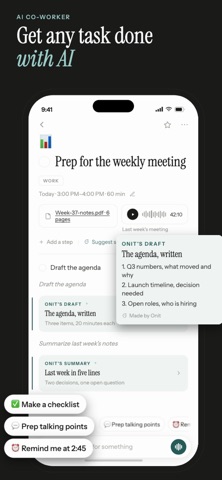
Open a task and Onit is already up to speed. It knows the deadline, the time you have, and the files you attached.
- Reads your documents, notes, and audio.
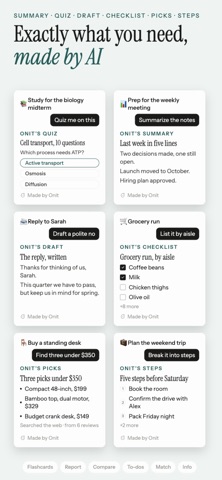
- Produces real output: summaries, quizzes, flashcards, lists, drafts, reports, study notes, and checklists.
- The output lives on the task — copy it, save as PDF, share, or send to Notes.
- Breaks big tasks into a few meaningful steps (3–5), never endless busywork.
- Knows your location, travel time, and weather when they matter.
— NOTES THAT DO SOMETHING —
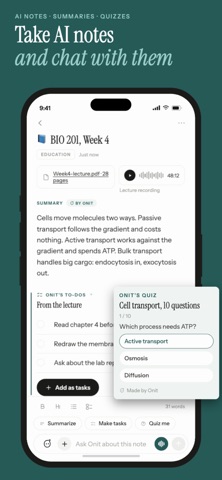
- Write a note yourself, or tell Onit what it should be about and let it write.
- Turn any note into tasks, a summary, a list, or a study set.
- Search your notes, or ask them a question and get an answer with the source.
— BUILT SIMPLE —
Three tabs. That's it.
- Home: today's flow, unscheduled tasks, and reminders in one clean timeline.
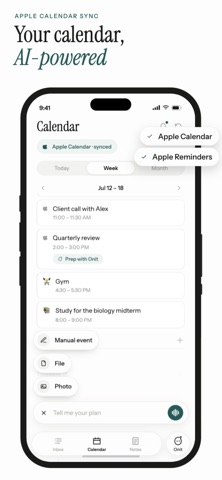
- Calendar: see your week and sync your Apple Calendar and Reminders.
- Notes: everything you wrote, and everything Onit wrote for you.
— PERFECT FOR —
- Knowledge workers turning docs into drafts and summaries
- Students turning readings into study notes, quizzes, and flashcards
- Busy parents capturing to-dos by voice or photo
- Anyone who takes notes and never turns them into anything
- Anyone who's app-hopped looking for a to-do app that finally sticks
— MANUAL TO-DOS ARE FREE, FOREVER —
Unlike apps that lock your task list behind a paywall, Onit keeps manual to-dos completely free and unlimited. You only pay for the AI — the Co-Planner and Co-Worker.
— ONIT PRO —
Unlock unlimited AI planning, task, and note tools.
- Weekly: $5.99
- Yearly: $39.99
Payment is charged to your Apple Account at confirmation of purchase. Your subscription automatically renews unless auto-renew is turned off at least 24 hours before the end of the current period. Your account is charged for renewal within 24 hours prior to the end of the current period. Manage or cancel anytime in your Account Settings after purchase.
Terms of Use (EULA): https://meezyo.com/terms
Privacy Policy: https://meezyo.com/privacy